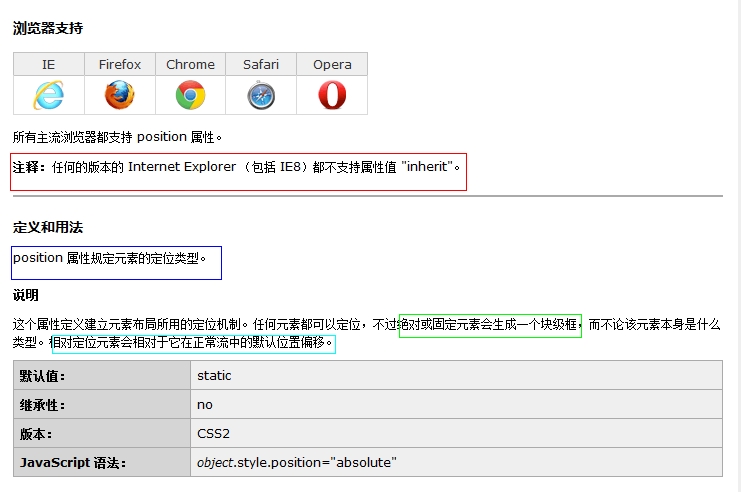
首先我们来看一下W3C对position的解释:
我们再看,W3C对position属性值的解释:
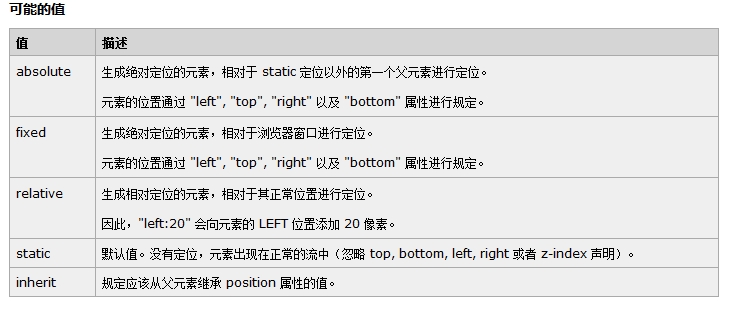
ok,我们需要了解的是:
其中absolute和relative是最常用的,fixed用得也比较多(其中IE6并不支持fixed)。
1、absolute(绝对定位)
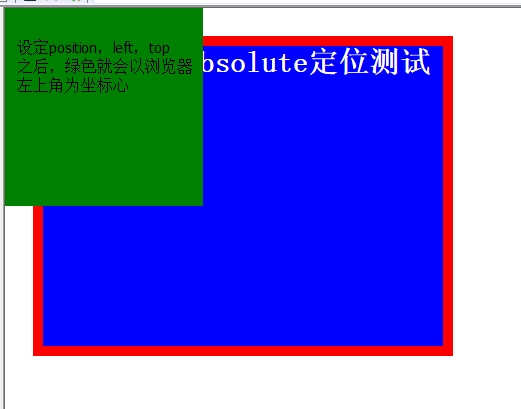
absolute是生成觉对定位的元素,脱离了文本流(即在文档中已经不占据位置),参照浏览器的左上角通过top,right,bottom,left(简称TRBL) 定位。可以选取具有定位的父级对象(下文将说到relative与absolute的结合使用)或者body坐标原点进行定位,也可以通过z-index 进行层次分级。absolute在没有设定TRBL值时是根据父级对象的坐标作为始点的,当设定TRBL值后则根据浏览器的左上角作为原始点。也就是这样的解释:
当设定position:absolute
如果父级(无限)没有设定position属性,那么当前的absolute则结合TRBL属性以浏览器左上角为原始点进行定位。
如果父级(无限)设定position属性,那么当前的absolute则结合TRBL属性以父级(最近)的左上角为原始点进行定位。
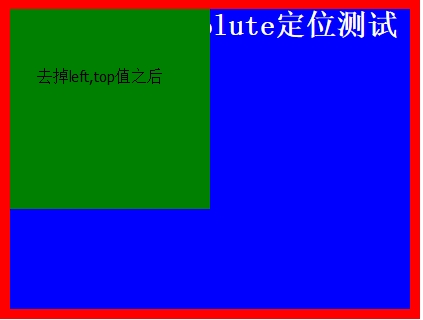
如果不设定TRBL属性值,那么当前absolute就会以父级左上角为原始点定位
ok,看下面这段代码:
|
1
2
3
4
5
6
7
8
9
10
11
12
13
14
15
16
17
18
19
20
21
22
23
24
25
26
27
28
29
30
31
32
33
34
35
36
37
38
39
40
41
42
43
44
45
46
47
|
<!DOCTYPE HTML PUBLIC "-//W3C//DTD HTML 4.01 Transitional//EN" "http://www.w3.org/TR/html4/loose.dtd"><html>
<head>
<title> New Document </title>
<meta name="Generator" content="EditPlus">
<meta name="Author" content="">
<meta name="Keywords" content="">
<meta name="Description" content="">
<title>position:absolute定位</title>
<style type="text/css">
html,body,div{margin:0;padding:0;list-style:none;}.center{margin:30px;border:red solid 10px;width:400px;height:300px;}.div1{width:200px;height:200px;background:green;/*设定TRBL*/position:absolute;left:0px;top:0px;}.div2{width:400px;height:300px;font-size:30px;font-weight:bold;color:#fff;background:blue;}</style>
</head>
<body>
<div class="center">
<div class="div1"></div>
<div class="div2">position:absolute定位测试</div>
</div>
</body>
</html>
|
示例图:
接下来我们去掉left,top的值:
|
1
2
3
4
5
6
7
|
.div1{ width:200px;
height:200px;
background:#0099FF;
/*没有设定TRBL*/
position:absolute;
}
|
那么我们恢复left,top,但是在父及加上position属性
代码改为这样:在center加上position属性:值为absolute;或者是relative都行
|
1
2
3
4
5
6
7
|
.center{margin:30px;border:red solid 10px;width:400px;height:300px;position:absolute;} |
效果如下:
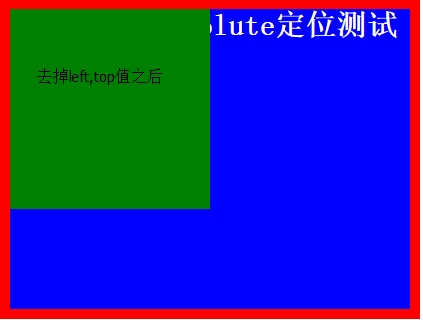
因此我们可以看出:
如果父级(无限)没有设定position属性,那么当前的absolute则结合TRBL属性以浏览器左上角为原始点进行定位。
如果父级(无限)设定position属性,那么当前的absolute则结合TRBL属性以父级(最近)的左上角为原始点进行定位。
如果不设定TRBL属性值,那么当前absolute就会以父级左上角为原始点定位
2、position: relative
参照父级(最近)的内容区的左上角为原始点结合TRBL属性进行定位(或者说相对于被定位元素在 父级内容区中的上一个元素进行偏移)
无父级则以BODY的左上角为原始点。相对定位是不能层叠的。在使用相对定位时,无论元素是否进行移动,元素依然占 据原来的空间。因此,移动元素会导致它覆盖其他框。
ok,我们来看下一段代码:
|
1
2
3
4
5
6
7
8
9
10
11
12
13
14
15
16
17
18
19
20
21
22
23
24
25
26
27
28
29
30
31
32
33
34
35
36
37
38
39
40
41
42
43
44
45
46
47
|
<!DOCTYPE HTML PUBLIC "-//W3C//DTD HTML 4.01 Transitional//EN" "http://www.w3.org/TR/html4/loose.dtd"><html>
<head>
<title> New Document </title>
<meta name="Generator" content="EditPlus">
<meta name="Author" content="">
<meta name="Keywords" content="">
<meta name="Description" content="">
<title>position:relative定位</title>
<style type="text/css">
html,body,div{margin:0;padding:0;list-style:none;}.center{margin:30px;border:red solid 10px;width:400px;height:300px;background:#FFFF00;}.div1{width:200px;height:150px;background:green;position:relative;top:-20px;left:0px;}.div2{width:400px;height:150px;font-size:30px;font-weight:bold;color:#fff;background:blue;}</style>
</head>
<body>
<div class="center">
<div class="div1"></div>
<div class="div2">position:relative定位测试</div>
</div>
</body>
</html>
|
效果如下:
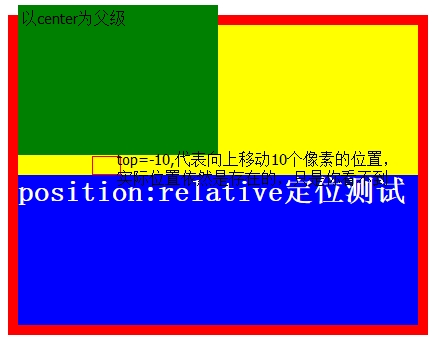
ok,我们修改一下代码,假如没有父级呢?我们需要先给body设置一下:
|
1
2
3
4
5
6
7
8
9
10
11
12
13
14
15
16
17
18
19
20
21
22
23
24
25
26
27
28
29
30
31
32
33
34
35
36
37
38
39
40
41
42
43
44
|
<!DOCTYPE HTML PUBLIC "-//W3C//DTD HTML 4.01 Transitional//EN" "http://www.w3.org/TR/html4/loose.dtd"><html>
<head>
<title> New Document </title>
<meta name="Generator" content="EditPlus">
<meta name="Author" content="">
<meta name="Keywords" content="">
<meta name="Description" content="">
<title>position:relative定位</title>
<style type="text/css">
body{margin-left:20px;margin-top:60px;list-style:none;width:900px;height:300px;background-color:black;}.div1{width:200px;height:150px;background:green;position:relative;top:-20px;left:0px;}.div2{width:400px;height:150px;font-size:30px;font-weight:bold;color:#fff;background:blue;}</style>
</head>
<body>
<div class="div1"></div>
<div class="div2">position:relative定位测试</div>
</body>
</html>
|
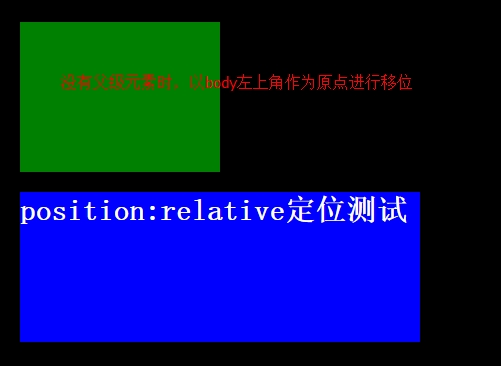
当然,如果使用relative相对定位的话,一般是相对于父级元素定位的,一般使用属性是margin-left,margin-top,
ok,到这里我想大家对于position属性基本上了解差不多了吧?
当然在实际前端开发中一般对于定位而言:absolute,relative是交叉使用的。
再来一局总结(网友总结的话):
属性值为 relative 会保持对象在正常的HTML流中,但是它的位置可以根据它的父级对象进行偏移。在相对(relative)定位对象之后的文本或对象占有他们自己的空间 而不会覆盖被定位对象的自然空间。与此不同的,在绝对(absolute)定位对象之后的文本或对象在被定位对象被拖离正常文档流之前会占有它的自然空间。放置绝对(absolute)定位对象在可视区域之外会导致滚动条出现。而放置相对(relative)定位对象在可视区域之外,滚动条不会出现。其实对于定位的主要问题是要记住每个定位的意义。相对定位是“相对于“元素在文档流中初始位置的,而绝对定位是”相对于“最近的已经定位的元素。
贴这么图和代码,累死我了,亲,留个言呗!