MMM高可用方案简介
MMM(Master-Master Replication Manager for MySQL)主主复制管理器,是一套提供了MySQL主主复制配置的监控、故障迁移和管理的可伸缩的脚本程序。在MMM高可用解决方案中,可以配置双主多从架构,通过MySQL Replication技术可以实现两台MySQL服务器互为主从,并且在任何时候只有一个节点可以写入,避免多节点写入的数据冲突,同时,当可写节点故障时,MMM套件可以立即监控到,然后将服务自动切换到另一个主节点继续提供服务,从而实现MySQL的高可用。
简而言之,通过MMM可以实现监控和管理MySQL主主复制和服务状态,同时也可以监控多个Slave节点的复制和运行状态,并且可以做到任意节点发生故障时实现自动切换的功能。MMM也为MySQL提供了读、写分离架构的良好平台。
MMM套件的优缺点
MMM集群套件具有良好的稳定性、高可用性和可扩展性。当活动的Master节点出现故障时,备用Master节点可以立即接管,而其他的Slave节点也能自动切换到备用Master节点继续进行同步复制,而无需人为干涉;MMM架构需要多个节点、多个IP,对服务器数量有要求,在读写非常繁忙的业务系统下表现不是很稳定,可能会出现复制延时、切换失效等问题。MMM方案并不太适应于对数据安全性要求很高,并且读、写繁忙的环境中。
MMM高可用套件工作原理
MMM套件主要的功能是通过以下三个脚本实现的:
1、mmm_mond:监控进程,运行在管理节点上,主要复制对所有数据库的监控工作,同时决定和处理所有节点的角色切换。
2、mmm_agentd:代理进程,运行在每一台MySQL服务器上,主要完成监控的测试工作和执行简单的远端服务设置。
3、mmm_control:一个简单的管理脚本,用来查看和管理集群运行状态,同时管理mmm_mond进程。
MMM高可用MySQL配置方案
在通过MMM套件实现的双Master架构中,需要5个IP地址,两个Master节点各有一个固定的物理IP,另外两个只读IP(reader IP)和一个可以IP(writer IP),这三个虚拟IP不会固定在任何一个节点上,相反,它会在两个Master节点之间来回切换(如何切换取决于节点的高可用)。在正常情况下Master1有两个虚拟IP(reader IP和writer IP),Master2有一个虚拟IP(reader IP),如果Master1故障,那么所有的reader和writer虚拟IP都会分配到Master上。
环境说明:
| 主机名 | IP地址 | 集群角色 | MySQL版本 | 系统版本 |
| Master1 |
192.168.1.210 |
主Master可读、写 |
mysql-5.6.28 | CentOS6.7 |
| Master2 |
192.168.1.211 |
备Master可读、写 |
mysql-5.6.28 | CentOS6.7 |
| Slave1 |
192.168.1.250 |
Slave节点只读 |
mysql-5.6.28 | CentOS6.7 |
| Slave2 |
192.168.1.209 |
Slave节点只读 | mysql-5.6.28 | CentOS6.7 |
| Monitor |
192.168.1.21 |
MMM服务管理端 |
mysql-5.6.28 | CentOS6.7 |
虚拟IP地址:
| writer IP |
192.168.1.230 | 写入VIP,仅支持单节点写入 |
| reader IP | 192.168.1.231 | 只读VIP,每个数据库节点一个读VIP,可以通过LVS、HAproxy等负载均衡软件对读VIP做负载均衡 |
| reader IP | 192.168.1.232 | |
| reader IP | 192.168.1.233 | |
| reader IP | 192.168.1.234 |
MMM的安装和配置
Step1:MMM套件的安装
1、在MMM管理端monitor安装MMM所有套件
|
1
2
|
[[email protected] ~]# rpm -ivh epel-release-6-8.noarch.rpm
[[email protected] ~]# yum install mysql-mmm mysql-mmm-agent mysql-mmm-tools mysql-mmm-monitor
|

2、在各个MySQL节点上安装mysql-mmm-agent服务
|
1
2
3
4
|
[[email protected] ~]# yum install mysql-mmm-agent
[[email protected] ~]# yum install mysql-mmm-agent
[[email protected] ~]# yum install mysql-mmm-agent
[[email protected] ~]# yum install mysql-mmm-agent
|
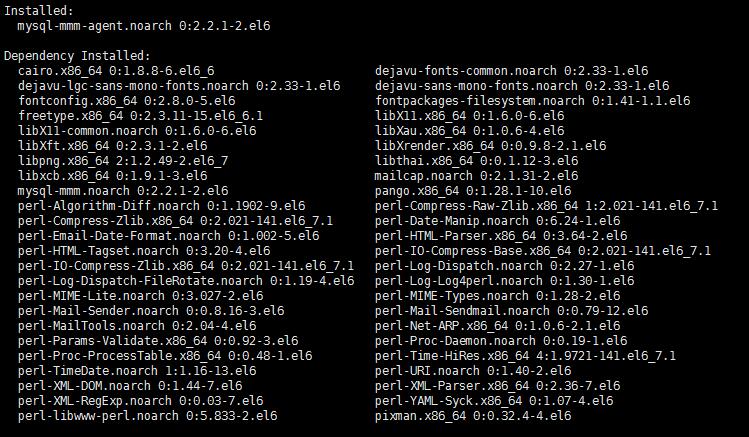
Step2:Master1和两个Slave上配置主从(这里需要提前做好配置,Master1和Master2主主配置也一样)
1、Master1上授权slave1、2的复制用户
|
1
2
3
4
|
[[email protected] ~]# mysql -uroot -ppasswd
mysql> grant replication slave on *.* to 'repl'@'192.168.1.250' identified by 'replpasswd';
mysql> grant replication slave on *.* to 'repl'@'192.168.1.209' identified by 'replpasswd';
mysql> flush privileges; |
2、Slave1、2上设置指定Master1同步复制
|
1
2
3
4
5
6
7
8
9
|
[[email protected] ~]# mysql -uroot -ppasswd
mysql> change master to -> master_host='192.168.1.210',
-> master_user='repl',
-> master_password='replpasswd',
-> master_port=3306,
-> master_log_file='mysql-bin.000034',
-> master_log_pos=120;
Query OK, 0 rows affected, 2 warnings (0.06 sec) |
|
1
2
3
4
5
6
7
8
9
|
[[email protected] ~]# mysql -uroot -ppasswd
mysql> change master to -> master_host='192.168.1.210',
-> master_user='repl',
-> master_password='replpasswd',
-> master_port=3306,
-> master_log_file='mysql-bin.000034',
-> master_log_pos=120;
Query OK, 0 rows affected, 2 warnings (0.02 sec) |
Step3:在所有的MySQL节点的/etc/my.cnf中增加参数
read_only=1
Step4:在所有的MySQL节点添加以下两个用户
mysql> grant replication client on *.* to 'mmm_monitor'@'192.168.1.%' identified by 'monitorpasswd';
mysql> grant super, replication client, process on *.* to 'mmm_agent'@'192.168.1.%' identified by 'agentpasswd';
Step5:在MMM管理端monitor上配置mmm_common.conf
|
1
2
3
4
5
|
[[email protected] ~]# ls /etc/mysql-mmm/mmm_agent.conf
mmm_common.conf #在所有的节点配置,配置相同
mmm_mon.conf #仅在MMM管理端配置
mmm_mon_log.conf mmm_tools.conf |
vim /etc/mysql-mmm/mmm_common.conf 所有的MMM节点配置相同
|
1
2
3
4
5
6
7
8
9
10
11
12
13
14
15
16
17
18
19
20
21
22
23
24
25
26
27
28
29
30
31
32
33
34
35
36
37
38
39
40
41
42
43
44
45
|
active_master_role writer<host default> cluster_interface eth0
pid_path /var/run/mysql-mmm/mmm_agentd.pid
bin_path /usr/libexec/mysql-mmm/
replication_user replication
replication_password replication
agent_user mmm_agent
agent_password agentpasswd
</host>
<host db1> ip 192.168.1.210
mode master
peer db2
</host>
<host db2> ip 192.168.1.211
mode master
peer db1
</host>
<host db3> ip 192.168.1.209
mode slave
</host>
<host db4> ip 192.168.1.250
mode slave
</host>
<role writer> hosts db1, db2
ips 192.168.1.230
mode exclusive
</role>
<role reader> hosts db1, db2, db3, db4
ips 192.168.1.231, 192.168.1.232, 192.168.1.233, 192.168.1.234
mode balanced
</role>
|
Step6:在MMM管理节点上配置mmm_mon.conf
[[email protected] ~]# vim /etc/mysql-mmm/mmm_mon.conf
|
1
2
3
4
5
6
7
8
9
10
11
12
13
14
15
16
17
18
19
20
21
22
23
24
25
26
27
|
include mmm_common.conf<monitor> ip 127.0.0.1
pid_path /var/run/mysql-mmm/mmm_mond.pid
bin_path /usr/libexec/mysql-mmm
status_path /var/lib/mysql-mmm/mmm_mond.status
ping_ips 192.168.1.1, 192.168.1.2, 192.168.1.210, 192.168.1.211, 192.168.1.209, 192.168.1.
250 flap_duration 3600
flap_count 3
auto_set_online 8
# The kill_host_bin does not exist by default, though the monitor will
# throw a warning about it missing. See the section 5.10 "Kill Host
# Functionality" in the PDF documentation.
#
# kill_host_bin /usr/libexec/mysql-mmm/monitor/kill_host
#
</monitor>
<host default> monitor_user mmm_monitor
monitor_password monitorpasswd
</host>
debug 0 |
Step7:在所有的MySQL节点配置mmm_agent.conf
|
1
2
3
|
[[email protected] mysql]# vim /etc/mysql-mmm/mmm_agent.conf
include mmm_common.confthis db1 #在四台mysql节点上设置对应的db,分别为db1、db2、db3、db4
|
Step8:所有节点设置ENABLED=1
|
1
2
3
|
cat /etc/default/mysql-mmm-agent
# mysql-mmm-agent defaultsENABLED=1 |
Step9:启动MMM服务
在MMM管理端启动服务
[[email protected] ~]# /etc/init.d/mysql-mmm-monitor start
Starting MMM Monitor Daemon: [ OK ]
在每个mysql节点启动服务
[[email protected] ~]# /etc/init.d/mysql-mmm-agent start
Starting MMM Agent Daemon: [ OK ]
查看集群运行状态
|
1
2
3
4
5
|
[[email protected] mysql-mmm]# mmm_control show
db1(192.168.1.210) master/AWAITING_RECOVERY. Roles:
db2(192.168.1.211) master/AWAITING_RECOVERY. Roles:
db3(192.168.1.209) slave/AWAITING_RECOVERY. Roles:
db4(192.168.1.250) slave/AWAITING_RECOVERY. Roles:
|
若一直出现上面AWAITING_RECOVERY的状态,可以手动设置各个MySQL节点为online状态
|
1
2
3
4
5
6
7
8
9
10
11
12
13
|
[[email protected] ~]# mmm_control set_online db1
OK: State of 'db1' changed to ONLINE. Now you can wait some time and check its new roles!
[[email protected] ~]# mmm_control set_online db2
OK: State of 'db2' changed to ONLINE. Now you can wait some time and check its new roles!
[[email protected] ~]# mmm_control set_online db3
OK: State of 'db3' changed to ONLINE. Now you can wait some time and check its new roles!
[[email protected] ~]# mmm_control set_online db4
OK: State of 'db4' changed to ONLINE. Now you can wait some time and check its new roles!
[[email protected] ~]# mmm_control show
db1(192.168.1.210) master/ONLINE. Roles: reader(192.168.1.234), writer(192.168.1.230)
db2(192.168.1.211) master/ONLINE. Roles: reader(192.168.1.231)
db3(192.168.1.209) slave/ONLINE. Roles: reader(192.168.1.232)
db4(192.168.1.250) slave/ONLINE. Roles: reader(192.168.1.233)
|
检测各个节点的运行状态
|
1
2
3
4
5
6
7
8
9
10
11
12
13
14
15
16
17
|
[[email protected] ~]# mmm_control checks all
db4 ping [last change: 2016/02/27 05:13:57] OK
db4 mysql [last change: 2016/02/27 05:13:57] OK
db4 rep_threads [last change: 2016/02/27 05:13:57] OK
db4 rep_backlog [last change: 2016/02/27 05:13:57] OK: Backlog is null
db2 ping [last change: 2016/02/27 05:13:57] OK
db2 mysql [last change: 2016/02/27 05:13:57] OK
db2 rep_threads [last change: 2016/02/27 05:13:57] OK
db2 rep_backlog [last change: 2016/02/27 05:13:57] OK: Backlog is null
db3 ping [last change: 2016/02/27 05:13:57] OK
db3 mysql [last change: 2016/02/27 05:13:57] OK
db3 rep_threads [last change: 2016/02/27 05:13:57] OK
db3 rep_backlog [last change: 2016/02/27 05:13:57] OK: Backlog is null
db1 ping [last change: 2016/02/27 05:13:57] OK
db1 mysql [last change: 2016/02/27 05:13:57] OK
db1 rep_threads [last change: 2016/02/27 05:13:57] OK
db1 rep_backlog [last change: 2016/02/27 05:13:57] OK: Backlog is null
|
Step10:查看各节点虚拟IP分配情况
Master1
|
1
2
3
4
5
|
[[email protected] ~]# ip a |grep eth0
2: eth0: <BROADCAST,MULTICAST,UP,LOWER_UP> mtu 1500 qdisc pfifo_fast state UP qlen 1000 inet 192.168.1.210/24 brd 192.168.1.255 scope global eth0
inet 192.168.1.234/32 scope global eth0
inet 192.168.1.230/32 scope global eth0
|
Mster2
|
1
2
3
4
|
[[email protected] ~]# ip a |grep eth0
2: eth0: <BROADCAST,MULTICAST,UP,LOWER_UP> mtu 1500 qdisc pfifo_fast state UP qlen 1000 inet 192.168.1.211/24 brd 192.168.1.255 scope global eth0
inet 192.168.1.231/32 scope global eth0
|
Slave1
|
1
2
3
4
5
|
[[email protected] ~]# ip a |grep eth0
2: eth0: <BROADCAST,MULTICAST,UP,LOWER_UP> mtu 1500 qdisc pfifo_fast state UP qlen 1000 inet 192.168.1.250/24 brd 192.168.1.255 scope global eth0
inet 192.168.1.213/32 scope global eth0
inet 192.168.1.233/32 scope global eth0
|
Slave2
|
1
2
3
4
|
[[email protected] ~]# ip a |grep eth0
2: eth0: <BROADCAST,MULTICAST,UP,LOWER_UP> mtu 1500 qdisc pfifo_fast state UP qlen 1000 inet 192.168.1.209/24 brd 192.168.1.255 scope global eth0
inet 192.168.1.232/32 scope global eth0
|
Step11:测试MMM实现MySQL高可用
1、授权一个可以通过远程使用VIP登陆集群的用户
mysql> grant all on *.* to 'hm'@'192.168.1.%' identified by '741616710';
2、使用VIP192.168.1.230登陆,并做相关测试,在各个节点查看是否同步数据库
[[email protected] ~]# mysql -uhm -p741616710 -h192.168.1.230
|
1
2
3
4
5
6
7
8
9
10
11
12
13
14
15
16
17
18
19
20
21
22
23
24
25
26
27
28
|
mysql> show variables like 'hostname%';
+---------------+---------+| Variable_name | Value |+---------------+---------+| hostname | master1 |
+---------------+---------+1 row in set (0.01 sec)
mysql> create database test1;Query OK, 1 row affected (0.00 sec)mysql> use test1Database changedmysql> create table tt1(id int, name varchar(20));
Query OK, 0 rows affected (0.13 sec)mysql> insert into tt1(id,name) values(1,'july'),(2,'dime');
Query OK, 2 rows affected (0.04 sec)Records: 2 Duplicates: 0 Warnings: 0mysql> select * from tt1;
+------+------+| id | name |
+------+------+| 1 | july || 2 | dime |+------+------+2 rows in set (0.00 sec)
|