Total PGs = (Total_number_of_OSD * 100) /max_replication_count)
1、 Create pool for OpenStack
|
1
2
3
4
5
|
pg=256ceph osd pool create volumes $pg #disk_pool
ceph osd pool create images $pg #image_pool
ceph osd pool create vms $pg #host_pool
ceph osd pool create backups $pg #backup_pool
|
2、 setup ceph client authentication
|
1
2
3
|
ceph auth get-or-create client.cinder mon'allow r' osd 'allow class-read object_prefix rbd_children, allow rwxpool=volumes, allow rwx pool=vms, allow rx pool=images'
ceph auth get-or-create client.glance mon'allow r' osd 'allow class-read object_prefix rbd_children, allow rwxpool=images'
ceph auth get-or-createclient.cinder-backup mon 'allow r' osd 'allow class-read object_prefixrbd_children, allow rwx pool=backups'
|
3、Add the keyringsfor client.cinder, client.glance, and client.cinder-backup to the appropriatenodes and change their ownership
|
1
2
3
4
|
ceph auth get-or-create client.glance | ssh{your-glance-api-server} sudo tee /etc/ceph/ceph.client.glance.keyring
ssh {your-glance-api-server} sudo chownglance:glance /etc/ceph/ceph.client.glance.keyring
ceph auth get-or-create client.cinder | ssh{your-volume-server} sudo tee /etc/ceph/ceph.client.cinder.keyring
ssh {your-cinder-volume-server} sudo chowncinder:cinder /etc/ceph/ceph.client.cinder.keyring
|
4、 Nodes running nova-compute need the keyring file for thenova-compute process
|
1
|
ceph auth get-or-create client.cinder | ssh{your-nova-compute-server} sudo tee /etc/ceph/ceph.client.cinder.keyring
|
5、 Create a temporary copy of the secret key on the nodes runningnova-compute:
|
1
2
3
4
5
6
7
8
9
10
11
12
13
14
|
ceph auth get-key client.cinder > client.cinder.keyceph auth get-key client.cinder | ssh{your-compute-node} tee client.cinder.key
uuidgen4f859b95-406e-49f6-9ff8-d6e04f7ba1efcat > secret.xml <<EOF
<secret ephemeral='no' private='no'>
<uuid>4f859b95-406e-49f6-9ff8-d6e04f7ba1ef</uuid>
<usage type='ceph'>
<name>client.cinder secret</name>
</usage>
</secret>
EOFsudo virsh secret-define --file secret.xml
sudo virsh secret-set-value --secret e05983be-9251-44cb-9738-198bf9ec2d7e --base64 $(cat client.cinder.key)&& rm client.cinder.key secret.xml
|
6、 Configuring Glance
|
1
2
3
4
5
6
7
8
|
vi /etc/glance/glance-api.conf
[DEFAULT]...default_store=rbdrbd_store_user=glancerbd_store_pool=imagesshow_image_direct_url=True... |
7、 Configuring Cinder
|
1
2
3
4
5
6
7
8
9
10
11
|
vi /etc/cinder/cinder.conf
[DEFAULT]...volume_driver=cinder.volume.drivers.rbd.RBDDriverrbd_pool=volumesrbd_ceph_conf=/etc/ceph/ceph.conf
rbd_flatten_volume_from_snapshot=false
rbd_max_clone_depth=5glance_api_version=2rbd_user=cinderrbd_secret_uuid=e05983be-9251-44cb-9738-198bf9ec2d7e |
8、 Configuring Cinder Backup
|
1
2
3
4
5
6
7
8
9
10
11
|
vi /etc/cinder/cinder.conf
[DEFAULT]...backup_driver=cinder.backup.drivers.cephbackup_ceph_conf=/etc/ceph/ceph.conf
backup_ceph_user=cinder-backupbackup_ceph_chunk_size=134217728backup_ceph_pool=backupsbackup_ceph_stripe_unit=0backup_ceph_stripe_count=0restore_discard_excess_bytes=true
|
9、 Configuring Nova
|
1
2
3
4
5
6
7
8
9
10
11
12
|
vi /etc/nova/nova.conf
[DEFAULT]...libvirt_images_type=rbdlibvirt_images_rbd_pool=vmslibvirt_images_rbd_ceph_conf=/etc/ceph/ceph.conf
rbd_user=cinderrbd_secret_uuid=e05983be-9251-44cb-9738-198bf9ec2d7elibvirt_inject_password=false
libvirt_inject_key=false
libvirt_inject_partition=-2libvirt_live_migration_flag="VIR_MIGRATE_UNDEFINE_SOURCE,VIR_MIGRATE_PEER2PEER,VIR_MIGRATE_LIVE,VIR_MIGRATE_PERSIST_DEST"
|
10、 Restart OpenStack
|
1
2
3
|
service openstack-glance-api restartservice openstack-nova-compute restartservice openstack-cinder-volume restart |
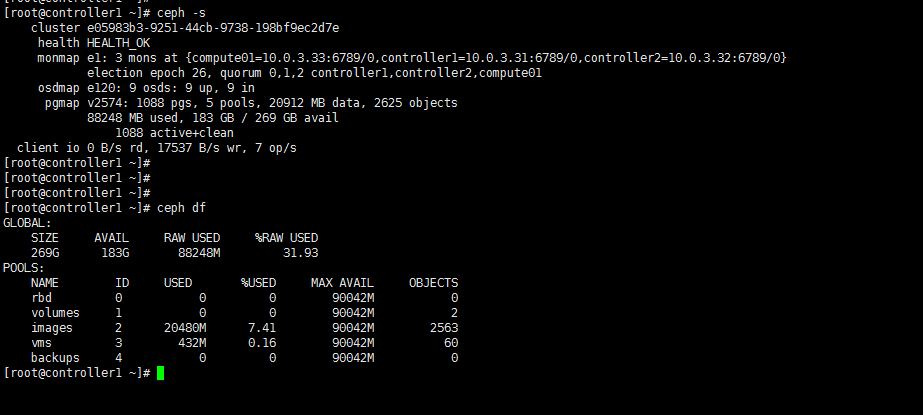
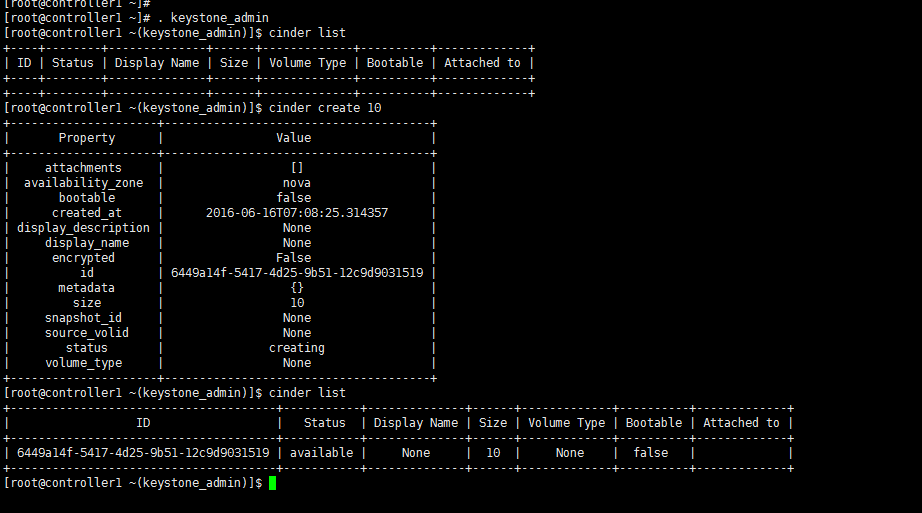
10、Test
本文转自Jacken_yang 51CTO博客,原文链接:http://blog.51cto.com/linuxnote/1789924,如需转载请自行联系原作者