1)说明:
Windows的默认编码为GBK,Linux的默认编码为UTF-8。在Windows下编辑的中文,在Linux下显示为乱码。为了解决此问题,修改secure CRT字符编码为UTF-8即可
2)查看支持的字符集:
如果没有中文语言呢
可以通过网上下载安装中文语言包yum groupinstall chinese-support(不能联网的通过其他电脑下载,上传上去吧)
# locale -a
|
1
2
3
4
5
6
7
8
9
10
11
12
13
14
15
16
17
|
[[email protected] ~]# locale -a|grep zh
zh_CNzh_CN.gb18030zh_CN.gb2312zh_CN.gbkzh_CN.utf8zh_HKzh_HK.big5hkscszh_HK.utf8zh_SGzh_SG.gb2312zh_SG.gbkzh_SG.utf8zh_TWzh_TW.big5zh_TW.euctwzh_TW.utf8 |
修改字符集
|
1
2
3
|
|
1
2
|
[[email protected] ~]# cat /etc/sysconfig/i18n
LANG="en_US.UTF-8"
|
|
1
2
3
|
[[email protected] ~]# echo "LANG=\"ch_CN.UTF-8\"">/etc/sysconfig/i18n
[[email protected] ~]# cat /etc/sysconfig/i18n
LANG="ch_CN.UTF-8"
|
执行如下命令或者重启即可生效。
source /etc/sysconfig/i18n
打开CRT会话选项,外观-字符编码—UTF-8即可。
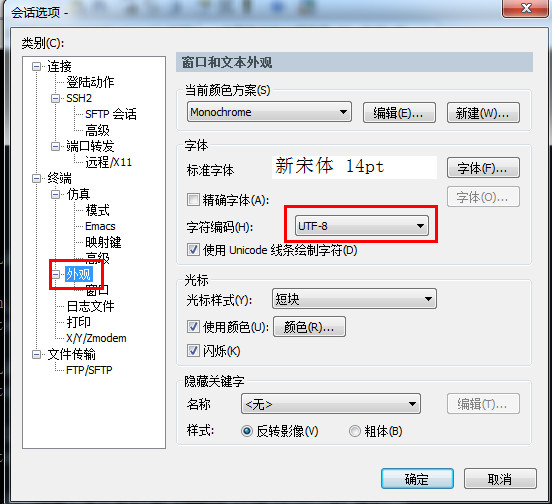
本文转自sandshell博客51CTO博客,原文链接http://blog.51cto.com/sandshell/1959654如需转载请自行联系原作者
sandshell