系统环境:
操作系统:Solaris 10(x86-64)
Cluster: Oracle CRS 10.2.0.1.0
Oracle: Oracle 10.2.0.1.0
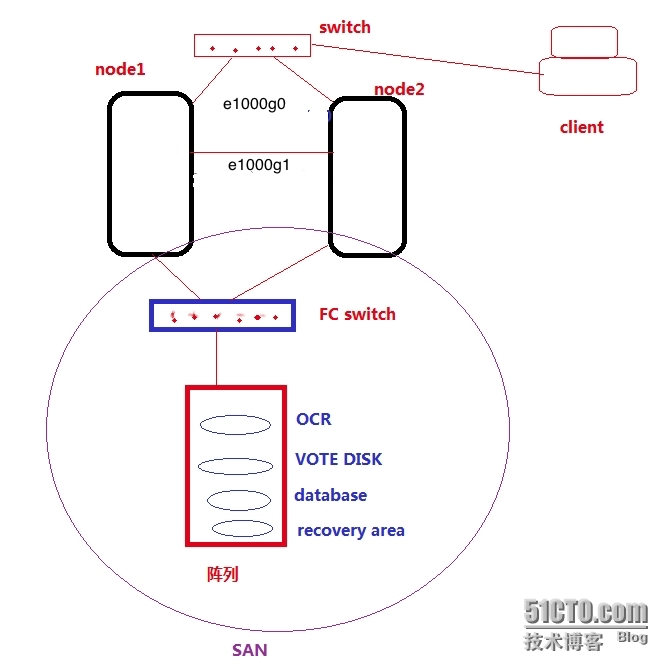
如图所示:RAC 系统架构
一、建立主机之间的信任关系(在所有node)
1、配置主机hosts.equiv文件
|
1
2
3
4
5
6
7
8
9
10
11
12
13
14
|
[[email protected]:/]# cat /etc/hosts.equiv node1 rootnode1 oraclenode1-vip rootnode1-vip oraclenode1-priv rootnode1-priv oraclenode2 rootnode2 oraclenode2-vip rootnode2-vip oraclenode2-priv rootnode2-priv oracle |
2、配置Oracle用户.rhosts文件
|
1
2
3
4
5
6
7
8
9
10
11
12
13
14
|
[[email protected]:/export/home/oracle]$ cat .rhosts node1 rootnode1 oraclenode1-vip rootnode1-vip oraclenode1-priv rootnode1-priv oraclenode2 rootnode2 oraclenode2-vip rootnode2-vip oraclenode2-priv rootnode2-priv oracle |
3、启动相关的服务,验证
|
1
2
3
4
5
6
7
8
9
10
11
12
13
14
15
16
|
[[email protected]:/]# svcs -a |grep rlogindisabled 10:05:17 svc:/network/login:rlogin
[[email protected]:/]# svcadm enable svc:/network/login:rlogin[[email protected]:/]# svcadm enable svc:/network/rexec:default[[email protected]:/]# svcadm enable svc:/network/shell:default[[email protected]:/]# svcs -a |grep rloginonline 11:37:34 svc:/network/login:rlogin
[[email protected]:/]# su - oracleOracle Corporation SunOS 5.10 Generic Patch January 2005
[[email protected]:/export/home/oracle]$ rlogin node1Last login: Wed Jan 21 11:29:36 from node2-priv
Oracle Corporation SunOS 5.10 Generic Patch January 2005
|
二、安装CRS前系统环境的检测(在node1)
|
1
2
3
4
5
6
7
8
9
10
11
12
13
14
15
16
17
18
19
20
21
22
23
24
25
26
27
28
29
30
31
32
33
34
35
36
37
38
39
40
41
42
43
44
45
46
47
48
49
50
51
52
53
54
55
56
57
58
59
60
61
62
63
64
65
66
67
68
69
70
71
72
73
74
75
76
77
78
79
80
81
82
83
84
85
86
87
88
89
90
91
92
93
94
95
96
97
98
99
100
101
102
103
104
105
106
107
108
109
110
111
112
113
114
115
116
117
118
119
120
121
122
123
124
125
126
127
128
129
130
131
132
133
134
135
136
137
138
139
140
141
142
143
144
145
146
147
148
149
150
151
152
153
154
155
156
157
158
159
160
161
162
163
164
165
166
167
168
|
[[email protected]:/export/home/oracle]$ unzip 10201_clusterware_solx86_64.zip[[email protected]:/export/home/oracle/clusterware/cluvfy]$ ./runcluvfy.sh USAGE:cluvfy [ -help ]cluvfy stage { -list | -help }cluvfy stage {-pre|-post} <stage-name> <stage-specific options> [-verbose]cluvfy comp { -list | -help }cluvfy comp <component-name> <component-specific options> [-verbose][[email protected]:/export/home/oracle/clusterware/cluvfy]$ ./runcluvfy.sh stage -pre crsinst -n node1,node2 -verbosePerforming pre-checks for cluster services setup
Checking node reachability...Check: Node reachability from node "node1"
Destination Node Reachable?
------------------------------------ ------------------------
node1 yes
node2 yes
Result: Node reachability check passed from node "node1".
Checking user equivalence...Check: User equivalence for user "oracle"
Node Name Comment
------------------------------------ ------------------------
node2 passed
node1 passed
Result: User equivalence check passed for user "oracle".
Checking administrative privileges...Check: Existence of user "oracle"
Node Name User Exists Comment
------------ ------------------------ ------------------------
node2 yes passed
node1 yes passed
Result: User existence check passed for "oracle".
Check: Existence of group "oinstall"
Node Name Status Group ID
------------ ------------------------ ------------------------
node2 exists 200
node1 exists 200
Result: Group existence check passed for "oinstall".
Check: Membership of user "oracle" in group "oinstall" [as Primary]
Node Name User Exists Group Exists User in Group Primary Comment
---------------- ------------ ------------ ------------ ------------ ------------
node2 yes yes yes yes passed
node1 yes yes yes yes passed
Result: Membership check for user "oracle" in group "oinstall" [as Primary] passed.
Administrative privileges check passed.Checking node connectivity...Interface information for node "node2"
Interface Name IP Address Subnet
------------------------------ ------------------------------ ----------------
e1000g0 192.168.8.12 192.168.8.0
e1000g1 10.10.10.12 10.10.10.0
Interface information for node "node1"
Interface Name IP Address Subnet
------------------------------ ------------------------------ ----------------
e1000g0 192.168.8.11 192.168.8.0
e1000g1 10.10.10.11 10.10.10.0
Check: Node connectivity of subnet "192.168.8.0"
Source Destination Connected?
------------------------------ ------------------------------ ----------------
node2:e1000g0 node1:e1000g0 yes
Result: Node connectivity check passed for subnet "192.168.8.0" with node(s) node2,node1.
Check: Node connectivity of subnet "10.10.10.0"
Source Destination Connected?
------------------------------ ------------------------------ ----------------
node2:e1000g1 node1:e1000g1 yes
Result: Node connectivity check passed for subnet "10.10.10.0" with node(s) node2,node1.
Suitable interfaces for the private interconnect on subnet "192.168.8.0":
node2 e1000g0:192.168.8.12node1 e1000g0:192.168.8.11Suitable interfaces for the private interconnect on subnet "10.10.10.0":
node2 e1000g1:10.10.10.12node1 e1000g1:10.10.10.11ERROR: Could not find a suitable set of interfaces for VIPs.
Result: Node connectivity check failed.---vip 网络检测失败Checking system requirements for 'crs'...
Check: Total memory Node Name Available Required Comment
------------ ------------------------ ------------------------ ----------
node2 1.76GB (1843200KB) 512MB (524288KB) passed
node1 1.76GB (1843200KB) 512MB (524288KB) passed
Result: Total memory check passed.Check: Free disk space in "/tmp" dir
Node Name Available Required Comment
------------ ------------------------ ------------------------ ----------
node2 3GB (3150148KB) 400MB (409600KB) passed
node1 2.74GB (2875128KB) 400MB (409600KB) passed
Result: Free disk space check passed.Check: Swap space Node Name Available Required Comment
------------ ------------------------ ------------------------ ----------
node2 2GB (2096476KB) 512MB (524288KB) passed
node1 2GB (2096476KB) 512MB (524288KB) passed
Result: Swap space check passed.Check: System architecture Node Name Available Required Comment
------------ ------------------------ ------------------------ ----------
node2 64-bit 64-bit passed
node1 64-bit 64-bit passed
Result: System architecture check passed.Check: Operating system version Node Name Available Required Comment
------------ ------------------------ ------------------------ ----------
node2 SunOS 5.10 SunOS 5.10 passed
node1 SunOS 5.10 SunOS 5.10 passed
Result: Operating system version check passed.Check: Operating system patch for "118345-03" Node Name Applied Required Comment
------------ ------------------------ ------------------------ ----------
node2 unknown 118345-03 failed
node1 unknown 118345-03 failed
Result: Operating system patch check failed for "118345-03".
Check: Operating system patch for "119961-01" Node Name Applied Required Comment
------------ ------------------------ ------------------------ ----------
node2 119961-06 119961-01 passed
node1 119961-06 119961-01 passed
Result: Operating system patch check passed for "119961-01".
Check: Operating system patch for "117837-05" Node Name Applied Required Comment
------------ ------------------------ ------------------------ ----------
node2 unknown 117837-05 failed
node1 unknown 117837-05 failed
Result: Operating system patch check failed for "117837-05".
Check: Operating system patch for "117846-08" Node Name Applied Required Comment
------------ ------------------------ ------------------------ ----------
node2 unknown 117846-08 failed
node1 unknown 117846-08 failed
Result: Operating system patch check failed for "117846-08".
Check: Operating system patch for "118682-01" Node Name Applied Required Comment
------------ ------------------------ ------------------------ ----------
node2 unknown 118682-01 failed
node1 unknown 118682-01 failed
Result: Operating system patch check failed for "118682-01".
---系统补丁检测失败Check: Group existence for "dba" Node Name Status Comment
------------ ------------------------ ------------------------
node2 exists passed
node1 exists passed
Result: Group existence check passed for "dba".
Check: Group existence for "oinstall" Node Name Status Comment
------------ ------------------------ ------------------------
node2 exists passed
node1 exists passed
Result: Group existence check passed for "oinstall".
Check: User existence for "oracle" Node Name Status Comment
------------ ------------------------ ------------------------
node2 exists passed
node1 exists passed
Result: User existence check passed for "oracle".
Check: User existence for "nobody" Node Name Status Comment
------------ ------------------------ ------------------------
node2 exists passed
node1 exists passed
Result: User existence check passed for "nobody".
System requirement failed for 'crs'
Pre-check for cluster services setup was unsuccessful on all the nodes.
|
----在以上的系统环境检测中,VIP网络检查失败;
如果在检测前没有配置VIP网络,可以用一下方式进行配置;如果已经配置过,就不会检测失败。
配置vip network(node1):[[email protected]:/]# ifconfig -alo0: flags=2001000849<UP,LOOPBACK,RUNNING,MULTICAST,IPv4,VIRTUAL> mtu 8232 index 1
inet 127.0.0.1 netmask ff000000
e1000g0: flags=1000843<UP,BROADCAST,RUNNING,MULTICAST,IPv4> mtu 1500 index 2
inet 192.168.8.11 netmask ffffff00 broadcast 192.168.8.255
ether 8:0:27:28:b1:8c
e1000g0:1: flags=4001000842<BROADCAST,RUNNING,MULTICAST,IPv4,DUPLICATE> mtu 1500 index 2
inet 192.168.8.13 netmask ffffff00 broadcast 192.168.8.255
e1000g1: flags=1000843<UP,BROADCAST,RUNNING,MULTICAST,IPv4> mtu 1500 index 3
inet 10.10.10.11 netmask ffffff00 broadcast 10.10.10.255
ether 8:0:27:6e:16:1 配置vip network(node2):[[email protected]:/]# ifconfig -alo0: flags=2001000849<UP,LOOPBACK,RUNNING,MULTICAST,IPv4,VIRTUAL> mtu 8232 index 1
inet 127.0.0.1 netmask ff000000
e1000g0: flags=1000843<UP,BROADCAST,RUNNING,MULTICAST,IPv4> mtu 1500 index 2
inet 192.168.8.12 netmask ffffff00 broadcast 192.168.8.255
ether 8:0:27:1f:bf:4c
e1000g0:1: flags=1000843<UP,BROADCAST,RUNNING,MULTICAST,IPv4> mtu 1500 index 2
inet 192.168.8.14 netmask ffffff00 broadcast 192.168.8.255
e1000g1: flags=1000843<UP,BROADCAST,RUNNING,MULTICAST,IPv4> mtu 1500 index 3
inet 10.10.10.12 netmask ffffff00 broadcast 10.10.10.255
ether 8:0:27:a5:2c:db
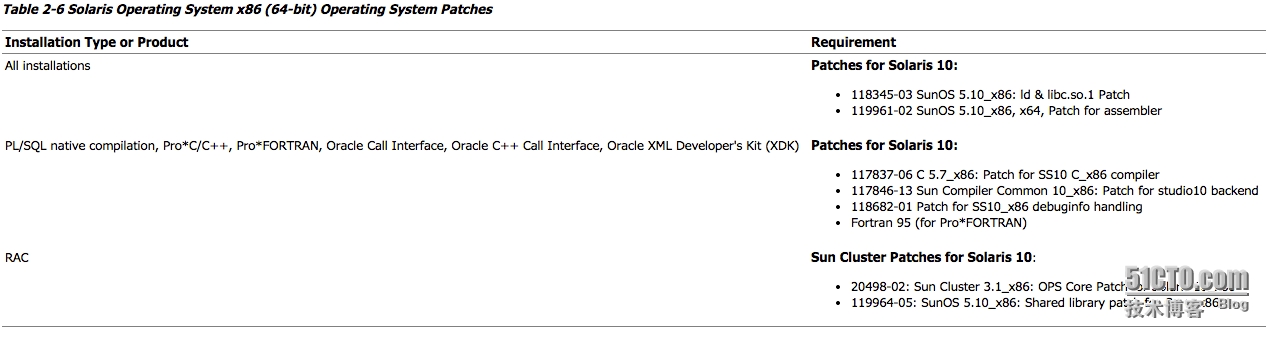
----在以上的系统环境检测中,部分补丁没有安装(可以通过Oracle官方网站下载,本机为测试环境暂不安装)
本文转自 客居天涯 51CTO博客,原文链接:http://blog.51cto.com/tiany/1606941,如需转载请自行联系原作者