前言* 随着网站访问人数越来越多,承受的并发和压力也越来越高,这时候我们需要对网站和架构进行优化,今天我们来讨论使用Squid对架构进行优化,缓存网站。网上对squid描述的文章也有成千上万,我这里简单记录一下实践的步骤。
一、实施环境
|
1
2
3
|
系统版本:CentOSx86_64 5.8Squid版本:squid-2.6Nginx版本:nginx-1.4.2 |
二、正式安装
安装之前我们需要对系统进行优化,主要优化系统内核相关参数,仅供参考:
|
1
2
3
4
5
6
7
8
9
10
11
12
13
14
15
16
17
18
19
20
21
22
23
24
25
26
27
28
29
30
31
32
33
34
|
vi /etc/sysctl.conf
#sysctl.conf config 2014-03-26net.ipv4.ip_forward = 0net.ipv4.conf.default.rp_filter = 1net.ipv4.conf.default.accept_source_route = 0kernel.sysrq = 0kernel.core_uses_pid = 1net.ipv4.tcp_syncookies = 1kernel.msgmnb = 65536kernel.msgmax = 65536kernel.shmmax = 68719476736kernel.shmall = 4294967296net.ipv4.tcp_max_tw_buckets = 10000net.ipv4.tcp_sack = 1net.ipv4.tcp_window_scaling = 1net.ipv4.tcp_rmem = 4096 87380 4194304net.ipv4.tcp_wmem = 4096 16384 4194304net.core.wmem_default = 8388608net.core.rmem_default = 8388608net.core.rmem_max = 16777216net.core.wmem_max = 16777216net.core.netdev_max_backlog = 262144net.core.somaxconn = 262144net.ipv4.tcp_max_orphans = 3276800net.ipv4.tcp_max_syn_backlog = 262144net.ipv4.tcp_timestamps = 0net.ipv4.tcp_synack_retries = 1net.ipv4.tcp_syn_retries = 1net.ipv4.tcp_tw_recycle = 1net.ipv4.tcp_tw_reuse = 1net.ipv4.tcp_mem = 94500000 915000000 927000000net.ipv4.tcp_fin_timeout = 1net.ipv4.tcp_keepalive_time = 15net.ipv4.ip_local_port_range = 1024 65535 |
优化Linux文件打开最大数:
|
1
2
3
4
5
|
vi /etc/security/limits.conf
* soft nproc 65535* hard nproc 65535* soft nofile 65535* hard nofile 65535 |
接下来上自动安装Squid脚本,里面分别配置了两个虚拟主机域名,前端有LVS,LVS均衡后端多组squid集群,根据命中率去调整squid集群的数量,Squid后端均衡Nginx或者Apache。(完整的架构LVS+Keepalived+Squid+Nginx+Resin/Tomcat/PHP+MySQL集群)
简单逻辑图如下:
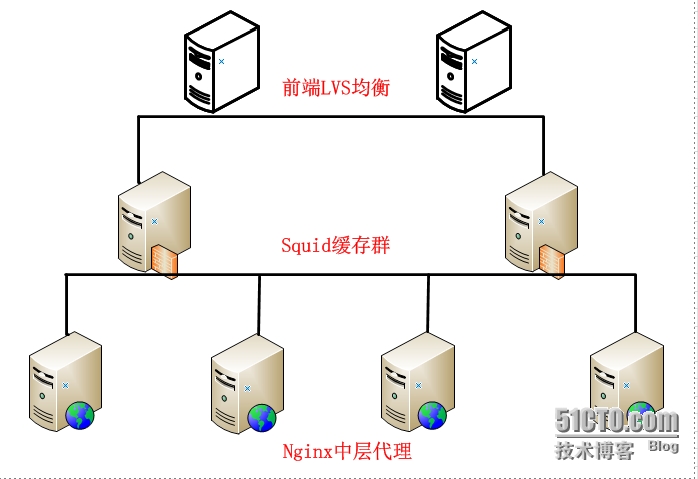
直接上脚本:
|
1
2
3
4
5
6
7
8
9
10
11
12
13
14
15
16
17
18
19
20
21
22
23
24
25
26
27
28
29
30
31
32
33
34
35
36
37
38
39
40
41
42
43
44
45
46
47
48
49
50
51
52
53
54
55
56
57
58
59
60
61
62
63
64
65
66
67
68
69
70
|
#!/bin/sh#Auto make install squid server#Author wugk 2014-03-26SQUID_CNF=/etc/squid/squid.conf
CACHE_DIR=( /data/cache1
/data/cache2
)#Install squid shellyum install -y squid
#config squid.confcat >>$SQUID_CNF <<EOF
#global config squid.conf 2014-03-26http_port 80 accel vhost vportcache_peer 192.168.149.128 parent 80 0 originserver name=wugk1cache_peer 192.168.149.129 parent 80 0 originserver name=wugk2cache_peer_domain wugk1 www.wugk1.comcache_peer_domain wugk2 www.wugk2.comvisible_hostname localhostforwarded_for offvia offcache_vary on#acl configacl manager proto cache_objectacl localhost src 127.0.0.1/32
acl to_localhost dst 127.0.0.0/8 0.0.0.0/32
acl localnet src 10.0.0.0/8 # RFC1918 possible internal network
acl localnet src 172.16.0.0/12 # RFC1918 possible internal network
acl localnet src 192.168.0.0/16 # RFC1918 possible internal network
acl SSL_ports port 443acl Safe_ports port 80 8080 # http
acl Safe_ports port 21 # ftp
acl Safe_ports port 443 # https
acl all src 0.0.0.0/0
acl CONNECT method CONNECThttp_access allow manager localhosthttp_access deny managerhttp_access deny !Safe_portshttp_access deny CONNECT !SSL_portshttp_access allow localnethttp_access allow localhosthttp_access allow allacl PURGE method PURGEhttp_access allow PURGE localhosthttp_access deny PURGE#squid config 2014-03-25cache_dir aufs /data/cache1 10240 16 256
cache_dir aufs /data/cache2 10240 16 256
cache_mem 4000 MBmaximum_object_size 8 MBmaximum_object_size_in_memory 256 KBhierarchy_stoplist cgi-bin ?coredump_dir /var/spool/squid
refresh_pattern ^ftp: 1440 20% 10080
refresh_pattern ^gopher: 1440 0% 1440refresh_pattern -i (/cgi-bin/|\?) 0 0% 0
refresh_pattern \.(jpg|png|gif|mp3|xml|html|htm|css|js) 1440 50% 2880 ignore-reloadrefresh_pattern . 0 20% 4320EOF#config cache_dirmkdir -p ${CACHE_DIR[@]} ;chown -R squid:squid ${CACHE_DIR[@]}
#restart squid server/etc/init.d/squid restart
if [ "$?" == "0" ];then
echo "The Squid Server Install Successfully !!"
else echo "The Squid Server Install Failed !!,Please Check Log......"
fi |
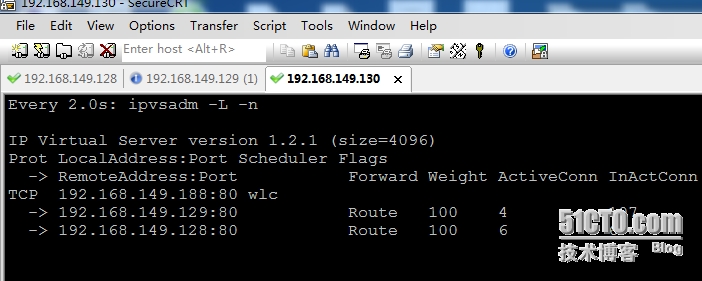
最后测试,前端LVS截图(注LVS此处不配置了,博客有专门的安装方法)
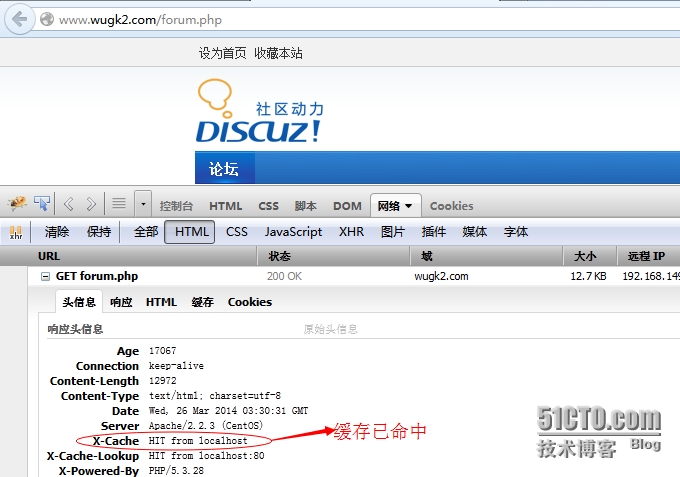
通过浏览器查看head头,缓存命中情况截图如下:
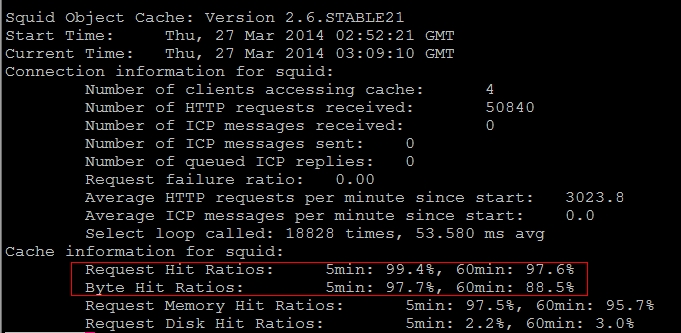
通过命令
|
1
|
squidclient -p 80 mgr:info |egrep "(Request Hit Ratios|Byte Hit Ratios)"
|
查看缓存命中率如下:
三、批量清空缓存
使用Shell脚本批量清空squid缓存脚本auto_clean_cache.sh
|
1
2
3
4
5
6
7
8
9
10
11
12
13
14
15
16
17
18
19
20
21
22
|
#!/bin/shDIR=/data/cache/
Command=/usr/sbin/squidclient
if [ "$1" = "" ];then
echo "Usage:{$0 "\$1" ,Example exec $0 forum.php}"
exit
figrep -r -a $1 ${DIR} | strings | grep "http:"|grep -v "=" >list.txt
count=`cat list.txt|wc -l`
if [ "$count" -eq "0" ];then
echo -e "---------------------------------\nThe $1 cache already update,Please exit ......" exit
fiwhile read line
do $Command -m PURGE -p 80 "$line" >>/dev/null
if [ $? -eq 0 ];then
echo -e "----------------------------------\nThe $line cache update successfully!"
fi
done < list.txt
|
脚本执行:
|
1
2
3
4
|
[[email protected] ~]# sh auto_clean_cache.sh forum.php----------------------------------The http://www.wugk2.com/forum.php cache update successfully!
[[email protected] ~]# |
更多squid优化及深入配置后期更新。。
本文转自 wgkgood 51CTO博客,原文链接:http://blog.51cto.com/wgkgood/1384580