之前在项目中添加自定义列的功能,思考了很久,参考了别的项目的实现,并加上了一下特定的功能,最近的项目离需要添加自定义列的功能,效果如下
-
初始列表
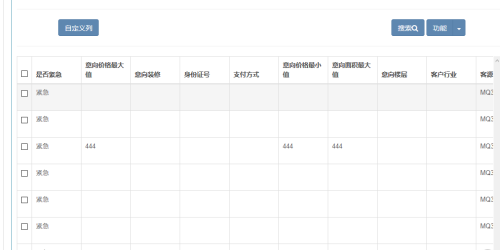
2.点击自定义列按钮之后效果如图
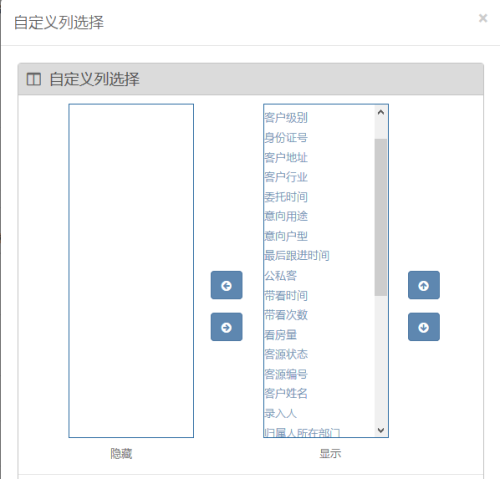
3.用上下左右按钮进行选择,或者双击隐藏或者显示的列
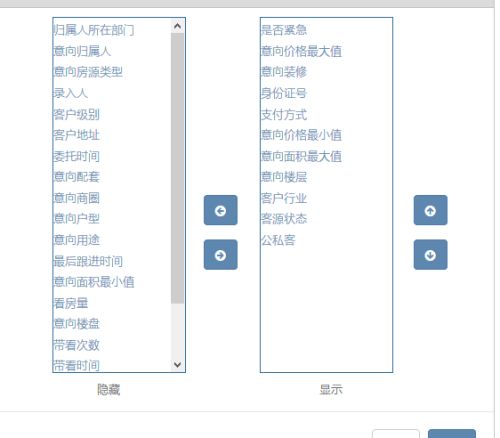
4.修改完要显示的自定义列之后进行保存的效果如下
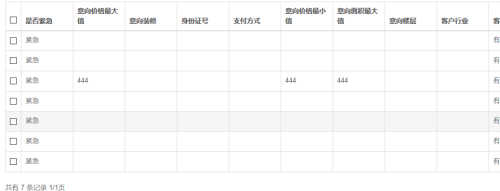
接下来上代码了:
1.首先是页面的html代码,样式问题可以随意进行修改
|
1
2
3
4
5
6
7
8
9
10
11
12
13
14
15
16
17
18
19
20
21
22
23
24
25
26
27
28
29
30
31
32
33
34
35
36
37
38
39
40
41
42
43
44
45
46
47
48
49
50
51
52
53
54
55
56
57
58
59
60
61
62
63
64
65
66
67
68
69
|
<div class="modal-content">
<div class="modal-header">
<button type="button" class="close" data-dismiss="modal" aria-hidden="true">×</button>
<h4 class="modal-title" id="customModalLabel">自定义列选择</h4>
</div>
<div class="modal-body" id="customBody">
<div class="row">
<div class="col-md-12">
<!-- BOX -->
<form id="transferForm" class="form-horizontal" role="form" action="#" validation="validation">
<div class="box border">
<div class="box-title">
<h4><i class="fa fa-columns"></i><span class="hidden-inline-mobile">自定义列选择</span></h4>
</div>
<div class="box-body">
<div class="row">
<div class="col-sm-4">
<div style="width:150px;height:400px;border:1.5px solid #2d6ca2;margin-left:50px;overflow:auto;">
<dl id="other">
#foreach($other in $otherMap.entrySet())
<dd style="margin-top:5px;" onclick="selKey(this);">
<a href="javascript:;" data-id="$!{other.key}">$!{other.value}</a>
</dd>
#end
</dl>
</div>
</div>
<div class="col-sm-2">
<div style="position:absolute; top:200px;margin-left:31px">
<a href="javascript:void(0);" class="btn btn-primary" onclick="exitCustom();"><i class="fa fa-arrow-circle-left"></i></a>
</div>
<div style="position:absolute; top:250px;margin-left:31px">
<a href="javascript:void(0);" class="btn btn-primary" onclick="insertCustom();"><i class="fa fa-arrow-circle-right"></i></a>
</div>
</div>
<div class="col-sm-3">
<div style="width:150px;height:400px;border:1.5px solid #2d6ca2;overflow:auto;">
<dl id="selected">
#foreach($selected in $selectedMap.entrySet())
<dd style="margin-top:5px;" onclick="selKey(this);">
<a href="javascript:;" data-id="$!{selected.key}">$!{selected.value}</a>
</dd>
#end
</dl>
</div>
</div>
<div class="col-sm-2">
<div style="position:absolute; top:200px;margin-left:31px">
<a href="javascript:void(0);" class="btn btn-primary" onclick="upCustom();"><i class="fa fa-arrow-circle-up"></i></a>
</div>
<div style="position:absolute; top:250px;margin-left:31px">
<a href="javascript:void(0);" class="btn btn-primary" onclick="downCustom();"><i class="fa fa-arrow-circle-down"></i></a>
</div>
</div>
</div>
</div>
<span style="padding-left:110px;">隐藏</span> <span style="padding-left:220px;">显示</span>
<div class="modal-footer">
<button type="button" class="btn btn-default" data-dismiss="modal">取消</button>
<button type="button" class="btn btn-primary" onclick="customSub()">保存</button>
</div>
</div>
</form>
<!-- /BOX -->
</div>
</div>
</div>
</div>
<script type="text/javascript" src="$jsModule.getTarget("")/style/js/jlj/customerbasic/custom.js"></script>
|
2.js代码部分如下
|
1
2
3
4
5
6
7
8
9
10
11
12
13
14
15
16
17
18
19
20
21
22
23
24
25
26
27
28
29
30
31
32
33
34
35
36
37
38
39
40
41
42
43
44
45
46
47
48
49
50
51
52
53
54
55
56
57
58
59
60
61
62
63
64
65
66
67
68
69
70
71
72
73
74
75
76
77
78
79
80
81
82
83
84
|
function selKey(label){
$(label).siblings().each(function(i,ele){
$(ele).attr("style","margin-top:5px;");
$(ele).removeAttr("data-selected");
});
$(label).attr("style","margin-top:5px;background-color:#B0C4DE;");
$(label).attr("data-selected","selected");
}function insertCustom(){
var html=$('#other').find('[data-selected]').html();
if (html==undefined) {
return;
}
$('#other').find('[data-selected]').remove();
$('#selected').append('<dd οnclick="selKey(this)" style="margin-top:5px;">'+html+'</dd>');
$('#selected').find('[data-selected]').attr('style',"margin-top:5px;");
$('#selected').find('[data-selected]').removeAttr("data-selected");
}function exitCustom(){
if($('#selected').find('dd').length==1){
bootbox.alert("至少有一个列需要显示");
return;
}
var html=$('#selected').find('[data-selected]').html();
if (html==undefined) {
return;
}
$('#selected').find('[data-selected]').remove();
$('#other').append('<dd οnclick="selKey(this)" style="margin-top:5px;">'+html+'</dd>');
$('#other').find('[data-selected]').attr('style',"margin-top:5px;");
$('#other').find('[data-selected]').removeAttr("data-selected");
}$('body').off('dblclick','#selected dd [data-id]');
$('body').off('dblclick','#other dd [data-id]');
$('body').on('dblclick','#selected dd [data-id]',function(i,ele){
exitCustom();
});$('body').on('dblclick','#other dd [data-id]',function(i,ele){
insertCustom();
});function upCustom(){
var html=$('#selected').find('[data-selected]').html();
var prev=$('#selected').find('[data-selected]').prev();
if (html==undefined||prev.length==0) {
return;
}
$('#selected').find('[data-selected]').remove();
$(prev).before('<dd οnclick="selKey(this)" style="margin-top:5px;background-color:#B0C4DE;" data-selected="selected">'+html+'</dd>');
}function downCustom(){
var html=$('#selected').find('[data-selected]').html();
var next=$('#selected').find('[data-selected]').next();
if (html==undefined||next.length==0) {
return;
}
$('#selected').find('[data-selected]').remove();
$(next).after('<dd οnclick="selKey(this)" style="margin-top:5px;background-color:#B0C4DE;" data-selected="selected">'+html+'</dd>');
}function customSub(){
if($('#selected').find('dd').length==0){
bootbox.alert("至少有一个列需要显示");
return;
}
var customs=[];
$('#selected').find('[data-id]').each(function(i,ele){
customs.push($(ele).attr('data-id')+"_"+$(ele).text());
});
$.ajax({
url : "/customerbasic/saveCustomList.action",
type : "post",
cache:false,
data: {"customs":customs.join(",")},
dataType : "json",
success : function(result) {
if (result.code="success") {
bootbox.alert("修改自定义列成功");
$('.close:visible').trigger('click');
selectPage("/customerbasic/"+$('[data-page]:visible').attr('data-page')+".action");
}else {
bootbox.alert("修改自定义列失败");
}
}
});
} |
3.java代码
action:
|
1
2
3
4
5
6
7
8
9
10
|
//保存自定义列 public void saveCustomList(){
try {
LOG.info("买卖客源保存自定义列进入action"+getErpPin()+"-------------");
Result result = customerBasicService.saveCustomList(customs,getErpPin());
print(result.resultJson());
} catch (Exception e) {
e.printStackTrace();
}
}
|
service:
|
1
2
3
4
5
6
7
8
9
10
11
12
13
14
15
16
17
18
19
20
21
22
23
24
25
26
27
28
29
30
31
32
33
|
@SuppressWarnings("unchecked")
@Override
public Result saveCustomList(String customs, String pin) {
Result result = new Result();
//查询当前的自定义列
String customStr= customListManager.queryByPin(pin);
boolean flag = false;
//创建自定义实体类,如果自定义列表里有当前pin的自定义列,那么就更新json窜,如果没有,就添加自定义列json串
if (customStr== null) {
Map<String, String> map = (Map<String, String>) JsonUtil.fromJson(
SystemDict.CUSTOMLIST, Map.class);
map.put("customerbasic", customs);
} else {
Map<String, String> map = (Map<String, String>) JsonUtil.fromJson(
customStr, Map.class);
map.put("customerbasic", customs);
}
//如果数据库保存成功了,那么保存redis。
if (flag) {
try {
redisClient.setObject(pin + "customerbasic", 999999,
Arrays.asList(customs.split(",")));
result.addModel("code", "success");
} catch (RedisAccessException e) {
result.addModel("code", "error");
e.printStackTrace();
}
} else {
result.addModel("code", "dataNUll");
}
return result;
}
|
属性文件里的内容或者静态变量里面的内容:
|
1
2
3
|
public static final String CUSTOMLIST="{"+
"\"customerbasic\":\"state_客源状态,isPublic_公私客,csCode_客源编号,name_客户姓名,orderBuilding_意向楼盘,orderHousingType_意向房源类型,createUserName_录入人,belongDept_归属人所在部门,level_客户级别,csId_身份证号,address_客户地址,industry_客户行业,belongUserName_意向归属人,entrustTime_委托时间,isUrgent_是否紧急,orderAssort_意向配套,orderBuilding_意向楼盘,orderBusinessArea_意向商圈,orderFit_意向装修,orderFloor_意向楼层,orderHouseType_意向户型,orderPurpose_意向用途,payCommissionType_支付方式,endFollowTime_最后跟进时间,orderPriceMin_意向价格最小值,orderPriceMax_意向价格最大值,orderSquareMin_意向面积最小值,orderSquareMax_意向面积最大值,viewTime_带看时间,viewNum_带看次数,showNum_看房量\","+
"}";
|
取值的时候只要从redis里面取出来就好了:
其中的逻辑其实并不负责,也有很多改进的地方,希望大家以后多多的提出宝贵意见。
本文转自 xinsir999 51CTO博客,原文链接:http://blog.51cto.com/xinsir/1858712,如需转载请自行联系原作者