For someone new to SQL Server Analysis Services, a decision must be made on whether to use a Multidimensional Cube or Tabular Model. Both types can be installed on the same server, but they must be different instances. That could mean additional license costs. But, with the developer’s edition, both can be installed and reviewed before a production decision is made. Data Source connections are the first step to review with both versions.
对于SQL Server Analysis Services的新用户,必须决定是使用多维多维数据集还是表格模型。 两种类型都可以安装在同一服务器上,但是它们必须是不同的实例。 那可能意味着额外的许可费用。 但是,使用开发人员的版本,可以在做出生产决策之前安装和检查两者。 数据源连接是使用两个版本进行检查的第一步。
Figure 1 shows the option during installation to pick the type of Analysis Service.
图1显示了安装过程中用于选择Analysis Service类型的选项。

The first step with a Cube or Tabular Model is to pick a connection or connections to data sources. The connection properties are very similar, but the retrieval of the data through tables or table-like sources is a little different. Both allow multiple connections. The cube can layout the relationships a little better with Data Source Views. Multidimensional also allows multiple cubes in one project, whereas Tabular has only one model – for now. The Tabular Model does have a relationship view, but you cannot separate different views of the relationships like a Data Source View in a cube.
多维数据集或表格模型的第一步是选择一个或多个数据源连接。 连接属性非常相似,但是通过表或类似表的源检索数据有些不同。 两者都允许多个连接。 多维数据集可以使用数据源视图更好地布局关系。 多维还允许在一个项目中使用多个多维数据集,而Tabular目前只有一个模型。 表格模型确实具有关系视图,但是您不能像多维数据集中的数据源视图那样分离关系的不同视图。
Figure 2 shows Visual Studio creating a Multidimensional Cube project while Figure 3 shows the solution explorer of this new project.
图2显示了Visual Studio创建的多维多维数据集项目,而图3显示了这个新项目的解决方案资源管理器。
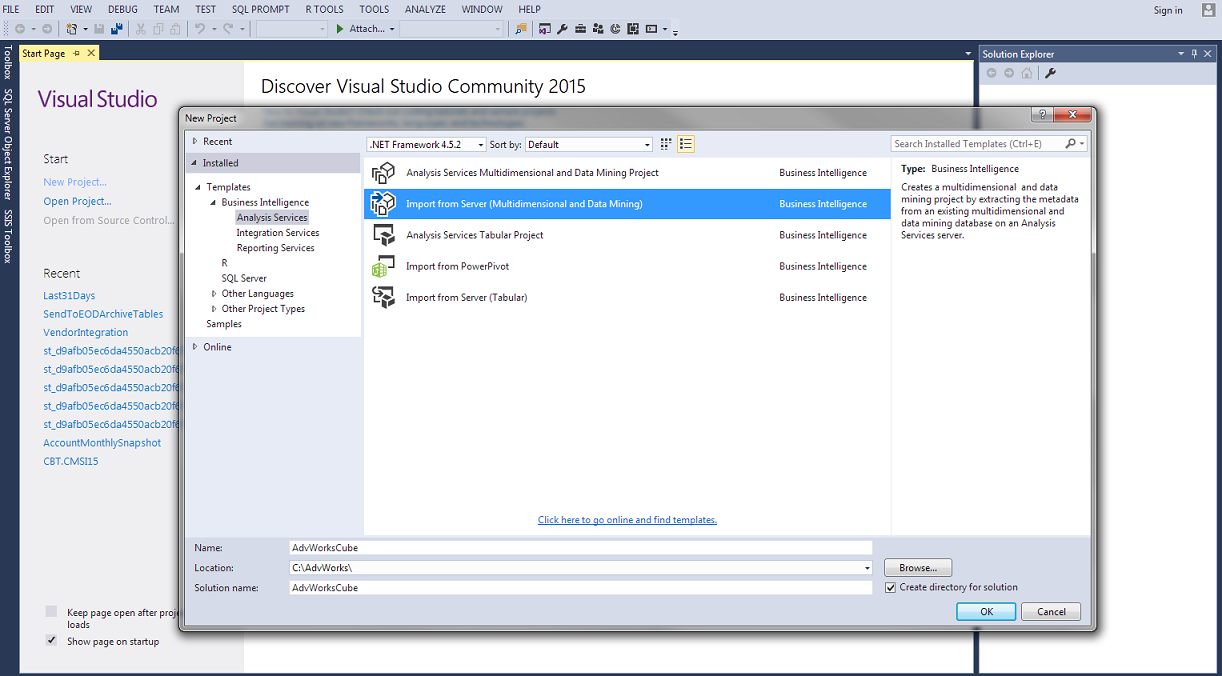

To add a connection to the project, right-click the Data Sources folder in the solution explorer and select New Data Source… The Data Source Wizard will step through the needed selections for the connection. This is from where the data mart or data warehouse gets selected. Well-designed dimensional models will have all fact and dimension tables within one database. But, there are times where shared dimensions are in different databases like a Master Data Management System.
要将连接添加到项目,请在解决方案资源管理器中右键单击“数据源”文件夹,然后选择“新建数据源”。“数据源向导”将逐步完成连接所需的选择。 这是从中选择数据集市或数据仓库的位置。 设计良好的维度模型将所有事实和维度表存储在一个数据库中。 但是,有时共享维度位于不同的数据库中,例如主数据管理系统。
After selecting the Instance and database to connect, the Impersonation Information appears like in Figure 4.
选择实例和数据库进行连接后,模拟信息将如图4所示。

The best practice for Impersonation Information is selecting Use the service account. The service account running the Analysis Service’s service will need to have access to the source data. This relieves the option of having to use a name and password or using the current user permissions for processing.
模拟信息的最佳做法是选择“ 使用服务帐户” 。 运行Analysis Service的服务的服务帐户将需要有权访问源数据。 这样就不必使用名称和密码或使用当前用户权限进行处理。
System Administers in IT today prefer services run from an Active Directory account. This enables a better and more secure system. The requirement to frequently change those passwords also pinpoints where the password needs to be changed: at the service.
如今,IT中的系统管理员更喜欢通过Active Directory帐户运行的服务。 这样可以实现更好,更安全的系统。 经常更改这些密码的要求还指出了需要更改密码的位置:在服务处。
To select the tables needed for a cube, the Data Source View or Views need to be created. Right-click on the Data Source View (DSV) folder in the solution explorer and select New Data Source View… The wizard will step through the selecting of the Data Source previously created followed by the tables.
要选择多维数据集所需的表,需要创建一个或多个数据源视图。 右键单击解决方案资源管理器中的“数据源视图”(DSV)文件夹,然后选择“新建数据源视图”。向导将逐步选择先前创建的数据源,然后选择表。
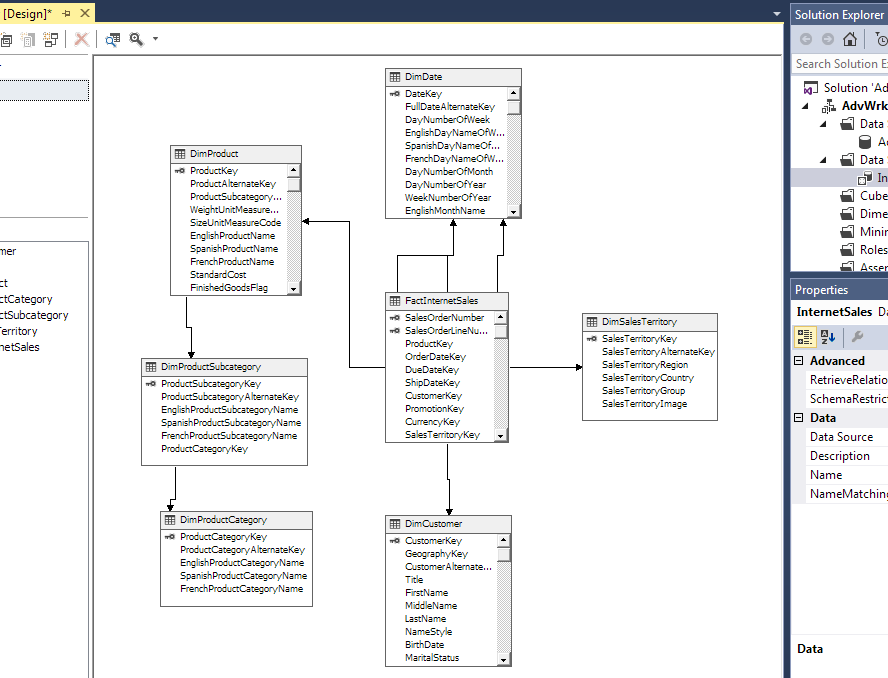
Figure 5 shows the fact and related dimension tables needed for a cube. FactInternetSales contains the measures while tables like DimCustomer and DimDate contain the attributes needed to slice and dice data. Customer and date will become dimensions in the cube.
图5显示了多维数据集所需的事实和相关维表。 FactInternetSales包含度量,而DimCustomer和DimDate之类的表包含对数据进行切片和切块所需的属性。 客户和日期将成为多维数据集中的维度。

The final part is to give the DSV a name. InternetSales is used in this example because the fact table FactInternetSales and related dimension tables have been selected.
最后一部分是给DSV命名。 在本示例中使用InternetSales,因为已经选择了事实表FactInternetSales和相关维度表。
Figure 6 shows the relationships retrieved from the foreign keys between FactInternetSales and the related dimension tables like DimSalesTerritory or DimCustomer.
图6显示了从FactInternetSales与相关维度表(如DimSalesTerritory或DimCustomer)之间的外键检索的关系。
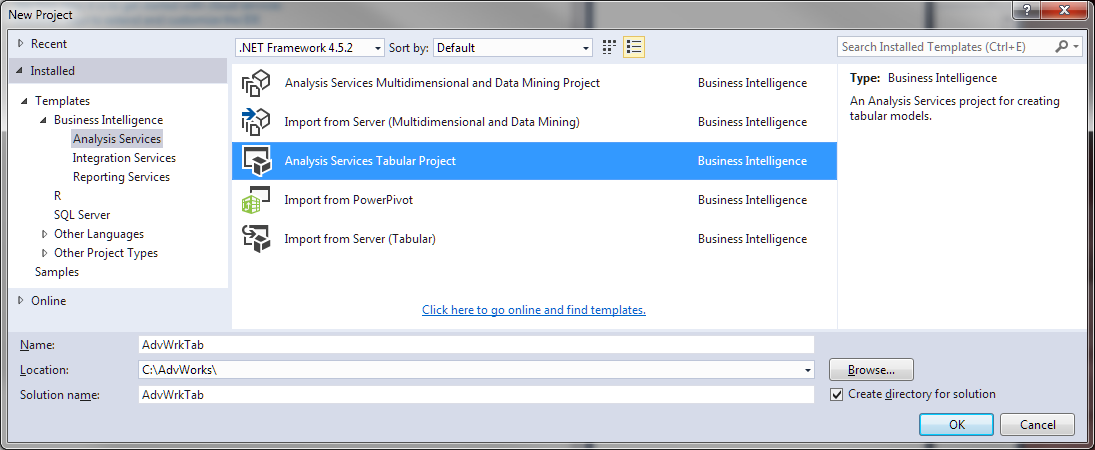
A Tabular Model uses a similar way to connect to the data, but the tables are loaded and listed in a different way. Figure 7 has the creation of a project for a tabular model.
表格模型使用类似的方式连接到数据,但是以不同的方式加载和列出表。 图7为表格模型创建了一个项目。
The tabular project has a solution explorer like a cube project, but you do not have the folders for Data Source or Data Source View. Instead, you have a file called Model.bim and a work area that looks like Excel.
表格项目具有类似于多维数据集项目的解决方案资源管理器,但是您没有用于数据源或数据源视图的文件夹。 相反,您有一个名为Model.bim的文件和一个类似于Excel的工作区。

To make a connection to a database, go to the Model menu choice and select Import From Data Source. The list of available connection types will display with Microsoft SQL Server being the first. This example uses the same database as the Multidimensional Cube project. Selecting next in the Table Import Wizard will proceed to the connection string.
要建立与数据库的连接,请转到“模型”菜单选项,然后选择“从数据源导入”。 可用连接类型的列表将显示,其中Microsoft SQL Server为第一个。 本示例使用与多维多维数据集项目相同的数据库。 在表导入向导中选择下一步将继续进行连接字符串。

The Tabular Model actual imports the data into the model to start development. Multidimensional uses connections to the table(s) and does not “import” until you process the cube for viewing. This is a big difference. It does not make one better than the other, but it does bring to light that care must be taken not to pull too much data while developing because things could get very slow.
表格模型实际将数据导入模型以开始开发。 多维使用与表的连接,并且在处理多维数据集进行查看之前不会“导入”。 这是一个很大的区别。 它并不能使另一个变得更好,但是它的确暴露了在开发过程中必须注意不要拉入过多的数据,因为事情可能会变得很慢。
The server name, authentication and impersonation information are the same in both versions because it involves a basic connection string. Entering the server name, database name and windows authentication is your best bet as well as using a Service Account for impersonation like previously discussed with cubes.
两种版本中的服务器名称,身份验证和模拟信息相同,因为它涉及基本连接字符串。 输入服务器名称,数据库名称和Windows身份验证是最好的选择,并且可以像前面讨论多维数据集一样使用服务帐户进行模拟。

Once the connection information is provided, Figure 11 shows the selecting of tables.
提供连接信息后,图11显示了表的选择。

The wizard has an option to provide a friendly name to the dimension and fact tables. The Filter Details helps with limiting the amount of data imported as well as columns used in model. The model might not need all columns from all tables and this is the step where that can be limited. It does not prevent the selection of columns later in the development process.
该向导可以选择为维度表和事实表提供友好名称。 筛选器详细信息有助于限制导入的数据量以及模型中使用的列。 该模型可能不需要所有表中的所有列,这是可以限制的步骤。 它不会阻止在开发过程的后期选择列。

Figure 12 shows the progress with importing the data into the project. The model will now be able to use column store compression technology to present the data to the developer. Having the data during the development of the model enables quick viewing of the effects of changes, unlike the Multidimensional Cube, which requires a deployment before viewing the effects of additions or changes.
图12显示了将数据导入到项目中的进度。 该模型现在将能够使用列存储压缩技术将数据呈现给开发人员。 在模型开发过程中拥有数据可以快速查看更改的效果,这与多维多维数据集不同,多维多维数据集需要先部署才能查看添加或更改的效果。
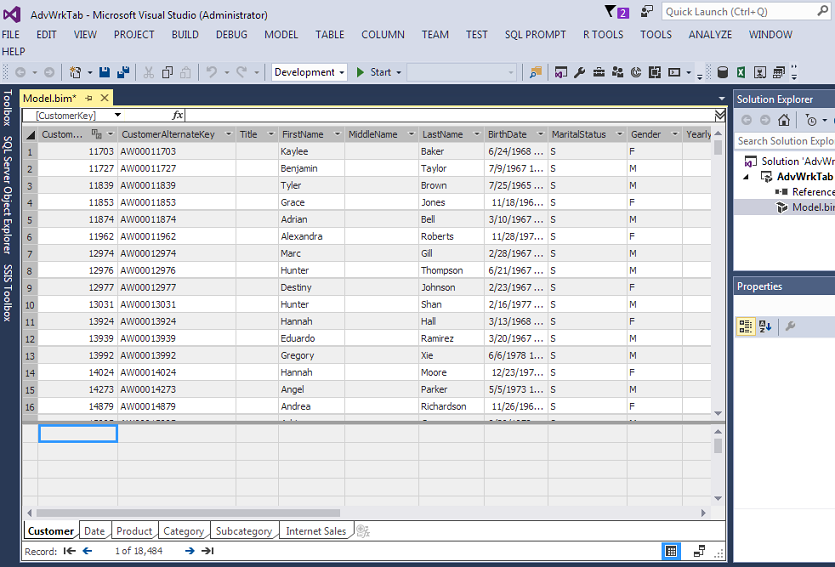
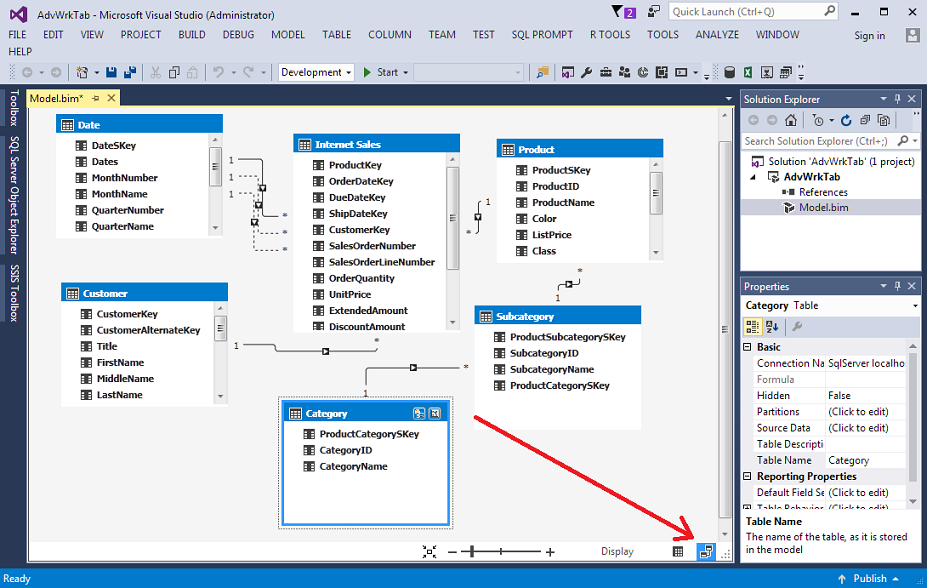
Figure 13 shows the tabs like Excel for viewing the data from each table. There is an icon in the bottom right that enables a relationship view like the Data Source View for cubes.
图13显示了类似于Excel的选项卡,用于查看每个表中的数据。 右下角有一个图标,用于启用关系视图,例如多维数据集的数据源视图。
These examples can help a new developer differentiate the beginning of Analysis Services development and whether the user wants to use a Tabular Model or a Multidimensional Cube. It also helps a Multidimensional Cube developer understand some of the differences in starting a new project using a Tabular Model. Both methods have useful techniques and a thorough analysis of both might be necessary before a production decision is made.
这些示例可以帮助新开发人员区分Analysis Services开发的开始以及用户是要使用表格模型还是多维多维数据集。 它还可以帮助多维多维数据集开发人员了解使用表格模型启动新项目时的一些差异。 两种方法都有有用的技术,在做出生产决策之前可能需要对两者进行彻底的分析。
NOTE: The developer’s edition is now free to anybody if you download SQL Server Developer’s Edition with Service Pack 1. To download for free SQL Server 2016 Developer’s edition without the service pack, you must sign up for Visual Studio Essentials.
注意:如果您下载带有Service Pack 1SQL Server开发人员版,则该开发人员版现已免费。要免费下载不带Service PackSQL Server 2016开发人员版,必须注册Visual Studio Essentials。
Other articles in this series:
本系列的其他文章:
- SQL Server Data Warehouse design best practice for Analysis Services (SSAS) 分析服务(SSAS)SQL Server数据仓库设计最佳实践
- Initial Attributes and Measures in SSAS Multidimensional Cubes SSAS多维立方体中的初始属性和度量
- Analysis Services (SSAS) Cubes – Dimension Attributes and Hierarchies Analysis Services(SSAS)多维数据集–维度属性和层次结构
有用的链接 (Useful links)
- Microsoft SQL Server Developer Edition is now free Microsoft SQL Server Developer Edition现在免费
- Set Impersonation Options (SSAS – Multidimensional) 设置模拟选项(SSAS –多维)
- Supported Data Sources (SSAS – Multidimensional) 支持的数据源(SSAS –多维)
- Data Sources Supported (SSAS Tabular) 支持的数据源(SSAS表格)
翻译自: https://www.sqlshack.com/connecting-data-sources-sql-server-analysis-services/