01.在服务端创建zabbix组
|
1
2
|
configuration---Templates---create template---Template Linux Disk IO===其中选择组为"Template"
|
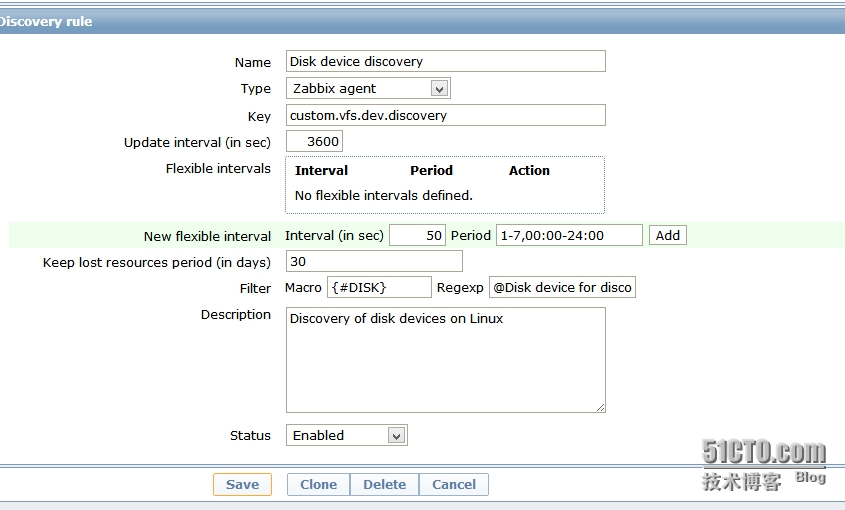
在Template Linux Disk IO中创建Discovery rule:
|
1
2
3
4
5
6
7
|
Name: Disk device discoveryKey: custom.vfs.dev.discoveryFilter Macro{#DISK} [email protected]
device for discovery -------应用的是我们刚创建的规则
Description: Discovery of disk devices on linux. |
如图:
02.创建----发现规则
|
1
2
3
4
5
6
7
8
9
|
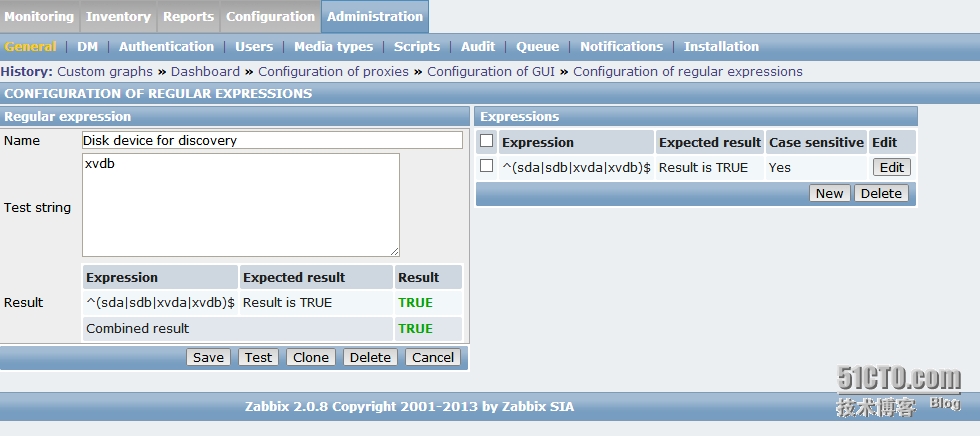
administration--General---Regular expressions ---New Regular expressions Name: Disk device for discovery
Test string: xvdbExpression: ^(sda|sdb|xvda|xvdb)$Expression type: Result is
TRUECase sensitive: Yes |
配置完成记得选择test---然后保存:
03.服务端配置。
|
1
2
|
下载模板,导入模板:wget https://raw.githubusercontent.com/dkanbier/zabbix-linux/master/templates/zbx_linux_disk_io_template.xml --no-check-certificate
导入模板 ============= 然后应用 |
客户端如下操作:
01.创建目录
|
1
2
3
4
5
6
7
8
9
10
|
1015 mkdir -p /opt/zabbix/linux
1016 cd /opt/zabbix/linux/ 1018 wget
https://raw2.github.com/dkanbier/zabbix-linux/master/LLD/queryDisks.pl
--no-check-certificate 1019 chmod +x queryDisks.pl
1020 chown -R
zabbix:zabbix /opt/zabbix/ -R
|
02.修改配置文件添加如下内容:
/usr/local/etc/zabbix_agentd.conf
UserParameter=custom.vfs.dev.discovery,/opt/zabbix/linux/queryDisks.pl
03.zabbix配置应用:
配置客户端的key,下载客户端KEY文件
wget https://raw2.github.com/dkanbier/zabbix-linux/master/UserParameters/userparameter_linux_disks.conf --no-check-certificate
查看:
[[email protected] zabbix_agentd.conf.d]# cat userparameter_linux_disks.conf
|
1
2
3
4
5
6
7
8
9
10
11
12
13
14
15
16
17
18
19
20
21
22
23
24
25
26
27
28
29
30
31
32
33
34
35
|
# See https://www.kernel.org/doc/Documentation/ABI/testing/procfs-diskstats
## reads completed successfullyUserParameter=custom.vfs.dev.read.ops[*],cat /proc/diskstats | egrep $1 | head -1 | awk '{print $$4}'
# sectors readUserParameter=custom.vfs.dev.read.sectors[*],cat /proc/diskstats | egrep $1 | head -1 | awk '{print $$6}'
# time spent reading (ms)UserParameter=custom.vfs.dev.read.ms[*],cat /proc/diskstats | egrep $1 |
head -1 | awk '{print $$7}'
# writes completedUserParameter=custom.vfs.dev.write.ops[*],cat /proc/diskstats |
egrep $1 | head -1 | awk '{print $$8}'
# sectors writtenUserParameter=custom.vfs.dev.write.sectors[*],cat /proc/diskstats |
egrep $1 | head -1 | awk '{print $$10}'
# time spent writing (ms)UserParameter=custom.vfs.dev.write.ms[*],cat /proc/diskstats | egrep $1
| head -1 | awk '{print $$11}'
# I/Os currently in progressUserParameter=custom.vfs.dev.io.active[*],cat /proc/diskstats |
egrep $1 | head -1 | awk '{print $$12}'
# time spent doing I/Os (ms)UserParameter=custom.vfs.dev.io.ms[*],cat /proc/diskstats | egrep $1 |
head -1 | awk '{print $$13}'
|
04.重启:
|
1
2
3
4
5
6
7
8
|
zabbix_agentd.conf.d]# /etc/rc.d/init.d/zabbix_agentd restart
Shutting down zabbix_agentd: [ OK ]Starting zabbix_agentd: [ OK ][[email protected] zabbix_agentd.conf.d]#
|
如下是客户端可以用脚本来执行:
|
1
2
3
4
5
6
7
8
9
10
11
12
13
14
15
16
17
18
19
|
mkdir -p /opt/zabbix/linux && cd /opt/zabbix/linux/ && mkdir /usr/local/etc/zabbix_agentd.conf.d -p
&& wget https://raw2.github.com/dkanbier/zabbix-linux/master/LLD/queryDisks.pl
--no-check-certificate && chmod +x queryDisks.pl && chown -R
zabbix:zabbix /opt/zabbix/ -R && echo "UserParameter=custom.vfs.dev.discovery,/opt/zabbix/linux/queryDisks.pl" >> /usr/local/etc/zabbix_agentd.conf && cd /usr/local/etc/zabbix_agentd.conf.d && wget
https://raw2.github.com/dkanbier/zabbix-linux/master/UserParameters/userparameter_linux_disks.conf
--no-check-certificate && killall -9 zabbix_agentd && rm -rf
/etc/init.d/zabbix_agentd && chown root:root /usr/local/zabbix/ -R
&& chmod +x /etc/init.d/zabbix_agentd && chmod +x /usr/bin/who && chown root:root /usr/local/zabbix/ -R && sed -i 's/#
Include=\/usr\/local\/etc\/zabbix_agentd.conf.d/
Include=\/usr\/local\/etc\/zabbix_agentd.conf.d/'
/usr/local/etc/zabbix_agentd.conf && /etc/rc.d/init.d/zabbix_agentd start |
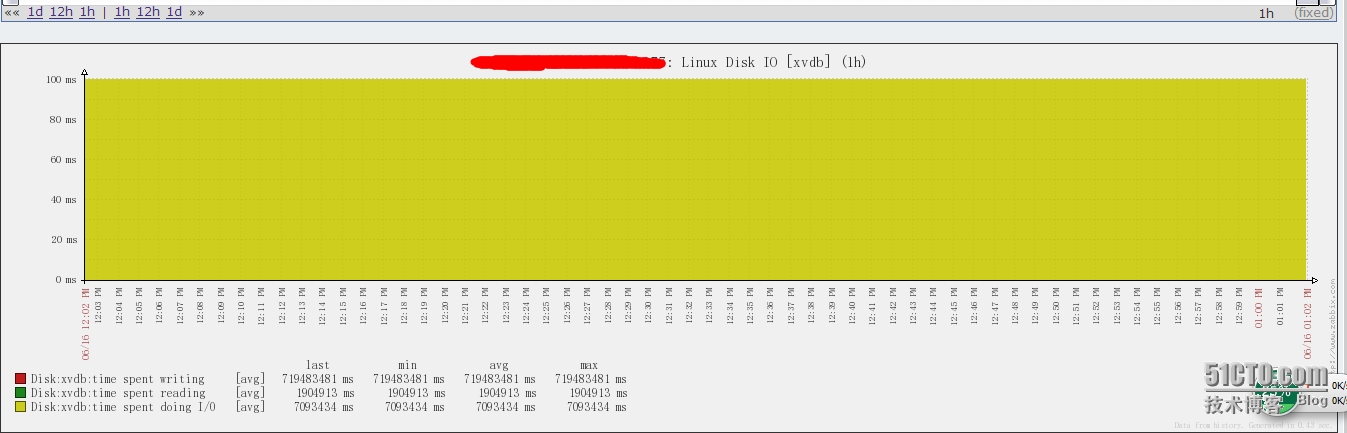
然后可以查看效果图:
本文转自devilangel 51CTO博客,原文链接:http://blog.51cto.com/devliangel/1426885,如需转载请自行联系原作者