当服务器数量以及应用达到一定的数量后,操作系统日志以及应用软件日志数量庞大,遇到问题时日志是第一手资料。平时用的sed、grep、awk已经难以满足我们的需求。随着互联网技术的发展,好多大型互联网公司研发了不同的日志分析产品,例如开源的Graylog、ELK还有Splunk等,同时Splunk也是一个商业产品,功能很强大,但是在目前的互联网领域里ELK的使用应该是更广泛。接下来会根据官网资料搭建ELK平台。
环境介绍:
-
操作系统 CentOS 7.4
-
Java版本:openjdk 1.8.0_151
-
安装方式:yum安装
一、安装Elasticsearch
配置yum源
|
1
2
3
4
5
6
7
8
9
10
11
12
13
14
15
16
17
18
19
20
21
22
23
24
25
26
27
28
29
30
31
32
33
34
35
36
37
38
39
40
41
|
1、下载并安装公共签名**rpm --import https://artifacts.elastic.co/GPG-KEY-elasticsearch 2、配置Elasticsearch安装包yum源编辑 /etc/yum.repos.d/elasticsearch.repo
[elasticsearch-5.x]name=Elasticsearch repository for 5.x packages
baseurl=https://artifacts.elastic.co/packages/5.x/yum
gpgcheck=1gpgkey=https://artifacts.elastic.co/GPG-KEY-elasticsearch
enabled=1autorefresh=1type=rpm-md
3、安装命令yum install -y elasticsearch
4、等待安装完成后将服务启动,并做好服务自启动、防火墙等设置[[email protected] ~]# systemctl enable elasticsearch
Created symlink from /etc/systemd/system/multi-user.target.wants/elasticsearch.service to /usr/lib/systemd/system/elasticsearch.service.
[[email protected] ~]# systemctl restart elasticsearch
5、检查监听端口以及相关服务[[email protected] ~]# netstat -nltup |grep 9200
tcp6 0 0 127.0.0.1:9200 :::* LISTEN 13315/java tcp6 0 0 ::1:9200 :::* LISTEN 13315/java 使用curl访问9200端口[[email protected] ~]# curl http://127.0.0.1:9200
{ "name" : "wEPnzRm",
"cluster_name" : "elasticsearch",
"cluster_uuid" : "dKeJNq1xSiizdAomMleZbg",
"version" : {
"number" : "5.6.3",
"build_hash" : "1a2f265",
"build_date" : "2017-10-06T20:33:39.012Z",
"build_snapshot" : false,
"lucene_version" : "6.6.1"
},
"tagline" : "You Know, for Search"
经检查elasticsearch 服务运行正常
|
二、安装Kibana
|
1
2
3
4
5
6
7
8
9
10
11
12
13
14
15
16
17
18
19
20
21
22
23
24
25
26
27
28
29
30
31
32
33
34
|
1、配置Kibana的yum源 编辑/etc/yum.repos.d/kibana-5.x
[kibana-5.x]name=Kibana repository for 5.x packages
baseurl=https://artifacts.elastic.co/packages/5.x/yum
gpgcheck=1gpgkey=https://artifacts.elastic.co/GPG-KEY-elasticsearch
enabled=1autorefresh=1type=rpm-md
2、安装kibanayum install -y kibana
3、启动服务service restart kibana 服务开机自启动chkconfig --add kibana4、检查监听端口和服务运行[[email protected] ~]# netstat -nltup
Active Internet connections (only servers)Proto Recv-Q Send-Q Local Address Foreign Address State PID/Program name
tcp 0 0 10.1.4.182:5601 0.0.0.0:* LISTEN 服务默认的端口为5601 默认配置文件的监听主机为localhost 只能本机访问,为了方便,将其改为内网地址10.1.4.1825、curl访问 http://10.1.4.182:5601
<script>var hashRoute = '/app/kibana';
var defaultRoute = '/app/kibana';
var hash = window.location.hash;
if (hash.length) {
window.location = hashRoute + hash;
} else {
window.location = defaultRoute;
}</script>
|
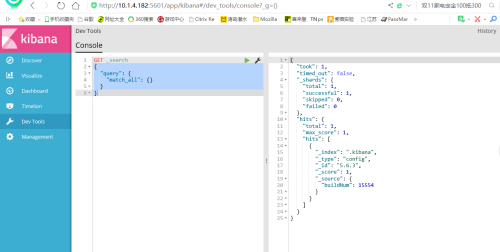
6、浏览器访问后截图
三、安装
|
1
2
3
4
5
6
7
8
9
10
11
12
13
14
|
1、配置yum源编辑 /etc/yum.repos.d/logstash
[logstash-5.x]name=Elastic repository for 5.x packages
baseurl=https://artifacts.elastic.co/packages/5.x/yum
gpgcheck=1gpgkey=https://artifacts.elastic.co/GPG-KEY-elasticsearch
enabled=1autorefresh=1type=rpm-md
2、安装yum install -y logstash
安装完毕 |
本文转自 tianya1993 51CTO博客,原文链接:http://blog.51cto.com/dreamlinux/1978720,如需转载请自行联系原作者