应用环境:
操作系统: RedHat EL55
Oracle: Oracle 10gR2
案例场景:
SCOTT用户做事务处理,事务已经完成!
|
1
2
3
4
5
6
7
8
9
10
11
12
|
Connected.16:42:23 2 for i in 1..1000000 loop
16:42:27 3 execute immediate 'insert into t1 values ('||i||')';
16:42:32 4 end loop;
16:42:36 5 end;
16:42:38 6 /
PL/SQL procedure successfully completed.Elapsed: 00:08:35.77
Commit complete. |
生成ASH报告:
16:55:43 [email protected] prod>@?/rdbms/admin/ashrpt
|
1
2
3
4
5
6
7
8
9
10
11
12
13
14
15
16
17
18
19
20
21
22
23
24
25
26
27
28
29
30
31
32
33
34
35
36
37
38
39
40
41
42
43
44
45
46
47
48
49
50
51
52
53
54
55
56
57
58
59
60
61
62
63
64
65
66
67
68
69
70
71
72
73
74
75
76
77
78
79
80
81
82
83
84
85
86
87
88
89
90
91
92
93
94
95
96
97
98
99
100
|
Current Instance~~~~~~~~~~~~~~~~ DB Id DB Name Inst Num Instance
----------- ------------ -------- ------------ 199802235 PROD 1 prod
Elapsed: 00:00:00.07
Specify the Report Type~~~~~~~~~~~~~~~~~~~~~~~Enter 'html' for an HTML report, or 'text' for plain text
Defaults to 'html'
Enter value for report_type: html
Type Specified: htmlInstances in this Workload Repository schema
~~~~~~~~~~~~~~~~~~~~~~~~~~~~~~~~~~~~~~~~~~~~ DB Id Inst Num DB Name Instance Host
------------ -------- ------------ ------------ ------------* 199802235 1 PROD prod rh55
Defaults to current databaseUsing database id: 199802235
Defaults to current instanceUsing instance number: 1
ASH Samples in this Workload Repository schema
~~~~~~~~~~~~~~~~~~~~~~~~~~~~~~~~~~~~~~~~~~~~~~Oldest ASH sample available: 15-Aug-14 11:55:37 [ 4625 mins in the past]
Latest ASH sample available: 18-Aug-14 17:00:17 [ 1 mins in the past]
Specify the timeframe to generate the ASH report~~~~~~~~~~~~~~~~~~~~~~~~~~~~~~~~~~~~~~~~~~~~~~~~Enter begin time for report:
-- Valid input formats:-- To specify absolute begin time:-- [MM/DD[/YY]] HH24:MI[:SS]-- Examples: 02/23/03 14:30:15
-- 02/23 14:30:15
-- 14:30:15
-- 14:30
-- To specify relative begin time: (start with '-' sign)
-- -[HH24:]MI-- Examples: -1:15 (SYSDATE - 1 Hr 15 Mins)
-- -25 (SYSDATE - 25 Mins)
Defaults to -15 mins
Enter value for begin_time: -10
Enter duration in minutes starting from begin time:
Defaults to SYSDATE - begin_timePress Enter to analyze till current timeEnter value for duration:
Report duration specified:Using 18-Aug-14 16:51:39 as report begin time
Using 18-Aug-14 17:01:40 as report end time
Specify Slot Width (using ashrpti.sql) for 'Activity Over Time' section
~~~~~~~~~~~~~~~~~~~~~~~~~~~~~~~~~~~~~~~~~~~~~~~~~~~~~~~~~~~~~~~~~~~~~~~-- Explanation:-- In the 'Activity Over Time' section of the ASH report,
-- the analysis period is divided into smaller slots
-- and top wait events are reported in each of those slots.
-- Default:-- The analysis period will be automatically split upto 10 slots
-- complying to a minimum slot width of-- 1 minute, if the source is V$ACTIVE_SESSION_HISTORY or
-- 5 minutes, if the source is DBA_HIST_ACTIVE_SESS_HISTORY.
Specify Slot Width in seconds to use in the 'Activity Over Time' section:
Defaults to a value as explained above:
Slot Width specified:Specify Report Targets (using ashrpti.sql) to generate the ASH report~~~~~~~~~~~~~~~~~~~~~~~~~~~~~~~~~~~~~~~~~~~~~~~~~~~~~~~~~~~~~~~~~~~~~-- Explanation:-- ASH Report can accept "Report Targets",
-- like a particular SQL statement, or a particular SESSION,
-- to generate the report on. If one or more report targets are
-- specified, then the data used to generate the report will only be
-- the ASH samples that pertain to ALL the specified report targets.-- Default:-- If none of the report targets are specified,-- then the target defaults to all activity in the database instance.
Specify SESSION_ID (eg: from V$SESSION.SID) report target:
Defaults to NULL:SESSION report target specified:Specify SQL_ID (eg: from V$SQL.SQL_ID) report target:
Defaults to NULL: (% and _ wildcards allowed)
SQL report target specified:Specify WATI_CLASS name (eg: from V$EVENT_NAME.WAIT_CLASS) report target:
[Enter 'CPU' to investigate CPU usage]
Defaults to NULL: (% and _ wildcards allowed)
WAIT_CLASS report target specified:Specify SERVICE_HASH (eg: from V$ACTIVE_SERVICES.NAME_HASH) report target:
Defaults to NULL:SERVICE report target specified:Specify MODULE name (eg: from V$SESSION.MODULE) report target:
Defaults to NULL: (% and _ wildcards allowed)
MODULE report target specified:Specify ACTION name (eg: from V$SESSION.ACTION) report target:
Defaults to NULL: (% and _ wildcards allowed)
ACTION report target specified:Specify CLIENT_ID (eg: from V$SESSION.CLIENT_IDENTIFIER) report target:
Defaults to NULL: (% and _ wildcards allowed)
CLIENT_ID report target specified:Specify the Report Name~~~~~~~~~~~~~~~~~~~~~~~The default report file name is ashrpt_1_0818_1704.html. To use this name,
press <return> to continue, otherwise enter an alternative.
Enter value for report_name: ash3.html
|
查看生成报告
通过html方式查看ASH报告:
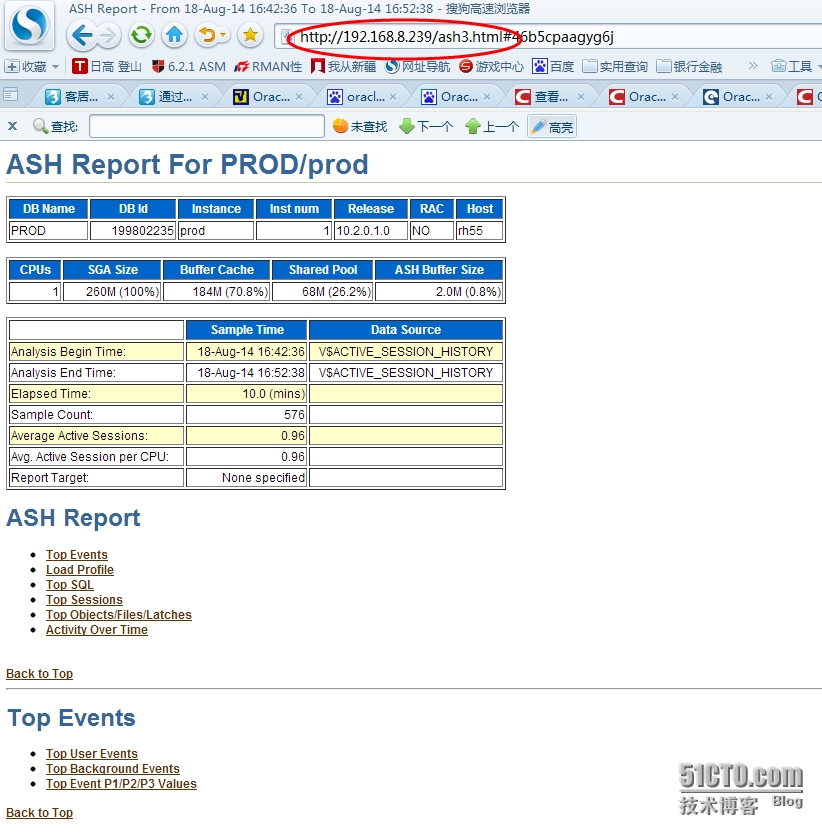
基本信息
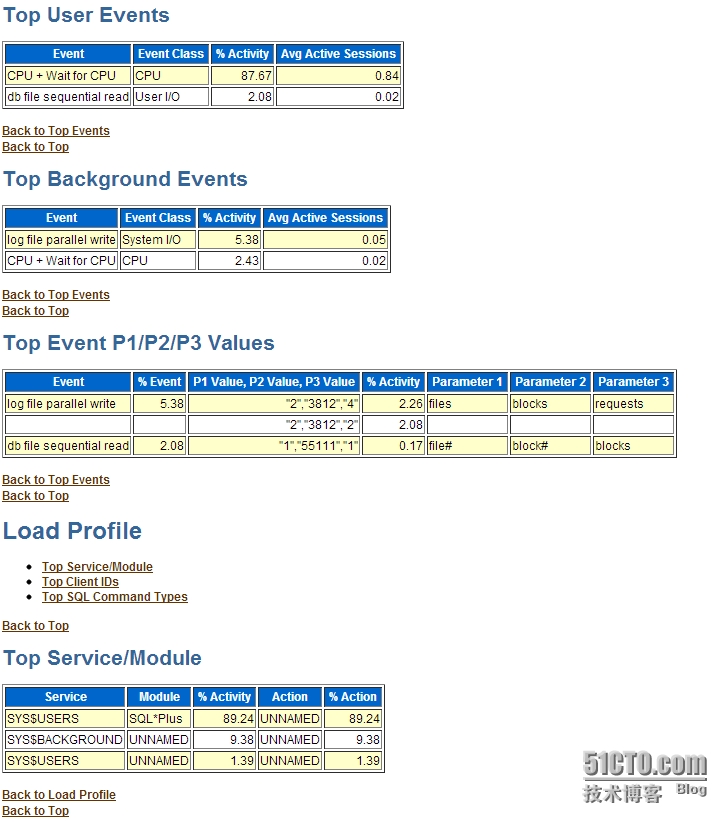
TOP事件:User TOP EVENTS
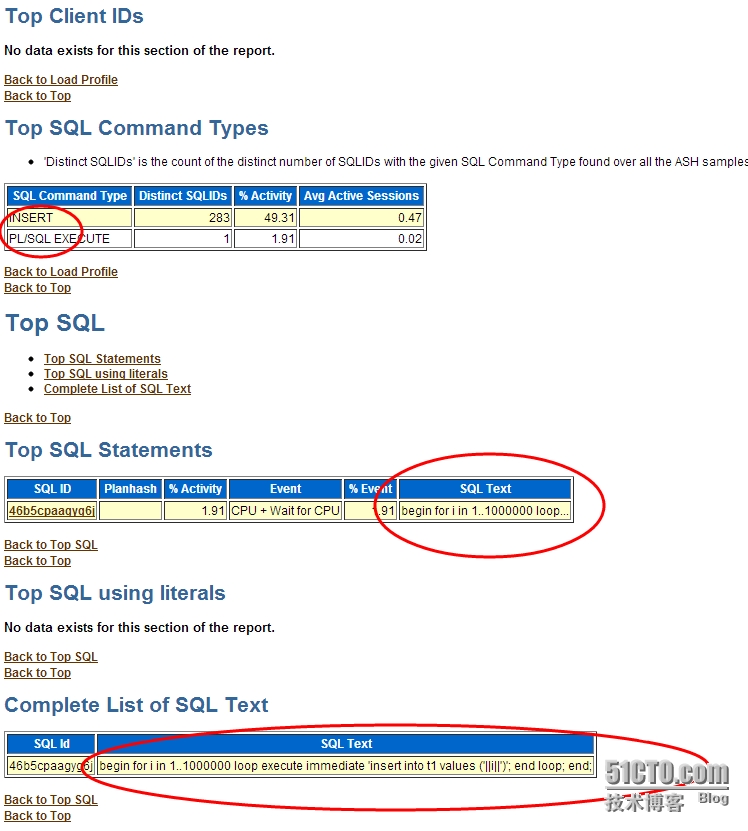
TOP SQL
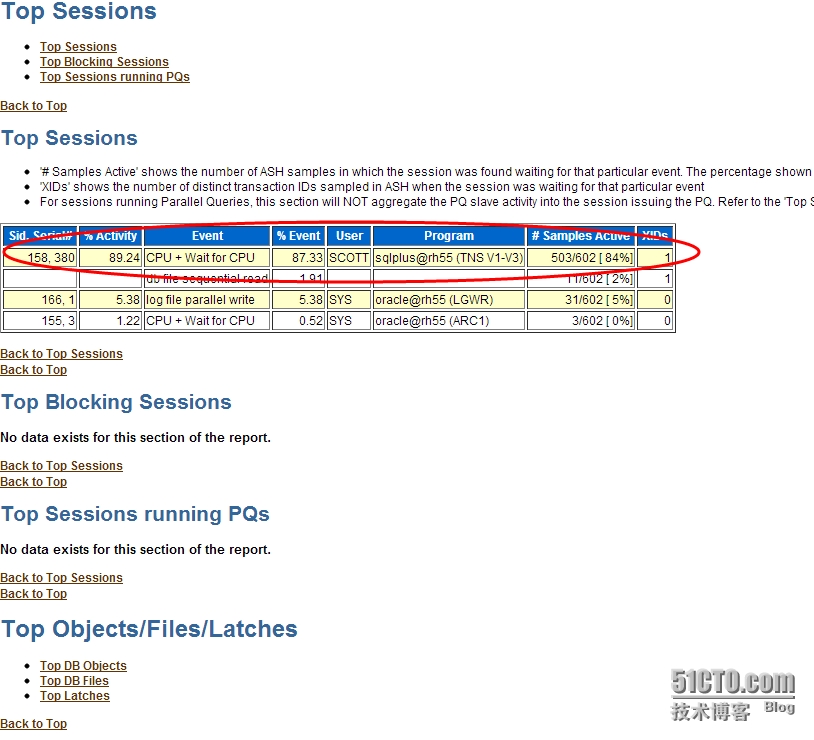
TOP SESSION
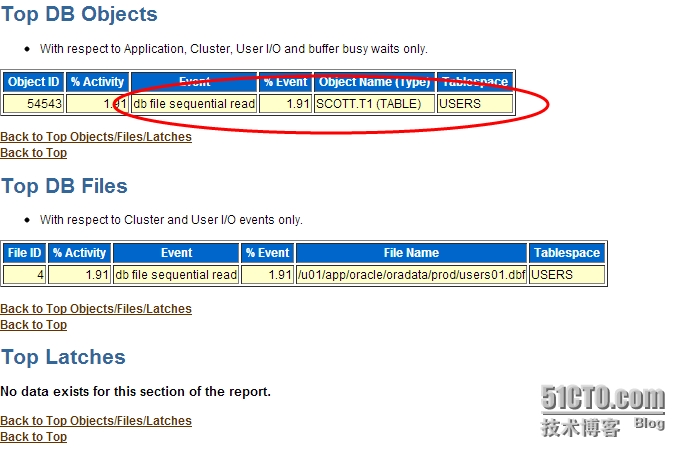
TOP OBJECTS
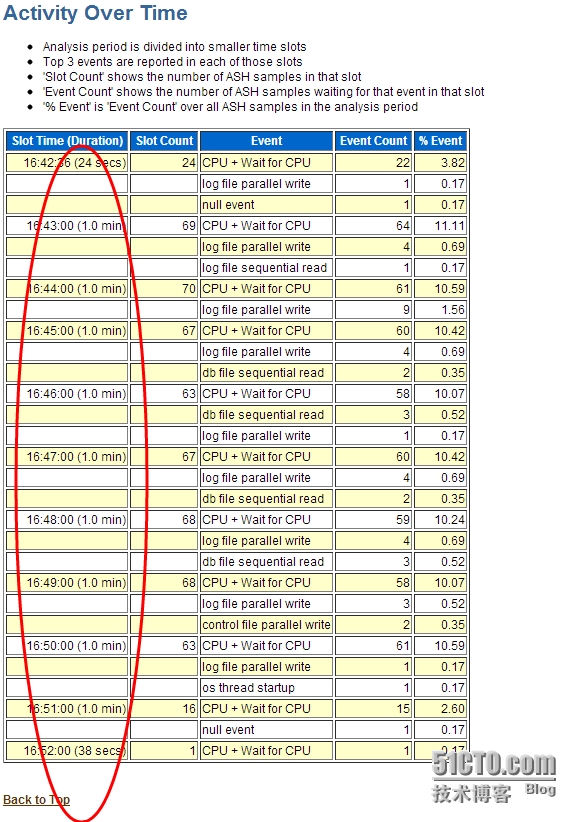
ASH 说明
ASH以V$SESSION为基础,每秒采样一次,记录活动会话等待的事件。不活动的会话不会采样,采样工作由新引入的后台进程MMNL来完成。
ASH buffers 的最小值为1MB,最大值不超过30MB。内存中记录数据。期望值是记录一小时的内容。
ASH内存分配:
SQL> select * from v$sgastat where name like '%ASH%';
POOL NAME BYTES
------------ -------------------------- ----------
shared pool ASH buffers 8388608
ASH报告生成脚本:@?/rdbms/admin/ashrpt.sql
ASH内存记录数据始终是有限的,为了保存历史数据,引入了自动负载信息库(Automatic Workload Repository ,AWR) 由后台进程MMON完成。ASH信息同样被采集写出到AWR负载库中。由于内存不是足够的,所以MMNL进程在ASH写满后会将信息写出到AWR负载库中。ASH全部写出是不可接受的,所以一般只写入收集的10%的数据量,而且使用direct-path insert完成,尽量减少日志的生成,从而最小化数据库性能影响。
内存中的ASH 信息可以通过V$ACTIVE_SESSION_HISTORY查询,而写出到AWR负载库的ASH信息,可以通过AWR的基础表wrh$_active_session_history查询,wrh$_active_session_history是一个分区表,Oracle会自动进行数据清理。
一般来说,我们在监控数据库时,如果是当前正在发生的问题,我们可以通过v$session+v$sqlarea来找出性能最差的SQL语句。如果在一个小时以内发生的我们可以通过生成ASH报告来找出SQL。如果是1小时以上或几天我们可以通过AWR报告来找出几小时,几天以来最影响系统的SQL语句。ADDM报告基于AWR库,默认可以保存30天的ADDM报告。
相关查询试图:
v$session (当前正在发生)
v$session_wait (当前正在发生)
v$session_wait_history (会话最近的10次等待事件)
v$active_session_history (内存中的ASH采集信息,理论为1小时)
wrh$_active_session_history (写入AWR库中的ASH信息,理论为1小时以上)
dba_hist_active_sess_history (根据wrh$_active_session_history生成的视图)
三. ASH 报告生成示例
ASH组件以v$active_session_history视图为基础,生成ASH报表,ASH报表与statspack类似,可以提供以下信息:
Top User Events
Top Background Events
Top Event P1/P2/P3 Values
Top Service/Module
Top Client IDs
Top SQL Command Types
Top SQL using literals
Top Blocking Sessions
Top DB Objects
Top DB Files
Top Latches
Activity Over Time
报表间隔时间可以精确到分钟,因而ASH可以提供比STATSPACK或AWR更详细的关于历史会话的信息,可以作为statspack或awr的补充。ASH报告通过@$ORACLE_HOME/rdbms/admin/ashrpt.sql脚本生成,包括hmtl和text两种格式。