一、准备工作
|
1
2
3
4
5
6
7
8
9
10
11
12
13
|
[[email protected] ~]# iptables -nL
Chain INPUT (policy ACCEPT)target prot opt source destination
Chain FORWARD (policy ACCEPT)target prot opt source destination
Chain OUTPUT (policy ACCEPT)target prot opt source destination
[[email protected] ~]# getenforce
Disabled[[email protected] ~]# crontab -l
0 * * * * /usr/sbin/ntpdate 210.72.145.44 64.147.116.229 time.nist.gov
[[email protected] ~]# hostname
kickstart.contoso.com |
相关服务器及服务说明如下:
| 角色 | IP地址 | 服务 | 说明 |
| Kickstart服务器 | 192.168.49.201 | apache,dhcp,tftp,kickstart | VMware NAT网络 |
| Centos客户端 | 192.168.49.4 | 待安装操作系统,pxe启动 |
二、安装过程
1、挂载CentOS 6.5系统盘
|
1
2
3
4
5
6
7
8
9
10
11
|
[[email protected] ~]# mount /dev/sr0 /mnt
mount: block device /dev/sr0 is write-protected, mounting read-only
[[email protected] ~]# mount
/dev/sda3 on / type ext4 (rw)
proc on /proc type proc (rw)
sysfs on /sys type sysfs (rw)
devpts on /dev/pts type devpts (rw,gid=5,mode=620)
tmpfs on /dev/shm type tmpfs (rw)
/dev/sda1 on /boot type ext4 (rw)
none on /proc/sys/fs/binfmt_misc type binfmt_misc (rw)
/dev/sr0 on /mnt type iso9660 (ro)
|
2、安装apache并启动服务
|
1
2
3
4
5
|
[[email protected] ~]# yum -y install httpd
[[email protected] ~]# rpm -qa |grep httpd
httpd-tools-2.2.15-59.el6.centos.x86_64httpd-2.2.15-59.el6.centos.x86_64[[email protected] ~]# /etc/init.d/httpd start
|
待服务启动后,将/mnt下的光盘文件拷贝到/var/www/html中去(当然也可以省略这一步,可以配置apache的根目录为/mnt即可,这里为了不去修改apache配置所以添加该步骤):
|
1
2
3
4
5
6
7
8
9
10
11
12
13
14
15
16
17
18
|
cp -aR /mnt/* /var/www/html
[[email protected] ~]# ll /var/www/html/
total 324-r--r--r-- 1 root root 14 Nov 29 2013 CentOS_BuildTagdr-xr-xr-x 3 root root 4096 Nov 29 2013 EFI-r--r--r-- 1 root root 212 Nov 28 2013 EULA-r--r--r-- 1 root root 18009 Nov 28 2013 GPLdr-xr-xr-x 3 root root 4096 Nov 29 2013 imagesdr-xr-xr-x 2 root root 4096 Nov 29 2013 isolinux-rw-r--r-- 1 root root 1126 Jul 14 01:58 ks.cfgdr-xr-xr-x 2 root root 258048 Nov 29 2013 Packages-r--r--r-- 1 root root 1354 Nov 28 2013 RELEASE-NOTES-en-US.htmldr-xr-xr-x 2 root root 4096 Nov 29 2013 repodata-r--r--r-- 1 root root 1706 Nov 28 2013 RPM-GPG-KEY-CentOS-6-r--r--r-- 1 root root 1730 Nov 28 2013 RPM-GPG-KEY-CentOS-Debug-6-r--r--r-- 1 root root 1730 Nov 28 2013 RPM-GPG-KEY-CentOS-Security-6-r--r--r-- 1 root root 1734 Nov 28 2013 RPM-GPG-KEY-CentOS-Testing-6-r--r--r-- 1 root root 3380 Nov 29 2013 TRANS.TBL |
3、安装tftp-server,并启用tftp服务
|
1
2
3
4
5
6
7
8
|
[[email protected] ~]# yum -y install tftp-server
[[email protected] ~]# rpm -qa|grep tftp
tftp-server-0.49-8.el6.x86_64[[email protected] ~]# sed -i '/disable/s/yes/no/' /etc/xinetd.d/tftp
[[email protected] ~]# sed -n '/disable/p' /etc/xinetd.d/tftp
disable= no[[email protected] ~]# /etc/init.d/xinetd start
Starting xinetd: [ OK ] |
4、准备pxe启动所需文件
|
1
2
3
4
5
6
7
|
[[email protected] ~]# cp /var/www/html/images/pxeboot/initrd.img /var/lib/tftpboot/
[[email protected] ~]# cp /var/www/html/images/pxeboot/vmlinuz /var/lib/tftpboot/
[[email protected] ~]# cp /var/www/html/isolinux/*.msg /var/lib/tftpboot/
[[email protected] ~]# cp /var/www/html/isolinux/splash.jpg /var/lib/tftpboot/
[[email protected] ~]# cp /var/www/html/isolinux/vesamenu.c32 /var/lib/tftpboot/
[[email protected] ~]# mkdir /var/lib/tftpboot/pxelinux.cfg
[[email protected] ~]# cp /var/www/html/isolinux/isolinux.cfg /var/lib/tftpboot/pxelinux.cfg/default
|
5、安装syslinux并拷贝pxelinux.0文件
|
1
2
3
4
5
6
7
8
9
10
11
12
13
14
15
16
17
18
19
20
21
22
23
24
25
26
27
28
29
30
31
32
33
34
35
36
37
38
39
40
41
42
43
44
45
46
47
48
49
50
51
52
53
54
55
56
57
58
59
60
61
62
63
64
65
66
67
68
69
70
71
72
73
74
75
76
77
78
79
80
81
82
83
84
85
86
87
88
89
90
91
92
93
94
95
96
97
98
99
100
101
102
103
104
105
106
107
108
109
110
111
112
113
114
115
|
[[email protected] ~]# yum -y install syslinux
Loaded plugins: fastestmirror, securityLoading mirror speeds from cached hostfileSetting up Install ProcessResolving Dependencies--> Running transaction check---> Package syslinux.x86_64 0:4.04-3.el6 will be installed--> Processing Dependency: syslinux-nonlinux for package: syslinux-4.04-3.el6.x86_64
--> Processing Dependency: mtools for package: syslinux-4.04-3.el6.x86_64
--> Running transaction check---> Package mtools.x86_64 0:4.0.12-1.el6 will be installed
---> Package syslinux-nonlinux.noarch 0:4.04-3.el6 will be installed--> Finished Dependency ResolutionDependencies Resolved=========================================================================================== Package Arch Version Repository Size
===========================================================================================Installing: syslinux x86_64 4.04-3.el6 base 346 k
Installing for dependencies:
mtools x86_64 4.0.12-1.el6 base 194 k
syslinux-nonlinux noarch 4.04-3.el6 base 584 k
Transaction Summary===========================================================================================Install 3 Package(s)Total download size: 1.1 MInstalled size: 2.5 MDownloading Packages:(1/3): mtools-4.0.12-1.el6.x86_64.rpm | 194 kB 00:00
(2/3): syslinux-4.04-3.el6.x86_64.rpm | 346 kB 00:00
(3/3): syslinux-nonlinux-4.04-3.el6.noarch.rpm | 584 kB 00:00
-------------------------------------------------------------------------------------------Total 1.1 MB/s | 1.1 MB 00:01
Running rpm_check_debugRunning Transaction TestTransaction Test SucceededRunning Transaction Installing : mtools-4.0.12-1.el6.x86_64 1/3 Installing : syslinux-nonlinux-4.04-3.el6.noarch 2/3 Installing : syslinux-4.04-3.el6.x86_64 3/3 Verifying : syslinux-4.04-3.el6.x86_64 1/3 Verifying : syslinux-nonlinux-4.04-3.el6.noarch 2/3 Verifying : mtools-4.0.12-1.el6.x86_64 3/3 Installed: syslinux.x86_64 0:4.04-3.el6
Dependency Installed: mtools.x86_64 0:4.0.12-1.el6 syslinux-nonlinux.noarch 0:4.04-3.el6
Complete![[email protected] ~]# rpm -ql syslinux-nonlinux
/usr/share/syslinux/altmbr.bin
/usr/share/syslinux/altmbr_c.bin
/usr/share/syslinux/altmbr_f.bin
/usr/share/syslinux/cat.c32
/usr/share/syslinux/chain.c32
/usr/share/syslinux/cmd.c32
/usr/share/syslinux/config.c32
/usr/share/syslinux/cpuid.c32
/usr/share/syslinux/cpuidtest.c32
/usr/share/syslinux/disk.c32
/usr/share/syslinux/dmitest.c32
/usr/share/syslinux/elf.c32
/usr/share/syslinux/ethersel.c32
/usr/share/syslinux/gfxboot.c32
/usr/share/syslinux/gptmbr.bin
/usr/share/syslinux/gptmbr_c.bin
/usr/share/syslinux/gptmbr_f.bin
/usr/share/syslinux/gpxecmd.c32
/usr/share/syslinux/gpxelinux.0
/usr/share/syslinux/gpxelinuxk.0
/usr/share/syslinux/hdt.c32
/usr/share/syslinux/host.c32
/usr/share/syslinux/ifcpu.c32
/usr/share/syslinux/ifcpu64.c32
/usr/share/syslinux/ifplop.c32
/usr/share/syslinux/int18.com
/usr/share/syslinux/isohdpfx.bin
/usr/share/syslinux/isohdpfx_c.bin
/usr/share/syslinux/isohdpfx_f.bin
/usr/share/syslinux/isohdppx.bin
/usr/share/syslinux/isohdppx_c.bin
/usr/share/syslinux/isohdppx_f.bin
/usr/share/syslinux/isolinux-debug.bin
/usr/share/syslinux/isolinux.bin
/usr/share/syslinux/kbdmap.c32
/usr/share/syslinux/linux.c32
/usr/share/syslinux/ls.c32
/usr/share/syslinux/lua.c32
/usr/share/syslinux/mboot.c32
/usr/share/syslinux/mbr.bin
/usr/share/syslinux/mbr_c.bin
/usr/share/syslinux/mbr_f.bin
/usr/share/syslinux/memdisk/usr/share/syslinux/memdump.com
/usr/share/syslinux/meminfo.c32
/usr/share/syslinux/menu.c32
/usr/share/syslinux/pcitest.c32
/usr/share/syslinux/pmload.c32
/usr/share/syslinux/poweroff.com
/usr/share/syslinux/pwd.c32
/usr/share/syslinux/pxechain.com
/usr/share/syslinux/pxelinux.0
/usr/share/syslinux/reboot.c32
/usr/share/syslinux/rosh.c32
/usr/share/syslinux/sanboot.c32
/usr/share/syslinux/sdi.c32
/usr/share/syslinux/sysdump.c32
/usr/share/syslinux/syslinux.com
/usr/share/syslinux/syslinux.exe
/usr/share/syslinux/syslinux64.exe
/usr/share/syslinux/ver.com
/usr/share/syslinux/vesainfo.c32
/usr/share/syslinux/vesamenu.c32
/usr/share/syslinux/vpdtest.c32
/usr/share/syslinux/whichsys.c32
[[email protected] ~]# cp /usr/share/syslinux/pxelinux.0 /var/lib/tftpboot/
|
5、安装dhcp并启动服务
|
1
2
3
4
5
6
7
8
9
10
11
12
13
14
15
16
17
18
19
20
21
22
23
24
25
26
27
28
29
30
31
32
33
34
35
36
37
|
[[email protected] ~]# yum -y install dhcp
[[email protected] ~]# vi /etc/dhcp/dhcpd.conf
[[email protected] ~]# cat /etc/dhcp/dhcpd.conf
## DHCP Server Configuration file.# see /usr/share/doc/dhcp*/dhcpd.conf.sample# see 'man 5 dhcpd.conf'#ddns-update-style interim; #设置DHCP服务器模式
ignore client-updates; #禁止客户端更新
log-facility local7; #使用rsyslog记录日志
subnet 192.168.49.0 netmask 255.255.255.0 { range 192.168.49.3 192.168.49.30; #地址池
option routers 192.168.49.2; #网关地址
option subnet-mask 255.255.255.0; #子网掩码
option domain-name-servers 192.168.49.2; #设置DNS
option domain-name "contoso.com"; #域名搜索列表
default-lease-time 600; #默认租约期限(单位秒)
max-lease-time 7200; #最大租约期限(单位秒)
next-server 192.168.49.201; #下一个访问的服务器地址,tftp服务器地址
filename "pxelinux.0"; #在next-server上需要下载的文件
}[[email protected] ~]# service dhcpd configtest
Syntax: OK[[email protected] ~]# dhcpd
Internet Systems Consortium DHCP Server 4.1.1-P1Copyright 2004-2010 Internet Systems Consortium.All rights reserved.For info, please visit https://www.isc.org/software/dhcp/
Not searching LDAP since ldap-server, ldap-port and ldap-base-dn were not specified in the config file
Wrote 0 leases to leases file.
Listening on LPF/eth0/00:0c:29:c1:d4:3d/192.168.49.0/24
Sending on LPF/eth0/00:0c:29:c1:d4:3d/192.168.49.0/24
Sending on Socket/fallback/fallback-net
[[email protected] ~]# /etc/init.d/dhcpd start
[[email protected] ~]# /etc/init.d/dhcpd status
dhcpd (pid 1670) is running... |
6、检查相关服务运行情况并添加开机自启动
|
1
2
3
4
5
6
7
8
9
|
[[email protected] ~]# /etc/init.d/httpd status
httpd (pid 1770) is running...[[email protected] ~]# chkconfig httpd on
[[email protected] ~]# /etc/init.d/xinetd status
xinetd (pid 1585) is running...[[email protected] ~]# chkconfig xinetd on
[[email protected] ~]# /etc/init.d/dhcpd status
dhcpd (pid 1670) is running...[[email protected] ~]# chkconfig dhcpd on
|
7、准备ks.cfg文件
下面通过system-config-kickstart的图形界面进行无人值守安装设置,如果熟知ks.cfg文件的格式,可以自己写脚本来完成,当然这里只是示例。
因为system-config-kickstart需要在图形界面下操作,所以首先要在操作系统中安装图形界面:
|
1
2
3
|
[[email protected] httpd]# yum -y groupinstall 'X Window System'
yum -y groupinstall 'Desktop'
yum -y groupinstall 'Desktop Platform' 'Desktop Platform Development' 'Graphical Administration Tools'
|
然后,使用yum安装system-config-kickstart:
|
1
|
[[email protected] httpd]# yum install system-config-kickstart
|
最后,执行system-config-kickstart命令:
|
1
|
[[email protected] httpd]# system-config-kickstart
|
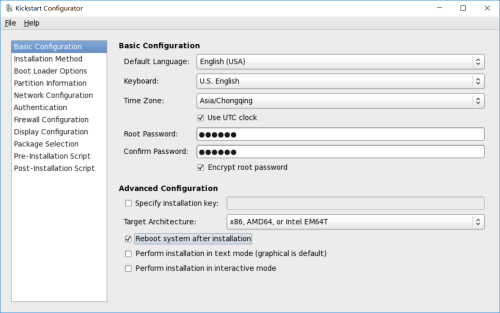
基本设置,包含语言、时区、root密码等信息,
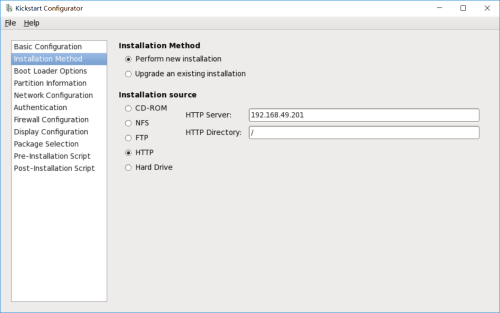
选择安装方式和安装源,
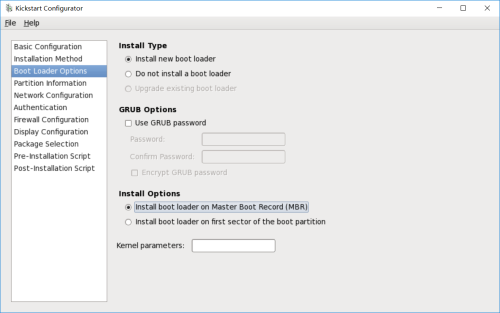
选择安装类型,GRUB选项以及安装选项,
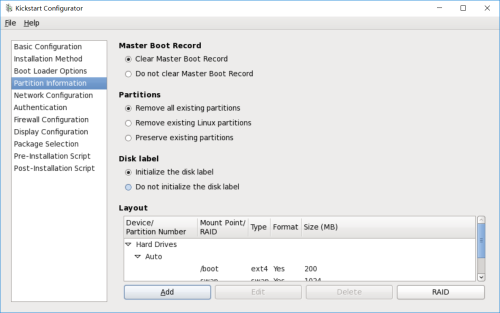
磁盘分区相关选项,
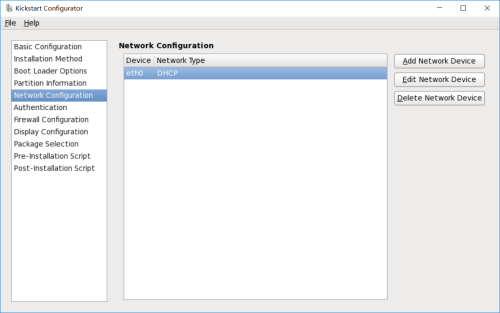
网络配置选项,
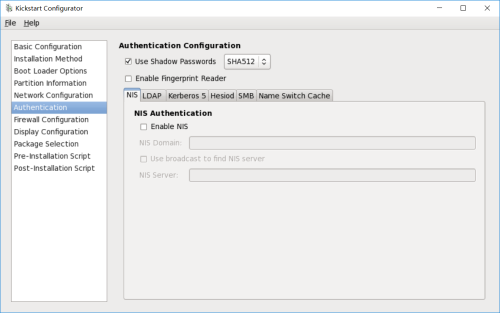
登录认证方式设置,有多种认证方式可选,如NIS、LDAP、Kerberos5等等,
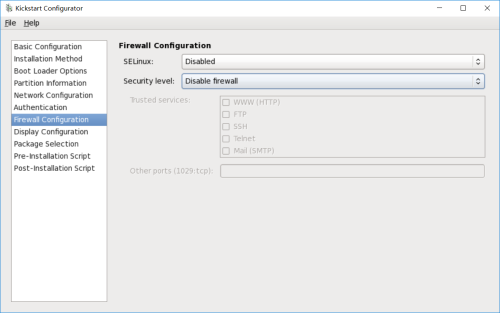
防火墙设置,
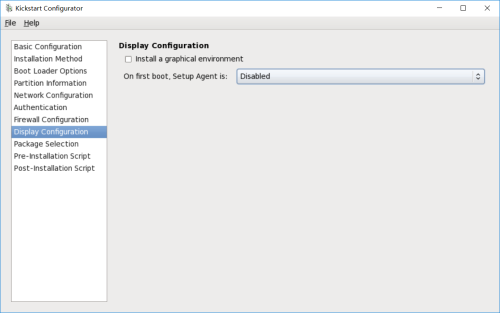
显示配置,
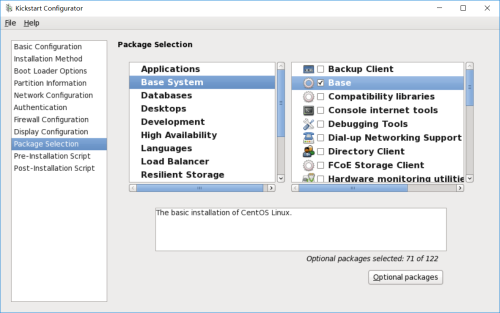
选择软件包,
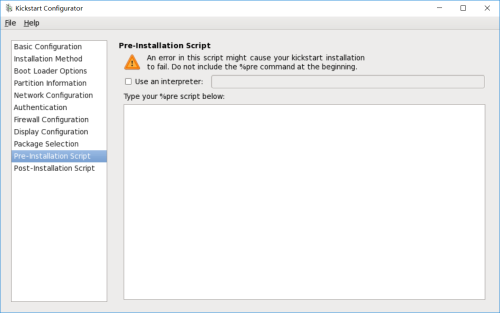
预安装脚本,
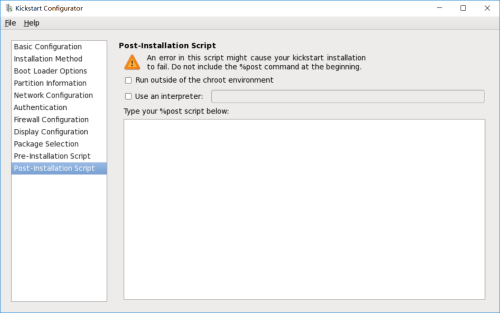
安装后的处理脚本,
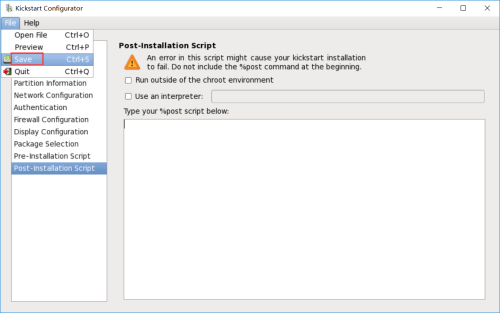
选好之后,点击“File",然后在下拉菜单中选择“Save”,
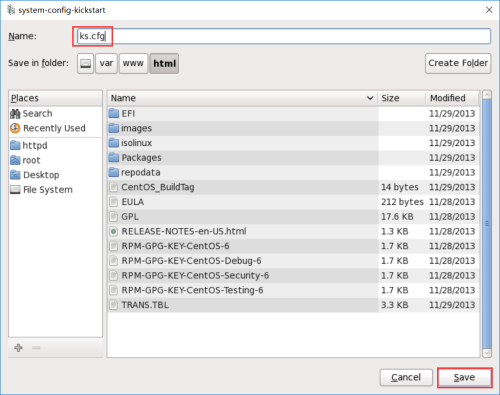
选择文件保存位置,确定后选择save保存。
|
1
2
3
4
5
6
7
8
9
10
11
12
13
14
15
16
17
18
19
20
21
22
23
24
25
26
27
28
29
30
31
32
33
34
35
36
37
38
39
40
41
42
43
44
45
46
47
48
49
50
|
[[email protected] httpd]# ll /var/www/html/ks.cfg
-rw-r--r-- 1 root root 1126 Jul 14 01:58 /var/www/html/ks.cfg
[[email protected] httpd]# cat /var/www/html/ks.cfg
#platform=x86, AMD64, or Intel EM64T#version=DEVEL# Firewall configurationfirewall --disabled# Install OS instead of upgradeinstall# Use network installationurl --url="http://192.168.49.201/"
# Root passwordrootpw --iscrypted $1$Y8sHozoZ$2BCNRpLHzBEab6Etd46hF1# System authorization informationauth --useshadow --passalgo=sha512# Use graphical installgraphical# System keyboardkeyboard us# System languagelang en_US# SELinux configurationselinux --disabled# Do not configure the X Window Systemskipx# Installation logging levellogging --level=info# Reboot after installationreboot# System timezonetimezone --isUtc Asia/Chongqing
# Network informationnetwork --bootproto=dhcp --device=eth0 --onboot=on# System bootloader configurationbootloader --location=mbr# Clear the Master Boot Recordzerombr# Partition clearing informationclearpart --all --initlabel # Disk partitioning informationpart /boot --fstype="ext4" --size=200
part swap --fstype="swap" --size=1024
part / --fstype="ext4" --grow --size=1
%packages@base@chinese-support@developmentcjkuni-fonts-ghostscriptdos2unix%end |
8、修改/var/lib/tftpboot/pxelinux.cfg/default,使客户端自动加载ks.cfg配置
|
1
2
3
4
5
6
7
8
9
|
[[email protected] httpd]# vi /var/lib/tftpboot/pxelinux.cfg/default
[[email protected] httpd]# cat /var/lib/tftpboot/pxelinux.cfg/default
......label linux menu label ^Install or upgrade an existing system
menu default
kernel vmlinuz
append initrd=initrd.img ks=http://192.168.49.201/ks.cfg text
...... |
三、测试
创建一个VMware虚拟机,网络选择NAT模式,然后不添加启动影响,开机启动
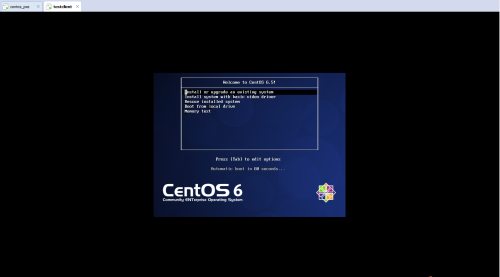
开机看到这个画面,很亲切啊有木有,
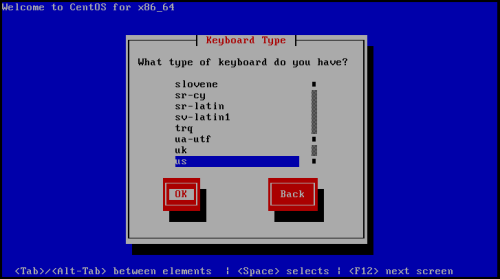
选择键盘类型,
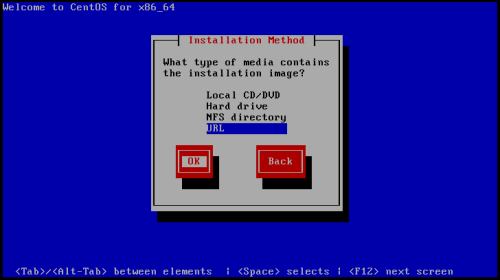
选择安装方式,
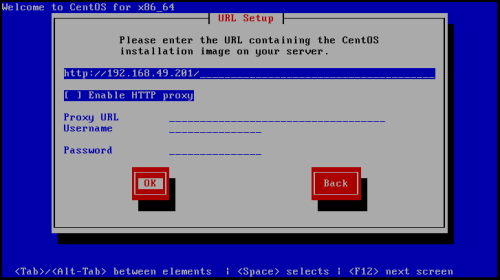
填写kickstart服务器的地址,
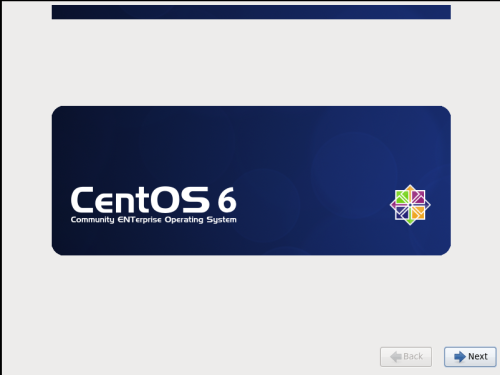
好吧,系统已经开始安装了,
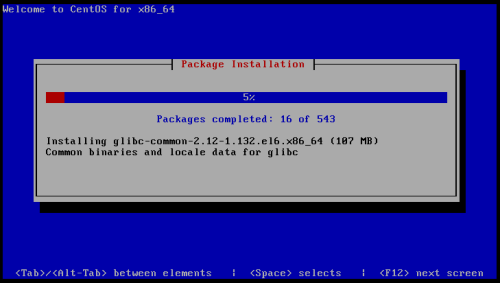
安装中,
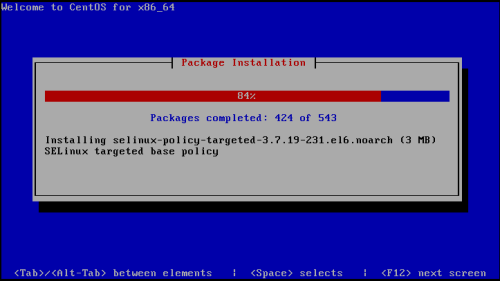
安装接近尾声,
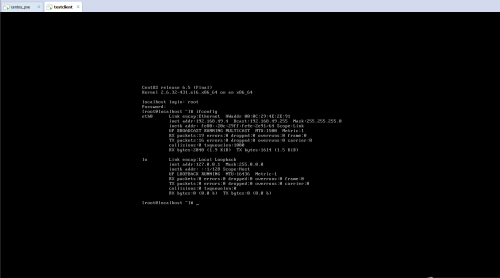
安装结束,使用之前设置的密码成功进入操作系统,因为没有安装图形桌面,所以就是这样的界面了,ok,至此成功结束。
本文转自 jerry1111111 51CTO博客,原文链接:http://blog.51cto.com/jerry12356/1948715,如需转载请自行联系原作者