事先需要查看虚拟机的MAC
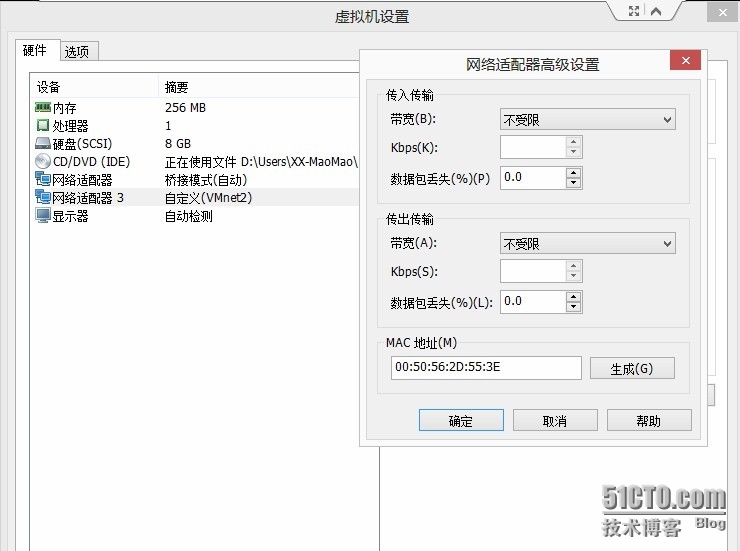
cat /etc/udev/rules.d/70-persistent-net.rules
# This file was automatically generated by the /lib/udev/write_net_rules
# program, run by the persistent-net-generator.rules rules file.
#
# You can modify it, as long as you keep each rule on a single
# line, and change only the value of the NAME= key.
# PCI device 0x8086:0x100f (e1000)
SUBSYSTEM=="net", ACTION=="add", DRIVERS=="?*", ATTR{address}=="00:0c:29:08:52:5f", ATTR{type}=="1", KERNEL=="eth*", NAME="eth0"
# PCI device 0x8086:0x100f (e1000)
SUBSYSTEM=="net", ACTION=="add", DRIVERS=="?*", ATTR{address}=="00:50:56:2d:55:3e", ATTR{type}=="1", KERNEL=="eth*", NAME="eth3"
/etc/sysconfig/network-scripts/ifcfg-eth
cat /etc/sysconfig/network-scripts/ifcfg-eth3
DEVICE=eth3
TYPE=Ethernet
ONBOOT=yes
NM_CONTROLLED=yes
BOOTPROTO=none
IPADDR=192.168.99.201
NETMASK=255.255.255.0
GATEWAY=10.0.0.254
DNS1=10.0.0.254
IPV6INIT=no
USERCTL=no
HWADDR=00:50:56:2d:55:3e
centos5.8系统下涉及文件(红色字体需要更改)
[[email protected] ~]# cat /etc/sysconfig/network-scripts/ifcfg-eth1
# Intel Corporation 82545EM Gigabit Ethernet Controller (Copper)
DEVICE=eth1
BOOTPROTO=none
ONBOOT=yes
HWADDR=00:0c:29:ed:2d:8e
NETMASK=255.255.255.0
IPADDR=192.168.99.200
GATEWAY=10.0.0.214
TYPE=Ethernet
另外如果5.8系统下有/etc/udev/rules.d/70-persistent-net.rules 直接删除.
全部修改完毕后
/etc/init.d/network restart 直接重启
转载于:https://blog.51cto.com/maomaolinux/1319918