社交网络如此流行,以至于所有的厂商都想在他们的网站中加入一些新的特性,例如有些需要即时的通知。这是非常常见的需求,设想你打开一个页面后,你肯定想你收到的通知,好友的状态列表等等即时的展现出来。原来的web设计就是一种方法,一个请求,一个相应,而现在在HTML5的帮助下对于服务器和客户端的通信来讲,我们有了新的办法。虽然现在还是有很多人在使用Long-polling技术模拟服务器和客户端的通信。
随着web浏览器的更新换代,现在已经有相当的一部分浏览器具有了比较新的非常酷的特性。有相当大的一部分浏览器支持HTML5 cmmunication API,是否时候抛弃long-polling了?让我们拭目以待。
如果您的网站有任何需要告知用户的通信,那么这个测试对您就有帮助。很简单,这个测试就是用户获取私人信息,在通知用户未读信息的时候,我们采用long-polling、Server-Sent Events和WebSockets的方式实现,然后比较结果。
首先让我们来看一下例子中基础的代码,我们需要一个访问数据库的库,一个获取未读通知数量和添加一个新的通知的模型。
我们需要一张数据库表:
1 |
CREATE TABLE IF NOT EXISTS `notification` (
|
2 |
`id` int(10) unsigned NOT NULL AUTO_INCREMENT,
|
3 |
`recipientUid` int(10) unsigned NOT NULL,
|
4 |
`eventId` int(10) unsigned NOT NULL,
|
5 |
`isNew` tinyint(1) unsigned NOT NULL DEFAULT '1',
|
7 |
KEY `IX_recipientUid` (`recipientUid`),
|
8 |
KEY `IX_isNew` (`isNew`)
|
9 |
) ENGINE=InnoDB DEFAULT CHARSET=utf8 COMMENT='User notifications';
|
获取未读通知数量和添加通知的模型:
02 |
class Model_UserNotification
|
07 |
public function __construct(Lib_Db $db)
|
13 |
* @param int $recipientUid
|
14 |
* <span>@return</span> int
|
16 |
public function fetchNumberByRecipientUid($recipientUid)
|
18 |
return $this->_db->fetch("SELECT count(*) as count "
|
19 |
. " FROM notification WHERE recipientUid = %d AND isNew = 1"
|
20 |
, $recipientUid)->count;
|
24 |
* @param int $recipientUid
|
27 |
public function add($recipientUid, $eventId)
|
29 |
$this->_db->update("INSERT INTO "
|
30 |
. " notification (`id`, `recipientUid`, `eventId`, `isNew`) VALUES (NULL, '%d', '%d', '1')"
|
31 |
, $recipientUid, $eventId);
|
35 |
* @param int $recipientUid
|
37 |
public function removeAll($recipientUid)
|
39 |
$this->_db->update("DELETE FROM "
|
40 |
. " notification WHERE recipientUid = %d"
|
long-polling

运行原理
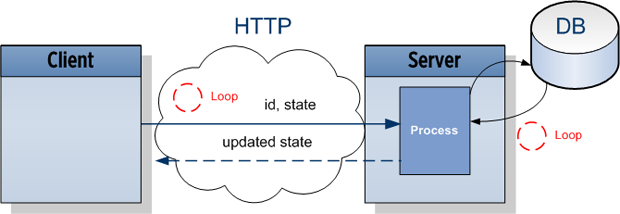
浏览器通过HTTP发送一个带有接收者ID(这里是user)的请求和当前状态(当前展示的未读通知的数量)到服务器。这将创建一个进程,这个进程一直查询数据库直到状态改变为止,当状态改变的时候,客户端就收到了服务器的相应,它可以更新自己的展示,而后发出下一个请求。
实现方式
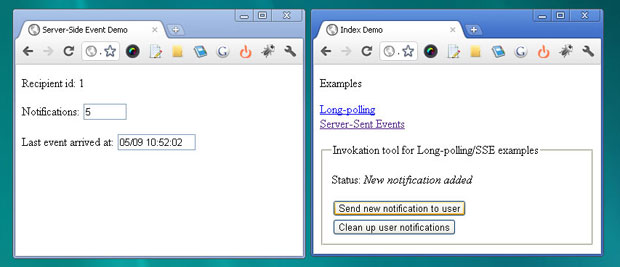
客户端就是简单的两个input输入框,一个展示未读消息数量,一个展示上次消息到达的时间。JavaScript通过AJAX的方式向服务器发送接收者用户id和当前的状态(当前页面上展示的未读通知数量)。使用JSONP处理跨域。
02 |
<p>Recipient id: <?= $recipientUid ?></p>
|
03 |
<p>Notifications: <input id="notificationNum" size="4" name="some" value="<?= $displayedNotificationNum ?>" /></p>
|
04 |
<p>Last event arrived at: <input id="time" size="12" name="some" value="0" /></p>
|
06 |
<script type="text/javascript">
|
10 |
var UID = <?= $recipientUid ?>; |
12 |
$.NotifierLongPolling = (function() { |
13 |
var _stateNode = $('#notificationNum'), _timeNode = $('#time');
|
15 |
onMessage : function(data) {
|
16 |
_stateNode.val(data.updatedNotificationNum);
|
17 |
_timeNode.val(data.time);
|
18 |
setTimeout($.NotifierLongPolling.send, 3000);
|
25 |
'jsonpCallback': '$.NotifierLongPolling.onMessage',
|
26 |
'data': 'recipientUid=' + UID + '&displayedNotificationNum='
|
34 |
$(document).bind('ready.app', function() { |
35 |
setTimeout($.NotifierLongPolling.send, 40);
|
服务器等待3秒,然后检查状态是否改变,如果状态改变了则响应请求,否则继续等待,然后查询。
02 |
$recipientUid = (int)$_REQUEST["recipientUid"];
|
03 |
$displayedNotificationNum = (int)$_REQUEST["displayedNotificationNum"];
|
08 |
$updatedNotificationNum = $model->fetchNumberByRecipientUid($recipientUid);
|
09 |
} while ($updatedNotificationNum == $displayedNotificationNum);
|
11 |
header("HTTP/1.0 200");
|
12 |
printf ('%s({"time" : "%s", "updatedNotificationNum" : "%d"});'
|
13 |
, $_REQUEST["callback"], date('d/m H:i:s'), $updatedNotificationNum);
|
客户端收到服务器返回的状态,然后展示出来,接下来再次发送请求。
Server-Sent Events

运行原理
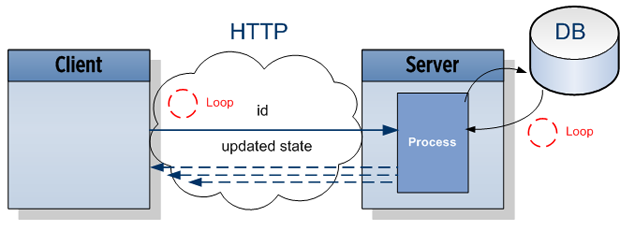
浏览器通过HTTP向服务器发送请求,服务器端拿出数据库中的最新的信息,立即返回给客户端,客户端等待三秒后再次发出下一个请求。
实现方式
同样,浏览器中HTML两个input,JavaScript模块打开EventSource,把接受者的id传给服务端。
02 |
<p>Recipient id: <?= $recipientUid ?></p>
|
03 |
<p>Notifications: <input id="notificationNum" size="4" name="some" value="<?= $displayedNotificationNum ?>" /></p>
|
04 |
<p>Last event arrived at: <input id="time" size="12" name="some" value="0" /></p>
|
06 |
<script type="text/javascript">
|
10 |
var UID = <?= $recipientUid ?>; |
12 |
NotifierSSE = (function() { |
13 |
var _stateNode = $('#notificationNum'),
|
14 |
_timeNode = $('#time'),
|
17 |
onMessage : function(event) {
|
18 |
var data = JSON.parse(event.data);
|
19 |
_stateNode.val(data.updatedNotificationNum);
|
20 |
_timeNode.val(data.time);
|
25 |
_src = new EventSource("server.php?recipientUid=" + UID);
|
26 |
_src.addEventListener('message', _handler.onMessage, false);
|
33 |
$(document).bind('ready.app', function() { |
34 |
setTimeout(NotifierSSE.init, 40);
|
服务器端将最新的未读消息数量返回给客户端。
02 |
header('Content-Type: text/event-stream');
|
03 |
header('Cache-Control: no-cache'); // recommended to prevent caching of event data.
|
05 |
$recipientUid = (int)$_REQUEST["recipientUid"];
|
07 |
function send($updatedNotificationNum)
|
09 |
printf ("id: %s\n\n", PROC_ID);
|
10 |
printf ('data: {"time" : "%s", "updatedNotificationNum" : "%d"}' . "\n\n"
|
11 |
,date('d/m H:i:s') , $updatedNotificationNum);
|
17 |
send($model->fetchNumberByRecipientUid($recipientUid));
|
客户端收到相应后,onMessage事件的处理器将被调用。浏览器将每3秒发送一个请求,除非将连接关闭(Close方法)。
WebSockets

运行原理
客户端通知WebSockets服务器一个事件,告诉他接收者id,服务器将立即通知消息,当任何新的未读消息来的时候,服务器都将立即返回数据给客户端。
01 |
<p>Recipient id: <?= $recipientUid ?></p>
|
02 |
<p>Notification: <span id="display"></span></p>
|
03 |
<button id="test">Fire an event</button>
|
06 |
realtime = new realtimeComm(window.location.host + ":20001");
|
07 |
realtime.addListener('/notification/updates', function(response) {
|
08 |
$('#display').html('Client #' + response.data.recipientUid + ' broadcast an action #' + response.data.actionId);
|
11 |
$('#test').bind('click', this, function(e){
|
14 |
realtime.send('/notification/presence', {
|
16 |
'recipientUid': <?= $recipientUid ?>
|
客户端打开一个WebSockets连接而且在/notification/updates上订阅一个事件处理。在HTML中添加一个发送向/notification/presents发送接收者id的button。这将在所有的打开连接中引起广播消息。所以每一个活跃的客户端都收到通知,客户端会检查消息中的id是否是当前登录的用户的id,如果是就更新通知数量。
总结
浏览器兼容性
- Long-polling支持大多数当前的浏览器
- Server-Sent Events支持Chrome9+、Firefox6+、Opera11+、Safari5+
- Chrome14、Firefox7支持最新的hybi-10协议,Firefox6支持hybi-07.
服务器负载
- Long-polling占一小部分CPU资源,但是创建空的进程将浪费系统的内存
- Server-Sent Events工作的方式有很多,除非Server-Sent Events不必在每一次响应发出后都关闭连接。
- WebSockets,服务器只需要一个进程处理所有的请求,没有循环,不必为每个客户端都分配cpu和内存。
客户端负载
- Long-polling取决于实现方式,但终究是一个异步的方式
- Server-Sent Events采用浏览器的内置的实现方式,只花费很少的一部分资源。
- WebSockets跟Server-Sent Events一样,采用浏览器的内置的实现方式,只花费很少的一部分资源。
时间线
- Long-polling接近实时,但是发送新的请求和发送相应会有一定的时延。
- Server-Sent Events默认延时3秒,但是可以调整。
- WebSockets真正的实时
实现方式复杂度
- Long-polling实现起来非常简单
- Server-Sent Events甚至比Long-polling更简单
- 需要一个WebSockets服务器处理事件,并开放一个端口