Web_image_check,图像检查点,功能与web_reg_find(文本检查点)类似,验证HTML页面中是否存在指定的图像。
应用场景:判断测试对象在打开的页面上是否存在某个logo,如公司logo,如果存在此logo则测试通过,若不存在此logo则测试不通过。
注意:
1.勾上runtime settings>>>internet protocl>>>preferences>>>check:enable imaage and text check
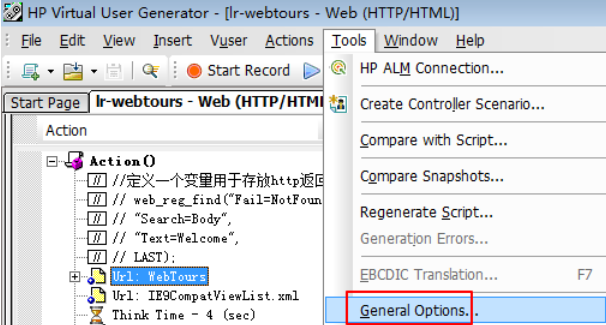
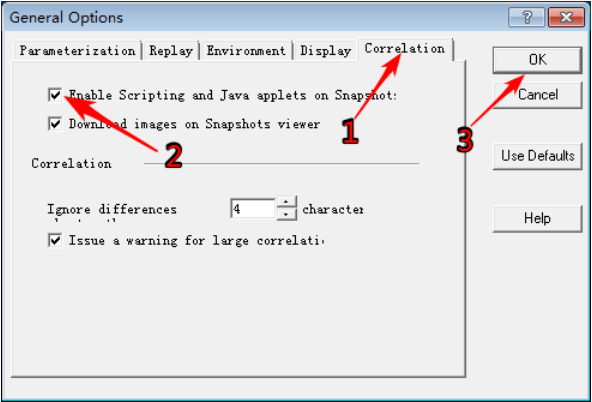
2.勾上tools>>>general options>>>correlation>>>enable scripting and java applets on snapshot
3.该函数需放到web_url后面,且web_url的mode须为html(此函数仅仅支持基于HTML的脚本)
1.按F4,进入runtime settings,选择“preferences”,勾选“enable image and text check”

1.点击“tools >>> general options”
1.勾选
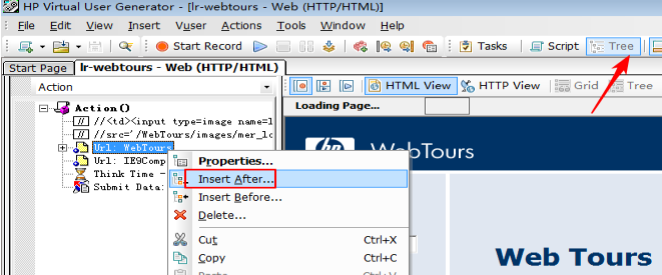
1.右键“源文件”

1.转到“树视图”
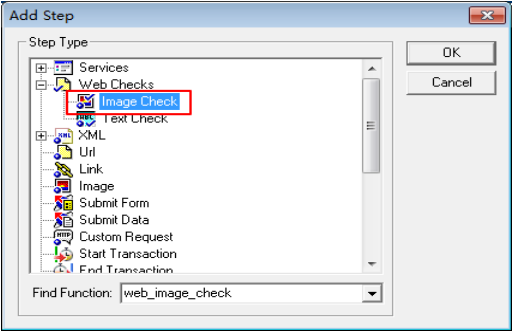
选择“image check”,点击“OK”
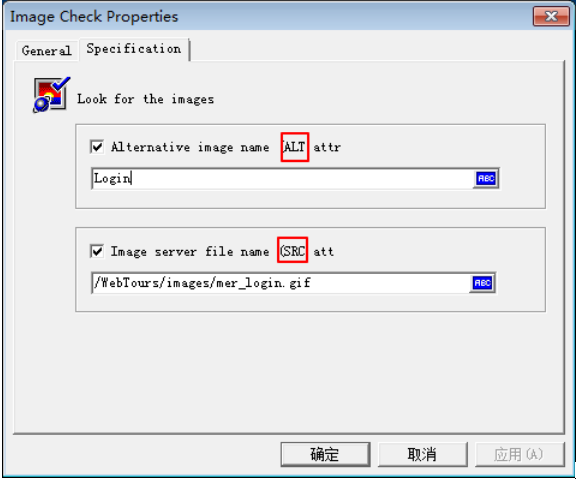
alt,src的值直接取该图片在网页源码中相应的值,点击“确定”
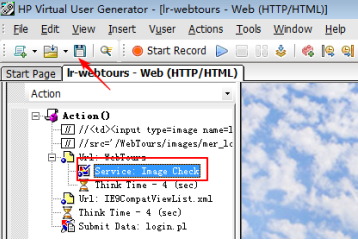
自动插入图像检查点函数,点击“保存”
19.回放脚本

本文转自 32氪 51CTO博客,原文链接:http://blog.51cto.com/10672221/1946776