先切个Eclipse设置时的Sample代码图:
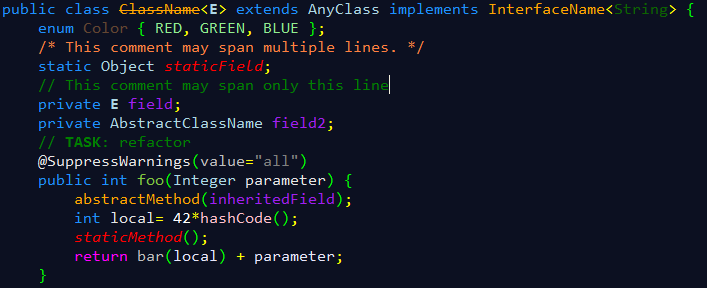
再切一个自己的图:

废话不说,直接入题。
方式一:替换Eclipse的配置文件
其实Eclipse的各种配置都是在文件设置里的,因此只要用一个配置好的模版来替换默认的配置文件,即可将所有配置克隆到新的Eclipse环境中。这些配置文件在workspace\.metadata\.plugins\org.eclipse.core.runtime\.settings文件夹下。
懒人直接上代码:文件org.eclipse.ui.editors.prefs:
|
1
2
3
4
5
6
7
8
9
10
11
12
13
14
15
|
AbstractTextEditor.Color.Background.SystemDefault=falseAbstractTextEditor.Color.Foreground.SystemDefault=falselineNumberRuler=trueAbstractTextEditor.Color.Foreground=248,248,248AbstractTextEditor.Color.SelectionBackground=37,59,118currentLineColor=60,65,77printMargin=trueAbstractTextEditor.Color.Background=12,16,33lineNumberColor=141,143,173AbstractTextEditor.Color.SelectionBackground.SystemDefault=falseprintMarginColor=122,123,139eclipse.preferences.version=1breakpointIndicationInOverviewRuler=trueoccurrenceIndicationColor=60,65,77overviewRuler_migration=migrated_3.1 |
文件org.eclipse.jdt.ui.prefs:
|
1
2
3
4
5
6
7
8
9
10
11
12
13
14
15
16
17
18
19
20
21
22
23
24
25
26
27
28
29
30
31
32
33
34
35
36
37
38
39
40
41
42
43
44
45
46
47
48
49
50
51
52
53
54
55
56
57
58
59
60
61
62
63
64
65
66
67
68
69
70
71
72
73
74
75
76
77
78
79
80
81
82
83
84
85
86
87
88
89
90
91
92
93
94
95
96
97
98
99
100
101
102
103
104
105
106
107
108
109
110
111
112
113
114
115
116
117
118
119
120
121
122
123
124
125
126
127
|
content_assist_disabled_computers=org.eclipse.jdt.ui.templateProposalCategory\u0000org.eclipse.jdt.ui.javaNoTypeProposalCategory\u0000org.eclipse.jdt.ui.javaTypeProposalCategory\u0000org.eclipse.jdt.ui.textProposalCategory\u0000content_assist_lru_history=<?xml version\="1.0" encoding\="UTF-8" standalone\="no"?><history maxLHS\="100" maxRHS\="10"/>
content_assist_number_of_computers=21content_assist_parameters_background=0,0,0content_assist_parameters_foreground=255,255,255content_assist_proposals_background=255,255,255content_assist_proposals_foreground=26,26,26eclipse.preferences.version=1fontPropagated=truejava_bracket=0,255,0java_comment_task_tag=0,128,0java_default=144,238,144java_doc_default=128,128,128java_doc_keyword=128,0,255java_doc_keyword_bold=falsejava_doc_link=128,128,192java_doc_tag=0,128,255java_keyword=30,144,255java_keyword_bold=falsejava_keyword_return=255,0,255java_keyword_return_bold=falsejava_multi_line_comment=139,105,20java_operator=255,255,0java_single_line_comment=0,128,0java_string=128,128,128org.eclipse.jdt.ui.editor.tab.width=org.eclipse.jdt.ui.formatterprofiles.version=12org.eclipse.jdt.ui.javadoclocations.migrated=trueorg.eclipse.jdt.ui.text.code_templates_migrated=trueorg.eclipse.jdt.ui.text.custom_code_templates=<?xml version\="1.0" encoding\="UTF-8" standalone\="no"?><templates/>
org.eclipse.jdt.ui.text.custom_templates=<?xml version\="1.0" encoding\="UTF-8" standalone\="no"?><templates/>
org.eclipse.jdt.ui.text.templates_migrated=trueorg.eclipse.jface.textfont=1|Consolas|12.0|0|WINDOWS|1|-16|0|0|0|400|0|0|0|0|3|2|1|49|Consolas;proposalOrderMigrated=truesemanticHighlighting.abstractMethodInvocation.color=255,165,0semanticHighlighting.abstractMethodInvocation.enabled=truesemanticHighlighting.annotation.color=229,229,229semanticHighlighting.annotationElementReference.color=191,191,191semanticHighlighting.annotationElementReference.enabled=truesemanticHighlighting.autoboxing.color=230,230,250semanticHighlighting.autoboxing.enabled=truesemanticHighlighting.class.color=173,216,230semanticHighlighting.class.enabled=truesemanticHighlighting.deprecatedMember.color=255,165,0semanticHighlighting.enum.enabled=truesemanticHighlighting.field.color=160,32,240semanticHighlighting.inheritedMethodInvocation.color=255,192,203semanticHighlighting.inheritedMethodInvocation.enabled=truesemanticHighlighting.interface.color=255,165,0semanticHighlighting.interface.enabled=truesemanticHighlighting.localVariable.color=230,230,250semanticHighlighting.localVariable.enabled=truesemanticHighlighting.localVariableDeclaration.color=229,229,229semanticHighlighting.localVariableDeclaration.enabled=truesemanticHighlighting.method.color=191,191,191semanticHighlighting.method.enabled=truesemanticHighlighting.methodDeclarationName.bold=falsesemanticHighlighting.methodDeclarationName.color=128,200,64semanticHighlighting.methodDeclarationName.enabled=truesemanticHighlighting.number.color=255,255,255semanticHighlighting.number.enabled=truesemanticHighlighting.parameterVariable.color=229,229,229semanticHighlighting.parameterVariable.enabled=truesemanticHighlighting.staticField.color=255,0,0semanticHighlighting.staticFinalField.color=144,238,144semanticHighlighting.staticFinalField.enabled=truesemanticHighlighting.staticMethodInvocation.color=255,0,0semanticHighlighting.typeArgument.enabled=truesemanticHighlighting.typeParameter.color=173,216,230semanticHighlighting.typeParameter.enabled=truesourceHoverBackgroundColor=245,245,181sourceHoverBackgroundColor.SystemDefault=falsesp_cleanup.add_default_serial_version_id=truesp_cleanup.add_generated_serial_version_id=falsesp_cleanup.add_missing_annotations=truesp_cleanup.add_missing_deprecated_annotations=truesp_cleanup.add_missing_methods=falsesp_cleanup.add_missing_nls_tags=falsesp_cleanup.add_missing_override_annotations=truesp_cleanup.add_serial_version_id=falsesp_cleanup.always_use_blocks=truesp_cleanup.always_use_parentheses_in_expressions=falsesp_cleanup.always_use_this_for_non_static_field_access=falsesp_cleanup.always_use_this_for_non_static_method_access=falsesp_cleanup.convert_to_enhanced_for_loop=falsesp_cleanup.correct_indentation=falsesp_cleanup.format_source_code=falsesp_cleanup.format_source_code_changes_only=falsesp_cleanup.make_local_variable_final=falsesp_cleanup.make_parameters_final=falsesp_cleanup.make_private_fields_final=truesp_cleanup.make_type_abstract_if_missing_method=falsesp_cleanup.make_variable_declarations_final=truesp_cleanup.never_use_blocks=falsesp_cleanup.never_use_parentheses_in_expressions=truesp_cleanup.on_save_use_additional_actions=falsesp_cleanup.organize_imports=truesp_cleanup.qualify_static_field_accesses_with_declaring_class=falsesp_cleanup.qualify_static_member_accesses_through_instances_with_declaring_class=truesp_cleanup.qualify_static_member_accesses_through_subtypes_with_declaring_class=truesp_cleanup.qualify_static_member_accesses_with_declaring_class=falsesp_cleanup.qualify_static_method_accesses_with_declaring_class=falsesp_cleanup.remove_private_constructors=truesp_cleanup.remove_trailing_whitespaces=falsesp_cleanup.remove_trailing_whitespaces_all=truesp_cleanup.remove_trailing_whitespaces_ignore_empty=falsesp_cleanup.remove_unnecessary_casts=truesp_cleanup.remove_unnecessary_nls_tags=falsesp_cleanup.remove_unused_imports=falsesp_cleanup.remove_unused_local_variables=falsesp_cleanup.remove_unused_private_fields=truesp_cleanup.remove_unused_private_members=falsesp_cleanup.remove_unused_private_methods=truesp_cleanup.remove_unused_private_types=truesp_cleanup.sort_members=falsesp_cleanup.sort_members_all=falsesp_cleanup.use_blocks=falsesp_cleanup.use_blocks_only_for_return_and_throw=falsesp_cleanup.use_parentheses_in_expressions=falsesp_cleanup.use_this_for_non_static_field_access=falsesp_cleanup.use_this_for_non_static_field_access_only_if_necessary=truesp_cleanup.use_this_for_non_static_method_access=falsesp_cleanup.use_this_for_non_static_method_access_only_if_necessary=truespelling_locale_initialized=truetabWidthPropagated=trueuseAnnotationsPrefPage=trueuseQuickDiffPrefPage=true |
注意,在替换文件内容前,建议先把原来的文件备份一下,拷贝该文件,在文件名最后增加.bak后缀,以后如果不想要这个深色主题了,直接可以用原来的文件恢复过来,方便又简单。
替换后,重启Eclipse即可看到效果。
这些属性具体的含义,一看应该能够猜到七八分了。如果觉得有些颜色不太喜欢,请自行修改。细节修改可以参看下面的“手动修改”。
方式二:手动修改
1. 改变背景颜色
Window->Preferences->General->Editor->Text Editors->右边选择Appearance color options->选Background color 选择背景颜色,这里我选的是(12,16,33)
选Current line highlight 来改变当前选中行的颜色。
2. 改变Java关键字、方法名、类名等的颜色
Window->Preferences->Java->Editor->Syntax Coloring->右边有个Element,展开里面的节点,选择要修改的项,右边作修改:

当然,修改XML文件的相关背景色也差不多,路径为:
Window->Preferences->XML->XML Files->Editor->Syntax Coloring->右边有个Syntax Element,选择要修改的项,右边作修改即可。最后再上一个XML文件的效果图:
