虚拟机安装好ubuntu后,使用xhell连接不上:

 ![1](https://yqfile.alicdn.com/f05e212860806cef77ed0b5a5742c48ad0062178.png)

检查网络连接,互相是可以ping通的:
虚拟机安装ubuntu之后无法使用ssh连接

虚拟机安装ubuntu之后无法使用ssh连接

检查ssh:

ps -e | grep ssh
/etc/init.d/ssh resart

  ![4](https://yqfile.alicdn.com/d7d6bf3cb81aaf3aabf9a6f1fa29b7f7f0c2488b.png)

发现没有安装ssh,使用apt-get install openssh-server安装ssh:
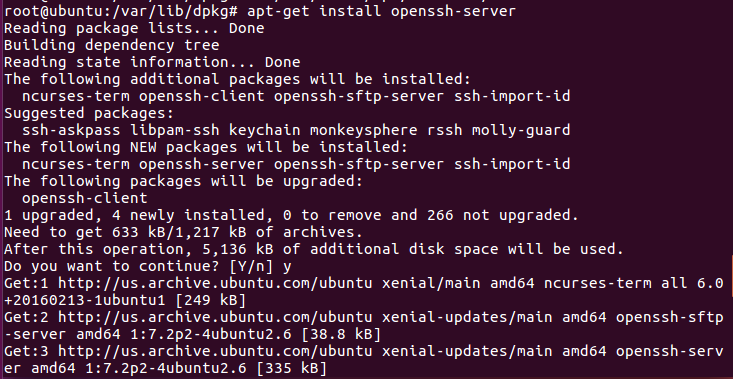
 ![5](https://yqfile.alicdn.com/19cc839e3c8d33c35ac811b3ae650a986219b469.png)

安装好后,执行/etc/init.d/ssh resart启动ssh,之后就可以连接
如果遇上以下报错:

E: Could not get lock /var/lib/dpkg/lock - open (11: Resource temporarily unavailable)

E: Unable to lock the administration directory (/var/lib/dpkg/), is another process using it?
虚拟机安装ubuntu之后无法使用ssh连接

则删除以下文件:

rm /var/lib/dpkg/lock

rm /var/lib/apt/lists/lock
rm /var/cache/apt/archives/lock

相关文章:

  • 2021-07-22
  • 2022-02-15
  • 2022-02-07
  • 2021-12-29
  • 2021-08-14
  • 2021-07-24
  • 2021-08-14
  • 2021-04-04
猜你喜欢
  • 2021-12-13
  • 2021-06-16
  • 2021-12-05
  • 2021-11-28
  • 2021-05-21
  • 2021-07-06
  • 2021-05-22
相关资源
相似解决方案