Linux系统中
mkdir命令用来创建指定名称的目录。全称是mkdir - make directories。
rmdir命令用来删除空目录。
mkdir
命令格式:
mkdir [OPTION]... DIRECTORY...
参数:
-m, --mode=MODE set file mode (as in chmod), not a=rwx - umask
配置文件夹的权限。
-p, --parents no error if existing, make parent directories as needed
帮助你直接将所需要的目录(包含上层目录)递归创建起来。
-v, --verbose print a message for each created directory
输出信息
rmdir
命令格式
rmdir [OPTION]... DIRECTORY...
参数
-p, --parents remove DIRECTORY and its ancestors; e.g., 'rmdir -p a/b/c' is similar to
'rmdir a/b/c a/b a'
命令示例:
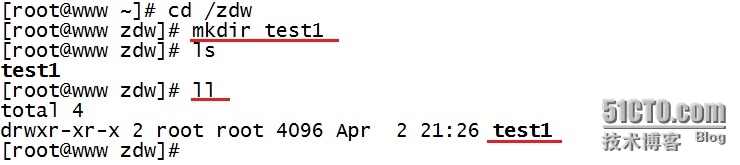
1.示例:创建一个空目录
|
1
2
3
4
5
6
7
|
[[email protected] ~]# cd /zdw
[[email protected] zdw]# mkdir test1 创建名为test1的新目录
[[email protected] zdw]# ls
test1[[email protected] zdw]# ll
total 4drwxr-xr-x 2 root root 4096 Apr 2 21:26 test1 |
2.示例:递归创建多个目录
|
1
2
3
4
5
6
7
8
9
10
11
12
13
14
|
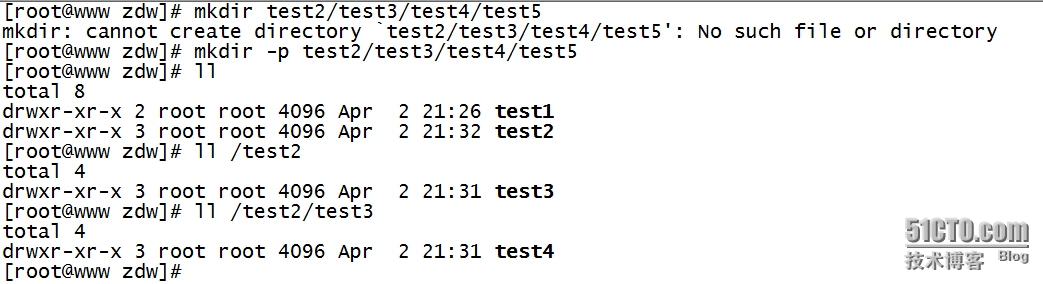
[[email protected] zdw]# mkdir test2/test3/test4/test5
mkdir: cannot create directory `test2/test3/test4/test5': No such file or directory
上面的提示可以看出无法直接创建此目录[[email protected] zdw]# mkdir -p test2/test3/test4/test5 加入-p的参数,可自行创建多层目录
[[email protected] zdw]# ll 验证
total 8drwxr-xr-x 2 root root 4096 Apr 2 21:26 test1drwxr-xr-x 3 root root 4096 Apr 2 21:32 test2[[email protected] zdw]# ll /test2 test2下有test3
total 4drwxr-xr-x 3 root root 4096 Apr 2 21:31 test3[[email protected] zdw]# ll /test2/test3 test3下有test4
total 4drwxr-xr-x 3 root root 4096 Apr 2 21:31 test4 |
3.示例:在一个目录下创建多个目录
|
1
2
3
4
5
6
|
[[email protected] ~]# mkdir /home/zdw/{1,2,3} -p
[[email protected] ~]# tree /home/zdw/
/home/zdw/├── 1├── 2└── 3 |
4.示例:创建目录时显示信息
|
1
2
3
4
|
drwxr-xr-x 3 root root 4096 Apr 2 21:31 test4[[email protected] zdw]# mkdir -vp t/t1 加入-v参数,可显示信息
mkdir: created directory `t'
mkdir: created directory `t/t1'
|

5.示例:创建权限为rwx--x--x的目录
|
1
2
3
4
5
6
7
|
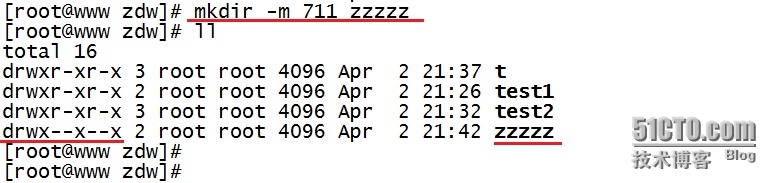
[[email protected] zdw]# mkdir -m 711 zzzzz 加入-m参数,设置权限,rwx分别对应421
[[email protected] zdw]# ll
total 16drwxr-xr-x 3 root root 4096 Apr 2 21:37 tdrwxr-xr-x 2 root root 4096 Apr 2 21:26 test1drwxr-xr-x 3 root root 4096 Apr 2 21:32 test2drwx--x--x 2 root root 4096 Apr 2 21:42 zzzzz 已看到权限为711的zzzzz目录 |
6.示例:删除空目录
|
1
2
3
4
5
6
|
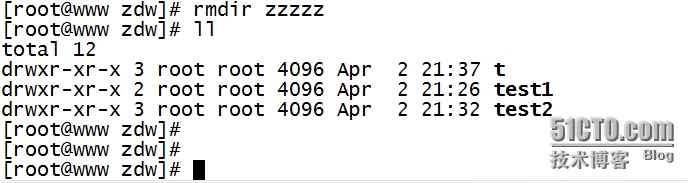
[[email protected] zdw]# rmdir zzzzz 使用rmdir,后面接目录名称
[[email protected] zdw]# ll
total 12drwxr-xr-x 3 root root 4096 Apr 2 21:37 tdrwxr-xr-x 2 root root 4096 Apr 2 21:26 test1drwxr-xr-x 3 root root 4096 Apr 2 21:32 test2 |
7.示例:删除test2/test3/test4/test5目录
|
1
2
3
4
5
|
[[email protected] zdw]# rmdir -p test2/test3/test4/test5 加入-p参数,连同上层空目录也一起删除
[[email protected] zdw]# ll
total 8drwxr-xr-x 3 root root 4096 Apr 2 21:37 tdrwxr-xr-x 2 root root 4096 Apr 2 21:26 test1 |

注:rmdir只能删除空目录,就是被删除的目录里面不能存在其它的目录或文件夹。如果要将所有目录下的东西都删除掉,就必须使用“rm -r test”。
本文转自cix123 51CTO博客,原文链接:http://blog.51cto.com/zhaodongwei/1759636,如需转载请自行联系原作者