需求:想把netstat-an吐出来的数据统计一下,看看本地连外地有多少个,外地连本地有多少个。协议分类什么的。
注意:因为netstat是cmd的命令,尽管在PowerShell下可以运行这个命令,但是吐出来的数据是没办法在加工的,它不是PowerShell原生命令。所以解决方法是把数据吐到一个csv文件中,然后针对CSV进行加工,最后得到需要的统计信息。
首先来一个中文版的,经过测试,需要PowerShell3.0以上,也就是Windows Server 2012以上的版本(windows8以上也可以)。
|
1
2
3
4
5
6
7
8
9
10
11
12
13
14
15
16
17
18
19
20
21
22
23
24
25
26
27
28
29
30
31
32
33
34
35
36
37
38
39
40
41
42
43
44
45
46
47
48
49
50
51
52
|
#Powered By kukisama http://jiushu.blog.51cto.com/netstat -an |Out-File -Encoding utf8 D:\3456.csv
$files = (Get-Childitem d:\3456.csv).pspath
$content = get-content $files
clear-content $files
add-Content $files -Value "协议,本地IP地址,端口,对端IP地址,对端端口,状态"
foreach ($line in $content -ne "活动连接" -ne " 协议 本地地址 外部地址 状态")
{
$liner = $line.Replace("[::1]","本地");
$line = $liner
$liner = $line.Replace("[::]","本地");
$line = $liner
$line = $liner -replace("\s{1,}" ,",")
$liner = $line
$line = $liner -replace(":{1,}" ," ")
$liner = $line
$liner = $line.Replace(",TCP","TCP")
$line = $liner
$liner = $line.Replace(",UDP","UDP")
$line = $liner
$line = $liner -replace("\s{1,}" ,",")
$liner = $line
$liner = $line.Replace("127.0.0.1","本地")
$line = $liner
$liner = $line.Replace("0.0.0.0","本地")
$line = $liner
$liner = $line.Replace("LISTENING","监听")
$line = $liner
$liner = $line.Replace("ESTABLISHED","等待")
$line = $liner
$liner = $line.Replace("TIME_WAIT","已建立连接")
$line = $liner
$liner = $line.Replace("CLOSE_WAIT","关闭等待")
$line = $liner
$liner = $line.Replace("SYN_SENT","同步发送")
add-Content $files -Value $liner -Encoding Default
}
$bb = Import-Csv -Path d:/3456.csv -Encoding Default
echo "====================================="
echo "以下为协议计数"
$bb| Group-Object –Property:协议|select Name,Count|sort -Property count
echo "====================================="
echo "以下为您本地IP连接外端地址的统计数据"
$bb| Group-Object –Property:本地IP地址|select Name,Count|sort -Property count
echo "====================================="
echo "以下为外端地址连接您本地IP的统计数据"
$bb| Group-Object –Property:对端IP地址|select Name,Count|sort -Property count
echo "====================================="
echo "以下为状态计数"
$bb| Group-Object –Property:状态|select Name,Count|sort -Property count
|
再来一个英文版的,因为在PowerShell2.0 也就是Windows Server 2008 R2中,是没有-Encoding Default参数的,所以要删了它,改成全英文的描述和说明。所以用中文装逼是失败的了。因此建议大家也尽量升级PowerShell到4.0(Windows Server 2008 R2是可以升级PowerShell的)
这里要说明一下的是,该文档只适合中文和英文系统,其他语种你需要修改第7行,增加更多-ne的属性。
|
1
2
3
4
5
6
7
8
9
10
11
12
13
14
15
16
17
18
19
20
21
22
23
24
25
26
27
28
29
30
31
32
33
34
35
36
37
38
39
40
41
42
43
44
45
46
47
48
49
50
51
52
|
#Powered By kukisama http://jiushu.blog.51cto.com/netstat -an |Out-File D:\3456.csv
$files = (Get-Childitem d:\3456.csv).pspath
$content = get-content $files
clear-content $files
add-Content $files -Value "proto,localAddress,duankou,duiduanip,duiduanduanou,zhuangtai"
foreach ($line in $content -ne "active connections" -ne " proto local address foreign address state" -ne "活动连接" -ne " 协议 本地地址 外部地址 状态")
{
$liner = $line.Replace("[::1]","local");
$line = $liner
$liner = $line.Replace("[::]","local");
$line = $liner
$line = $liner -replace("\s{1,}" ,",")
$liner = $line
$line = $liner -replace(":{1,}" ," ")
$liner = $line
$liner = $line.Replace(",TCP","TCP")
$line = $liner
$liner = $line.Replace(",UDP","UDP")
$line = $liner
$line = $liner -replace("\s{1,}" ,",")
$liner = $line
$liner = $line.Replace("127.0.0.1","local")
$line = $liner
$liner = $line.Replace("0.0.0.0","local")
$line = $liner
<# $liner = $line.Replace("LISTENING","监听")
$line = $liner
$liner = $line.Replace("ESTABLISHED","等待")
$line = $liner
$liner = $line.Replace("TIME_WAIT","已建立连接")
$line = $liner
$liner = $line.Replace("CLOSE_WAIT","关闭等待")
$line = $liner
$liner = $line.Replace("SYN_SENT","同步发送")#>
add-Content $files -Value $liner }
$files$bb = Import-Csv -Path d:\3456.csv
echo "====================================="
echo "以下为协议计数"
$bb| Group-Object –Property:proto|select Name,Count|sort -Property count
echo "====================================="
echo "以下为您本地IP连接外端地址的统计数据"
$bb| Group-Object –Property:localAddress|select Name,Count|sort -Property count
echo "====================================="
echo "以下为外端地址连接您本地IP的统计数据"
$bb| Group-Object –Property:duiduanip|select Name,Count|sort -Property count
echo "====================================="
echo "以下为状态计数"
$bb| Group-Object –Property:zhuangtai|select Name,Count|sort -Property count
|
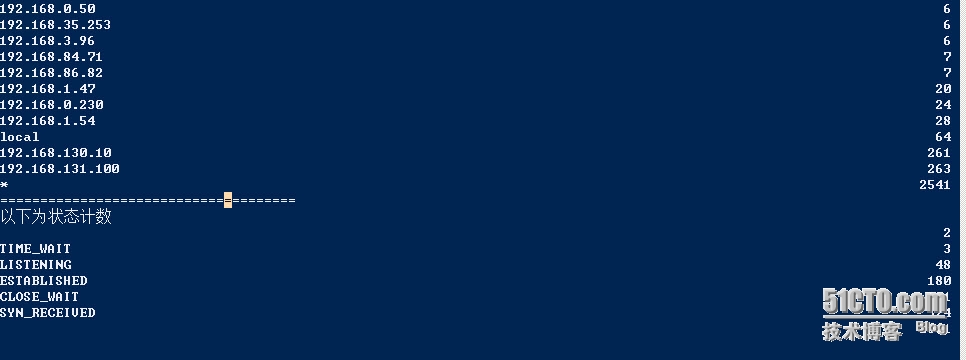
输出结果如下
本文转自 九叔 51CTO博客,原文链接:http://blog.51cto.com/jiushu/1663669,如需转载请自行联系原作者