一、keepalived简介
keepalived是高可用集群的解决方案之一,相比于heartbeat,corosync来说是较为轻量级的。keeoalived是vrrp协议在linux主机上以守护进程方式实现,其优点是能够根据配置文件自动生成ipvs规则,同时相比于LVS,多出了健康状态检测的功能,这是LVS不具备的。
keepalived官方架构图如下:
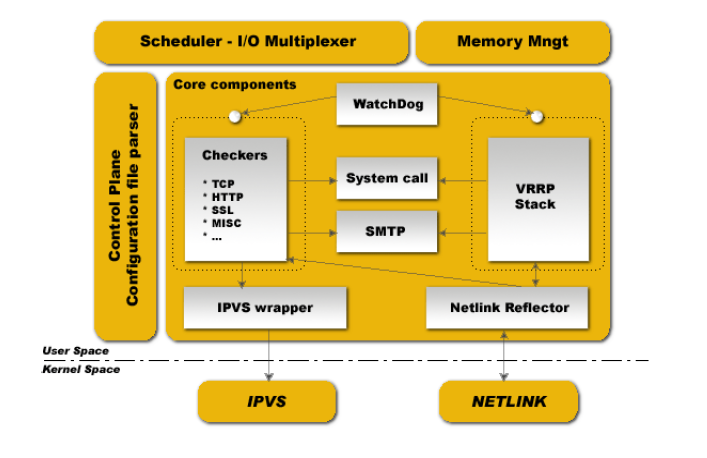
(引自keepalived官方文档:http://keepalived.org/)
Scheduler:调度器
memory mngt:内存空间管理
control plane configuretion file parser:配置文件的主控器,类似于Nginx的master进程
VRRP Stack:vrrp功能的实现
Checkers:健康状态检测
WatchDog:监控VRRP进程,并进行守护
二、keepalived配置
1、集群配置前准备
Nginx:192.168.0.104
node1:192.168.0.40
|
1
2
3
4
5
6
7
8
9
10
11
12
13
14
15
16
17
18
19
20
21
22
23
24
25
26
27
28
29
30
31
32
33
34
35
36
37
38
39
40
41
42
43
44
45
46
47
48
49
50
51
52
53
54
55
56
57
58
59
60
61
62
63
64
65
66
67
68
69
70
71
72
|
1、本机的主机名与hosts中定义的主机保持一致,要与hostname(uname -n)获得的名称保持一致
vim /etc/hosts 192.168.0.104 Nginx192.168.0.40 node12、各节点时间同步[[email protected] ~]# yum install ntp
[[email protected] ~]# vim /etc/ntp.conf
将下面的语句restrict default kod nomodify notrap nopeer noquery修改为restrict default nomodify restrict 192.168.0.0 mask 255.255.255.0 nomodify[[email protected] ~]# service ntpd start
[[email protected] ~]# ntpdate 192.168.0.40
10 Feb 14:14:50 ntpdate[2214]: adjust time server 192.168.0.40 offset 0.032422 sec
[[email protected] ~]# date; ssh 192.168.0.40 'date'
2017年 02月 10日 星期五 14:16:21 CST[email protected]'s password: 2017年 02月 10日 星期五 14:16:24 CST3、各节点之间**认证 1.生成**对
Generating public/private rsa key pair.
Enter file in which to save the key (/root/.ssh/id_rsa):
Enter passphrase (empty for no passphrase):
Enter same passphrase again: Your identification has been saved in /root/.ssh/id_rsa.
Your public key has been saved in /root/.ssh/id_rsa.pub.
The key fingerprint is:0b:ca:be:1f:0f:b3:3a:aa:cc:c8:76:2c:76:25:59:fd [email protected]The key's randomart image is:+--[ RSA 2048]----+| || || . || . . || o . S || + o . E || . = + . ||=+ =. * ||===.+=o . |+-----------------+ 2.将**传输至各节点
[email protected]'s password: .ssh/authorized_keys
to make sure we haven't added extra keys that you weren't expecting.
3.测试[[email protected] ~]# date; ssh 192.168.0.40 'date'
2017年 02月 10日 星期五 14:24:45 CST2017年 02月 10日 星期五 14:24:46 CST4.iptables与selinux规则放行或禁用[[email protected] ~]# getenforce
Disabled[[email protected] ~]# service iptables stop
5.各节点均进行上述操作[[email protected] ~]# ssh-****** -t rsa
[[email protected] ~]# ssh-copy-id -i .ssh/id_rsa.pub [email protected]
[[email protected] ~]# date; ssh 192.168.0.104 'date'
Fri Feb 10 14:27:02 CST 2017Fri Feb 10 14:27:02 CST 2017 |
2、keepalived集群配置
1.各节点安装keepalived,yum安装(keepalived被官方收录到base源中)
|
1
2
|
[[email protected] ~]# yum install keepalived -y
[[email protected] ~]# yum install keepalived -y
|
2.配置文件
Nginx配置
|
1
2
3
4
5
6
7
8
9
10
11
12
13
14
15
16
17
18
19
20
21
22
23
24
25
26
27
|
[[email protected] ~]# cd /etc/keepalived/
[[email protected] keepalived]# cp keepalived.conf{,.bak}
[[email protected] keepalived]# grep -Ev '#|^$' keepalived.conf
! Configuration File for keepalived
global_defs { notification_email {
}
smtp_server 127.0.0.1 #mail服务器
smtp_connect_timeout 30
router_id Nginx
}vrrp_instance VI_1 { state MASTER #vrrp工作模式master或backup
interface eth0 #vip配置接口
virtual_router_id 51 #同一虚拟路由id一致
priority 100 #优先级
advert_int 1 #发送心跳信息的时间
authentication {
auth_type PASS #字符串认证
auth_pass 51ea2a78
}
virtual_ipaddress {
192.168.0.80/24 label eth0:0 #vip
}
} |
将配置文件复制到别的节点,并修改配置文件
|
1
2
3
4
5
6
|
[[email protected] keepalived]# scp keepalived.conf node1:/etc/keepalived/
The authenticity of host 'node1 (192.168.0.40)' can't be established.
RSA key fingerprint is 46:dc:2d:3c:90:45:80:f4:21:40:03:2c:5b:ca:f0:77.
Are you sure you want to continue connecting (yes/no)? yes
Warning: Permanently added 'node1' (RSA) to the list of known hosts.
keepalived.conf 100% 3606 3.5KB/s 00:00
|
node1配置
|
1
2
3
4
5
6
7
8
9
10
11
12
13
14
15
16
17
18
19
20
21
22
23
24
25
26
|
[[email protected] keepalived]# cp keepalived.conf{,.bak}
[[email protected] keepalived]# egrep -v '#|^$' keepalived.conf
! Configuration File for keepalived
global_defs { notification_email {
}
notification_email_from [email protected]
smtp_server 127.0.0.1
smtp_connect_timeout 30
router_id node1
}vrrp_instance VI_1 { state BACKUP
interface eth0
virtual_router_id 51
priority 90
advert_int 1
authentication {
auth_type PASS
auth_pass 51ea2a78
}
virtual_ipaddress {
192.168.0.80/24 label eth0:0
}
} |
3.启动日志(各节点一同修改)
|
1
2
3
4
5
6
|
[[email protected] keepalived]# vim /etc/sysconfig/keepalived
KEEPALIVED_OPTIONS="-D -S 3"
[[email protected] keepalived]# vim /etc/rsyslog.conf
local7.* /var/log/boot.log
local3.* /var/log/keepalived.log
[[email protected] keepalived]# service rsyslog restart
|
4.启动服务并测试
|
1
2
3
4
5
6
7
8
9
10
11
|
[[email protected] keepalived]# service keepalived start; ssh node1 'service keepalived start'
[[email protected] keepalived]# ifconfig eth0:0
eth0:0 Link encap:Ethernet HWaddr 00:0C:29:8E:59:EC inet addr:192.168.0.80 Bcast:0.0.0.0 Mask:255.255.255.0
UP BROADCAST RUNNING MULTICAST MTU:1500 Metric:1
Interrupt:19 Base address:0x2000
[[email protected] keepalived]# ps -ef | grep keepalived
root 2532 1 0 19:49 ? 00:00:00 /usr/sbin/keepalived -D
root 2533 2532 0 19:49 ? 00:00:00 /usr/sbin/keepalived -D
root 2535 2532 0 19:49 ? 00:00:00 /usr/sbin/keepalived -D
root 2543 1996 0 19:53 pts/0 00:00:00 grep keepalived
|
三、手动调度
1、配置vrrp脚本并调用(各节点)
|
1
2
3
4
5
6
7
8
9
10
11
12
13
14
15
16
17
18
19
20
21
22
23
24
25
26
27
28
29
30
31
32
33
34
35
36
|
[[email protected] keepalived]# !gre
grep -Ev '#|^$' keepalived.conf
! Configuration File for keepalived
global_defs { notification_email {
}
notification_email_from [email protected]
smtp_server 127.0.0.1
smtp_connect_timeout 30
router_id Nginx
}#vrrp脚本,检查该目录下是否有down文件,有则权重减2,无则不进行操作vrrp_script chk_maintance { script "[[ -f /etc/keepalived/down ]] && exit 1 || exit 0"
interval 1
weight -2
}vrrp_instance VI_1 { state MASTER
interface eth0
virtual_router_id 51
priority 100
advert_int 1
authentication {
auth_type PASS
auth_pass 51ea2a78
}
virtual_ipaddress {
192.168.0.80/24 label eth0:0
}
#调用脚本
track_script {
chk_maintance
}
} |
2、测试
|
1
2
3
4
5
6
7
8
9
10
11
12
13
14
15
16
|
[[email protected] keepalived]# touch /etc/keepalived/down
[[email protected] keepalived]# ip add | grep eth0
2: eth0: <BROADCAST,MULTICAST,UP,LOWER_UP> mtu 1500 qdisc pfifo_fast state UP qlen 1000 inet 192.168.0.104/24 brd 192.168.0.255 scope global eth0
[[email protected] keepalived]# ip addr | grep eth0
2: eth0: <BROADCAST,MULTICAST,UP,LOWER_UP> mtu 1500 qdisc pfifo_fast state UP qlen 1000 inet 192.168.0.40/24 brd 192.168.0.255 scope global eth0
inet 192.168.0.80/24 scope global secondary eth0:0
[[email protected] keepalived]# rm down
rm:是否删除普通空文件 "down"?y
[[email protected] keepalived]# ip add | grep eth0
2: eth0: <BROADCAST,MULTICAST,UP,LOWER_UP> mtu 1500 qdisc pfifo_fast state UP qlen 1000 inet 192.168.0.104/24 brd 192.168.0.255 scope global eth0
inet 192.168.0.80/24 scope global secondary eth0:0
|
本文转自 元婴期 51CTO博客,原文链接:http://blog.51cto.com/jiayimeng/1896332