|
1
2
3
4
5
6
7
8
9
10
11
12
13
|
我的博客已迁移到xdoujiang.com请去那边和我交流一、基础环境1、关闭selinux服务 sed -i 's/SELINUX=.*/SELINUX=disabled/' /etc/selinux/config
setenforce 02、关闭iptables服务chkconfig iptables offiptables -F/etc/init.d/iptables save
/etc/init.d/iptables stop
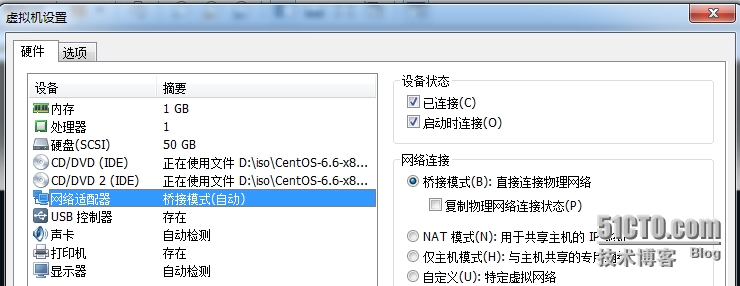
3、serverA桥接模式 |
|
1
|
4、服务端serverA=192.168.1.120(我这里只使用了eth0网络接口) |

|
1
2
3
4
5
6
7
8
9
10
11
12
13
14
15
16
17
18
19
20
21
22
23
24
25
26
27
28
29
30
31
32
33
34
35
36
37
38
39
40
41
42
43
44
45
46
47
48
49
50
51
52
53
54
55
56
57
58
59
60
61
62
63
64
65
66
67
68
69
70
71
72
73
74
75
76
77
78
79
80
81
82
83
84
85
86
87
88
89
90
91
92
93
94
95
96
97
98
99
100
101
102
103
104
105
106
107
108
109
110
111
112
113
114
115
116
117
118
119
120
121
122
123
124
125
126
127
128
129
130
131
132
133
134
135
136
137
138
139
140
141
142
143
144
145
146
147
148
149
150
151
152
153
154
155
156
157
158
159
160
161
162
163
164
165
166
167
168
169
170
171
172
173
174
175
176
177
178
179
180
181
182
183
184
185
186
187
188
189
190
191
192
193
194
195
196
197
198
199
200
201
202
203
204
205
206
207
208
209
210
211
212
213
214
215
216
217
218
219
220
221
222
223
224
225
226
227
228
229
230
231
232
233
234
235
236
237
238
239
240
241
242
243
244
245
246
247
248
249
250
251
252
253
254
255
256
257
258
259
260
261
262
263
264
265
266
267
268
269
270
271
272
273
274
275
276
277
278
279
280
281
282
283
284
285
286
287
288
289
290
291
292
293
|
5、之前已经下载好了2张dvdCentOS-6.6-x86_64-bin-DVD1.iso和CentOS-6.6-x86_64-bin-DVD2.iso二、安装cobbler(serverA)1、安装所需要的包yum -y install cobbler debmirror pykickstart openssl fence-agents dnsmasq syslinux
2、先看下cobbler命令有哪些cobblerusage=====cobbler <distro|profile|system|repo|image|mgmtclass|package|file> ...
[add|edit|copy|getks*|list|remove|rename|report] [options|--help]
cobbler <aclsetup|buildiso|import|list|replicate|report|reposync|sync|validateks|version|signature|get-loaders|hardlink> [options|--help]
3、cobbler check(检查配置)The following are potential configuration items that you may want to fix:1)The 'server' field in /etc/cobbler/settings must be set to something other than localhost, or kickstarting features will not work.
This should be a resolvable hostname or IP for the boot server as reachable by all machines that will use it.
2)For PXE to be functional, the 'next_server' field in /etc/cobbler/settings must be set to something other than 127.0.0.1,
and should match the IP of the boot server on the PXE network.3)SELinux is enabled. Please review the following wiki page for details on ensuring cobbler works correctly in your SELinux environment:
https://github.com/cobbler/cobbler/wiki/Selinux
4)some network boot-loaders are missing from /var/lib/cobbler/loaders, you may run 'cobbler get-loaders' to download them, or,
if you only want to handle x86/x86_64 netbooting, you may ensure that you have installed a *recent* version of the syslinux
package installed and can ignore this message entirely. Files in this directory, should you want to support all architectures,
should include pxelinux.0, menu.c32, elilo.efi, and yaboot. The 'cobbler get-loaders' command is the easiest way to resolve these requirements.
5)change 'disable' to 'no' in /etc/xinetd.d/rsync
6)comment out 'dists' on /etc/debmirror.conf for proper debian support
7)comment out 'arches' on /etc/debmirror.conf for proper debian support
8)The default password used by the sample templates for newly installed machines (default_password_crypted in /etc/cobbler/settings) is still set to 'cobbler' and should be changed, try: "openssl passwd -1 -salt 'random-phrase-here' 'your-password-here'" to generate new one
Restart cobblerd and then run 'cobbler sync' to apply changes.
4、下载客户端启动文件cd /var/lib/cobbler/loaders
cat filelist.txt
http://dgoodwin.fedorapeople.org/loaders/README
http://dgoodwin.fedorapeople.org/loaders/COPYING.elilo
http://dgoodwin.fedorapeople.org/loaders/COPYING.yaboot
http://dgoodwin.fedorapeople.org/loaders/COPYING.syslinux
http://dgoodwin.fedorapeople.org/loaders/elilo-3.8-ia64.efi
http://dgoodwin.fedorapeople.org/loaders/yaboot-1.3.14-12
http://dgoodwin.fedorapeople.org/loaders/pxelinux.0-3.61
http://dgoodwin.fedorapeople.org/loaders/menu.c32-3.61
http://dgoodwin.fedorapeople.org/loaders/grub-0.97-x86.efi
http://dgoodwin.fedorapeople.org/loaders/grub-0.97-x86_64.efi
wget -i filelist.txt5、修改/etc/cobbler/settings配置文件
1)先备份下配置cp /etc/cobbler/settings /etc/cobbler/settings.bak
2)生成密码openssl passwd -1 -salt 'root' 'redhat'
$1$root$M1uN9dLHipbORRwJW/xR3/
3)开始修改sed -i 's/^server:.*/server: 192.168.1.120/' /etc/cobbler/settings
sed -i 's/^next_server:.*/next_server: 192.168.1.120/' /etc/cobbler/settings
sed -i '/default_password_crypted/c\default_password_crypted:\ "$1$root$M1uN9dLHipbORRwJW/xR3/"' /etc/cobbler/settings
sed -i 's/^manage_dhcp:.*/manage_dhcp: 1/' /etc/cobbler/settings
sed -i 's/^manage_dns:.*/manage_dns: 1/' /etc/cobbler/settings
sed -i 's/^manage_tftpd:.*/manage_tftpd: 1/' /etc/cobbler/settings
sed -i 's/^restart_dhcp:.*/restart_dhcp: 1/' /etc/cobbler/settings
sed -i 's/^restart_dns:.*/restart_dns: 1/' /etc/cobbler/settings
sed -i 's/^pxe_just_once:.*/pxe_just_once: 1/' /etc/cobbler/settings
6、修改/etc/xinetd.d/rsync配置文件
1)先备份下配置cp /etc/xinetd.d/rsync /etc/xinetd.d/rsync.bak
2)开始修改sed -i '/disable/s/yes/no/g' /etc/xinetd.d/rsync
7、修改/etc/cobbler/modules.conf配置文件
1)先备份下配置cp /etc/cobbler/modules.conf /etc/cobbler/modules.conf.bak
2)开始修改diff /etc/cobbler/modules.conf /etc/cobbler/modules.conf.bak
56c56< module = manage_dnsmasq---> module = manage_bind69c69< module = manage_dnsmasq---> module = manage_isc8、修改/etc/cobbler/dnsmasq.template配置文件
1)先备份下配置cp /etc/cobbler/dnsmasq.template /etc/cobbler/dnsmasq.template.bak
2)开始修改diff /etc/cobbler/dnsmasq.template /etc/cobbler/dnsmasq.template.bak
11c11< dhcp-range=192.168.1.140,192.168.1.150---> dhcp-range=192.168.1.5,192.168.1.2009、修改kickstart配置文件1)进入目录cd /var/lib/cobbler/kickstarts
2)复制模板给centos6.6x86_64.cfgcp sample_end.ks centos6.6x86_64.cfg
3)修改默认的模板为centos模板cobbler profile edit --name=CentOS6.6-x86_64 --kickstart=/var/lib/cobbler/kickstarts/centos6.6x86_64.cfg
4)具体配置cat centos6.6x86_64.cfg
auth --useshadow --enablemd5bootloader --location=mbrclearpart --all --initlabeltextfirewall --disabledfirstboot --disablekeyboard uslang en_USurl --url=$tree$yum_repo_stanza$SNIPPET('network_config')
rebootrootpw --iscrypted $default_password_cryptedselinux --disabledskipxtimezone Asia/shanghai
installzerombrpart /boot --fstype=ext4 --size=200
part swap --fstype=swap --size=2048part / --fstype=ext4 --size=10000part /opt --fstype=ext4 --grow --size=1
%pre$SNIPPET('log_ks_pre')
$SNIPPET('kickstart_start')
$SNIPPET('pre_install_network_config')
$SNIPPET('pre_anamon')
%end%packages --nobasewgetvimopenssh-server$SNIPPET('func_install_if_enabled')
%end%post --nochroot$SNIPPET('log_ks_post_nochroot')
%end%post$SNIPPET('log_ks_post')
$yum_config_stanza$SNIPPET('post_install_kernel_options')
$SNIPPET('post_install_network_config')
$SNIPPET('func_register_if_enabled')
$SNIPPET('download_config_files')
$SNIPPET('koan_environment')
$SNIPPET('redhat_register')
$SNIPPET('cobbler_register')
$SNIPPET('post_anamon')
$SNIPPET('kickstart_done')
%end10、挂载并导入dvd iso1)挂载第1张dvdmount -o loop /opt/CentOS-6.6-x86_64-bin-DVD1.iso /mnt
cobbler import --arch=x86_64 --path=/mnt --name=centos6.6
umount /mnt
2)挂载第2张dvdmount -o loop /opt/CentOS-6.6-x86_64-bin-DVD2.iso /mnt
cp -rf /mnt/Packages/ /var/www/cobbler/ks_mirror/centos6.6-x86_64/
umount /mnt
11、创建索引1)进入目录cd /var/www/cobbler/ks_mirror/centos6.6-x86_64/
2)createrepo创建索引createrepo -g repodata/9e2ddcc42b44eb150ebc61dde29c997318d8330b92205b3dbb3a87bcc06d10be-c6-x86_64-comps.xml .
Spawning worker 0 with 6518 pkgsWorkers FinishedGathering worker resultsSaving Primary metadataSaving file lists metadata
Saving other metadataGenerating sqlite DBsSqlite DBs complete12、设置开机启动chkconfig httpd on chkconfig cobblerd onchkconfig dnsmasq on13、启动服务/etc/init.d/cobblerd restart
/etc/init.d/dnsmasq restart
service xinetd restart/etc/init.d/httpd restart
14、同步cobbler sync
15、查看端口是否都开放了(53 67 69 80 873)netstat -tupnl
Active Internet connections (only servers)Proto Recv-Q Send-Q Local Address Foreign Address State PID/Program name
tcp 0 0 0.0.0.0:53 0.0.0.0:* LISTEN 1002/dnsmasq tcp 0 0 0.0.0.0:22 0.0.0.0:* LISTEN 1017/sshd tcp 0 0 127.0.0.1:25151 0.0.0.0:* LISTEN 1077/python2 tcp 0 0 :::53 :::* LISTEN 1002/dnsmasq tcp 0 0 :::22 :::* LISTEN 1017/sshd tcp 0 0 :::873 :::* LISTEN 1026/xinetd tcp 0 0 :::80 :::* LISTEN 1044/httpd udp 0 0 0.0.0.0:53 0.0.0.0:* 1002/dnsmasq udp 0 0 0.0.0.0:67 0.0.0.0:* 1002/dnsmasq udp 0 0 0.0.0.0:69 0.0.0.0:* 1026/xinetd udp 0 0 :::53 :::* 1002/dnsmasq 16、通过命令cobbler setting report来查看下之前修改的配置内容cobbler setting report17、查看cobbler listdistros: centos6.6-x86_64
profiles: CentOS6.6-x86_64
systems:repos:images:mgmtclasses:packages:files:18、查看导入的发行版系统信息cobbler distro reportcobbler distro reportName : centos6.6-x86_64Architecture : x86_64TFTP Boot Files : {}Breed : redhatComment : Fetchable Files : {}Initrd : /var/www/cobbler/ks_mirror/centos6.6-x86_64/images/pxeboot/initrd.img
Kernel : /var/www/cobbler/ks_mirror/centos6.6-x86_64/images/pxeboot/vmlinuz
Kernel Options : {}Kernel Options (Post Install) : {}Management Classes : []OS Version : rhel6Owners : ['admin']
Red Hat Management Key : inheritRed Hat Management Server : inheritTemplate Files : {}19、查看配置信息cobbler profile reportcobbler profile reportName : centos6.6-x86_64TFTP Boot Files : {}Comment : DHCP Tag : defaultDistribution : centos6.6-x86_64Enable gPXE? : 0Enable PXE Menu? : 1Fetchable Files : {}Kernel Options : {}Kernel Options (Post Install) : {}Kickstart : /var/lib/cobbler/kickstarts/centos6.6x86_64.cfg
Kickstart Metadata : {}Management Classes : []Management Parameters : inheritName Servers : []Name Servers Search Path : []Owners : ['admin']
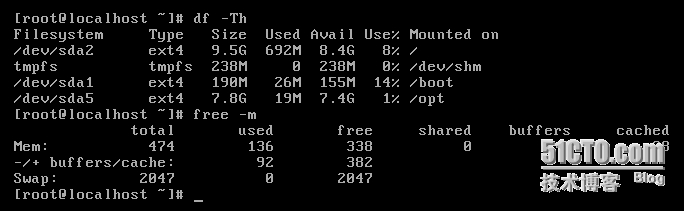
Parent Profile : Proxy : Red Hat Management Key : inheritRed Hat Management Server : inheritRepos : []Server Override : inheritTemplate Files : {}Virt Auto Boot : 1Virt Bridge : xenbr0Virt CPUs : 1Virt Disk Driver Type : rawVirt File Size(GB) : 5Virt Path : Virt RAM (MB) : 512Virt Type : kvm20、查看状态查看正在安装cobbler statusip |target |start |state 192.168.1.148 |profile:CentOS6.6-x86_64|Sun Jul 5 20:50:36 2015|installing (6m 4s) 查看已经安装完成cobbler statusip |target |start |state 192.168.1.148 |profile:CentOS6.6-x86_64|Sun Jul 5 20:50:36 2015|finished 21、查看安装好后的信息 |

|
1
2
|
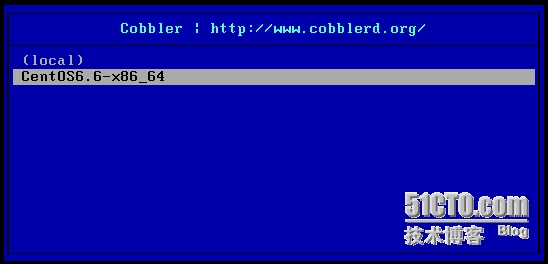
三、客户端也是配置的桥接模式,客户端安装的时候按F12网络引导就OK了,选择相应需要安装的发行版本,回车后就一路安装了. |

本文转自 xdoujiang 51CTO博客,原文链接:http://blog.51cto.com/7938217/1671122,如需转载请自行联系原作者