一、简介
软件负载均衡一般通过两种方式来实现:基于操作系统的软负载实现和基于第三方应用的软负载实现。
LVS 就是基于 Linux 操作系统实现的一种软负载,HAProxy就是开源的并且基于第三应用实现的软负载。HAProxy 相比 LVS 的使用要简单很多,功能方面也很丰富。当前,HAProxy 支持两种主要的代理模式:"tcp"即 4 层(大多用于邮件服务器、内部协议通信服务器等)和 7 层(HTTP)在 4 层模式下, HAproxy仅在客户端和服务器之间转发双向流量。 7 层模式下, HAProxy 会分析协议,并且能通过允许、拒绝、交换、增加、修改或者删除请求(request)或者回应(response)里指定内容来控制协议,这种操作要基于特定规则。
详情可以HAProxy 官方网站(http://haproxy.1wt.eu)可以下载配置说明文档(configuration.txt)和架构文件(architecture.txt)作为参考。
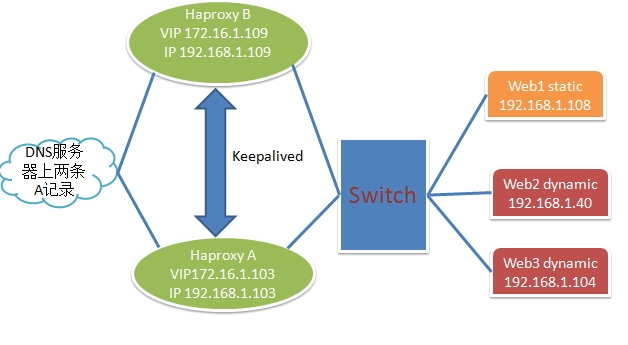
二、拓扑图
三、 配置过程
注:
OS:Centos 6.5x86_64
己经安装的包组 :
|
1
|
#yum groupinstall -y "Development tools" "Server Platform Development"
|
前提:
HAproxy A与B要做到
主机名解析
时间同步
无**登录
1、HAproxy A配置
-
安装keepalived、haproxy
|
1
|
#yum install -y keepalived haproxy |
配置keepalived
-
编辑/etc/keepalived/keepalived.conf
-
12345678910111213141516171819202122232425262728293031323334353637383940414243444546474849505152535455565758596061626364
! Configuration Fileforkeepalivedglobal_defs {notification_email {}notification_email_from [email protected]smtp_connect_timeout 3smtp_server 127.0.0.1router_id LVS_DEVEL}vrrp_script chk_haproxy {script"killall -0 haproxy"interval 1weight 2}vrrp_instance VI_1 {interface eth0state MASTERpriority 201virtual_router_id 109garp_master_delay 1authentication {auth_type PASSauth_pass password}track_interface {eth0}virtual_ipaddress {172.16.1.103/16dev eth0 label eth0:0}track_script {chk_haproxy}notify_master"/etc/keepalived/notify.sh master"notify_backup"/etc/keepalived/notify.sh backup"notify_fault"/etc/keepalived/notify.sh fault"}vrrp_instance VI_2 {interface eth0state BACKUPpriority 99virtual_router_id 52garp_master_delay 1authentication {auth_type PASSauth_pass password}track_interface {eth0}virtual_ipaddress {172.16.1.109/16dev eth0 label eth0:1}track_script {chk_haproxy}}通知脚本
|
1
2
3
4
5
6
7
8
9
10
11
12
13
14
15
16
17
18
19
20
21
22
23
24
25
26
27
28
29
30
31
32
|
#!/bin/bash# description: An example of notify script#vip=172.16.1.103contact='[email protected]'
notify() { mailsubject="`hostname` to be $1: $vip floating"
mailbody="`date '+%F\ %T'`: vrrp transition, `hostname` changed to be $1"
echo $mailbody | mail -s "$mailsubject" $contact
}case "$1" in
master)
notify master
/etc/rc.d/init.d/haproxy start
exit 0
;;
backup)
notify backup
/etc/rc.d/init.d/haproxy stop
exit 0
;;
fault)
notify fault
/etc/rc.d/init.d/haproxy stop
exit 0
;;
*)
echo 'Usage: `basename $0` {master|backup|fault}'
exit 1
;;
esac#chmod +x /etc/keepalived/notify.sh |
配置haproxy
-
编辑配置文件 /etc/haproxy/haproxy.cfg
|
1
2
3
4
5
6
7
8
9
10
11
12
13
14
15
16
17
18
19
20
21
22
23
24
25
26
27
28
29
30
31
32
33
34
35
36
37
38
39
40
41
42
43
44
45
46
47
48
49
50
51
52
53
54
55
56
57
58
59
60
61
62
63
64
65
66
67
68
69
70
71
72
73
74
75
76
77
78
|
#---------------------------------------------------------------------# Example configuration for a possible web application. See the# full configuration options online.## http://haproxy.1wt.eu/download/1.4/doc/configuration.txt##---------------------------------------------------------------------#---------------------------------------------------------------------# Global settings#---------------------------------------------------------------------global #全局配置区域
log 127.0.0.1 local2 #日志将通过rsyslog进行归档记录
chroot /var/lib/haproxy #运行的安装路径
pidfile /var/run/haproxy.pid #pid文件存放的位置
maxconn 4000 #最大连接
user haproxy #运行haproxy的用户
group haproxy #运行haprixy的组
daemon #以后台模式运行haproxy
# turn on stats unix socket
stats socket /var/lib/haproxy/stats
#---------------------------------------------------------------------# common defaults that all the 'listen' and 'backend' sections will# use if not designated in their block#---------------------------------------------------------------------defaults mode http #工作模式
log global #记录日志
option httplog
option dontlognull #不记录健康检查的日志信息
option http-server-close #启用服务器端主动关闭
option forwardfor except 127.0.0.0/8 #传递客户端IP
option redispatch #当后端服务器组中的某一台主机故障后,能够自动将请求重定向到组内的其它主机
retries 3 #请求重试次数
timeout http-request 10s #http请求超时时间
timeout queue 1m #一个请求在队列里的超时时间
timeout connect 10s #连接服务器超时时间
timeout client 1m #客户端超时时间
timeout server 1m #客户端超时时间
timeout http-keep-alive 10s
timeout check 10s #心跳检测超时时间
maxconn 3000 #最大连接数
#---------------------------------------------------------------------# main frontend which proxys to the backends#---------------------------------------------------------------------frontend proxy *:80 acl url_static path_beg -i /static /images /javascript /stylesheets
acl url_static path_end -i .jpg .gif .png .css .js
use_backend static if url_static
default_backend dynamic
#---------------------------------------------------------------------# static backend for serving up images, stylesheets and such#---------------------------------------------------------------------backend static #后端调度
balance roundrobin #调度算法
server web2 192.168.1.108:80 inter 1500 rise 2 fall 3 check maxconn 5000
#----------------------------------------listen statistics mode http # http 7 层模式
bind *:8080 #监听地址
stats enable #启用状态监控
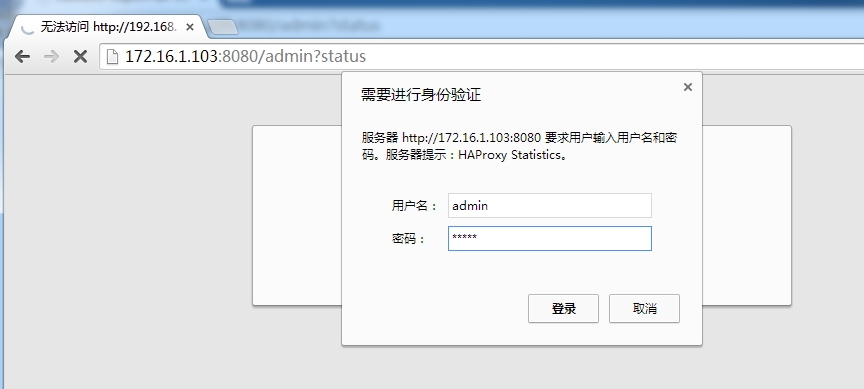
stats auth admin:essun #验证的用户与密码
stats uri /admin?status #访问路径
stats admin if TRUE #如果验证通过了就允许登录
stats refresh 6s #每6秒刷新一次
acl allow src 172.16.1.0/24 #允许的IP地址
tcp-request content accept if allow #如果允许的地址段就允许访问
tcp-request content reject #拒绝非法连接
#---------------------------------------------------------------------# round robin balancing between the various backends#---------------------------------------------------------------------backend dynamic balance roundrobin
server web2 192.168.1.40:80 check inter 1500 rise 2 fall 3 maxconn 5000
#服务器定义,serverid为web2,check inter 1500是检测心跳频率#rise 2是2次正确认为服务器可用#fall 3是3次失败认为服务器不可用#最大连接数据为5000server web3 192.168.1.104:80 check inter 1500 rise 2 fall 3 maxconn 5000 |
-
将此文件同时也复制到HAproxy B上一份
2、HAproxy B的配置
安装keepalived、haproxy
|
1
|
#yum install -y keepalived haproxy |
-
修改keepalived在配置文件(/etc/keepalived/keepalived.conf)
-
123456789101112131415161718192021222324252627282930313233343536373839404142434445464748495051525354555657585960616263646566
! Configuration Fileforkeepalivedglobal_defs {notification_email {}notification_email_from [email protected]smtp_connect_timeout 3smtp_server 127.0.0.1router_id LVS_DEVEL}vrrp_script chk_haproxy {script"killall -0 haproxy"interval 1weight 2}vrrp_instance VI_1 {interface eth0state BACKUPpriority 200virtual_router_id 109garp_master_delay 1authentication {auth_type PASSauth_pass password}track_interface {eth0}virtual_ipaddress {172.16.1.103/16dev eth0 label eth0:0}track_script {chk_haproxy}}vrrp_instance VI_2 {interface eth0state MASTERpriority 100virtual_router_id 52garp_master_delay 1authentication {auth_type PASSauth_pass password}track_interface {eth0}virtual_ipaddress {172.16.1.109/16dev eth0 label eth0:1}track_script {chk_haproxy}notify_master"/etc/keepalived/notify.sh master"notify_backup"/etc/keepalived/notify.sh backup"notify_fault"/etc/keepalived/notify.sh fault"}修改通知脚本
|
1
2
3
4
5
6
7
8
9
10
11
12
13
14
15
16
17
18
19
20
21
22
23
24
25
26
27
28
29
30
31
32
|
#!/bin/bash# description: An example of notify script#vip=172.16.1.109
contact='[email protected]'
notify() { mailsubject="`hostname` to be $1: $vip floating"
mailbody="`date '+%F\ %T'`: vrrp transition, `hostname` changed to be $1"
echo $mailbody | mail -s "$mailsubject" $contact
}case "$1" in
master)
notify master
/etc/rc.d/init.d/haproxy start
exit 0
;;
backup)
notify backup
/etc/rc.d/init.d/haproxy stop
exit 0
;;
fault)
notify fault
/etc/rc.d/init.d/haproxy stop
exit 0
;;
*)
echo 'Usage: `basename $0` {master|backup|fault}'
exit 1
;;
esac#chmod +x /etc/keepalived/notify.sh |
-
由于HAproxy A中的haporxy配置与HAporxy B 的配置文件相同从HAproxy A中发过来一份放在同一目录下即可
|
1
|
#scp -p /etc/haproxy/haproxy.cnf 192.168.1.109:/etc/haproxy/
|
3、测试一下keepalived功能
-
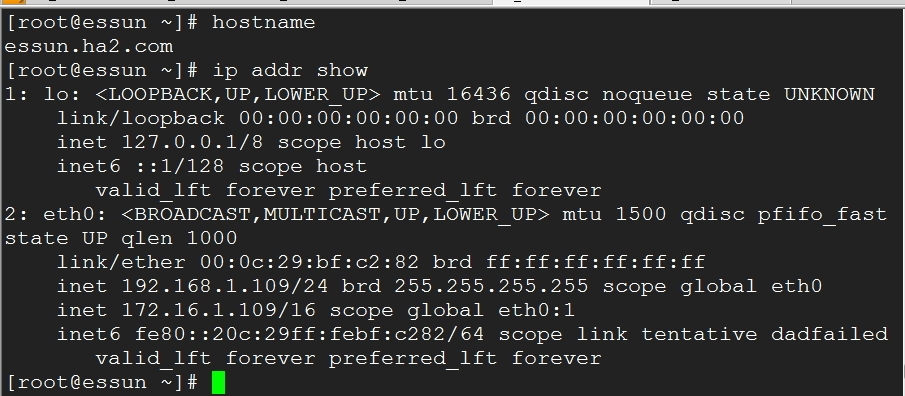
HAproxy B 上面的ip地址
-
将ha2上的keepalived停止后,ip地址己经转移到了ha1上了
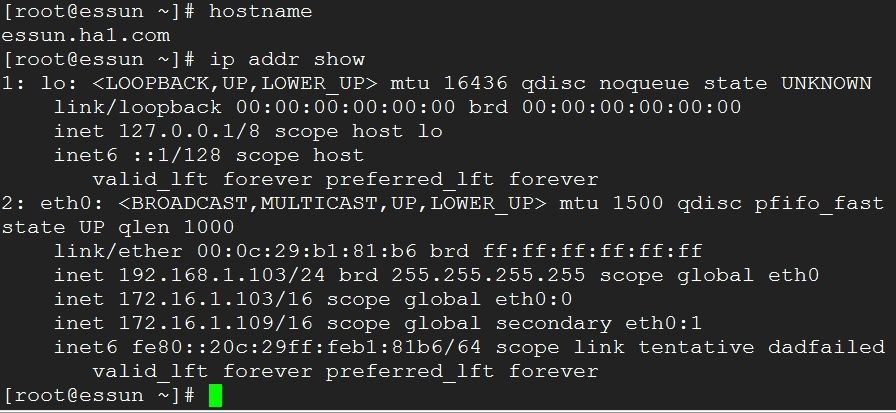
当ha2启动后,172.16.1.109还是会回到ha2上面。
4、安装后端的web服务
-
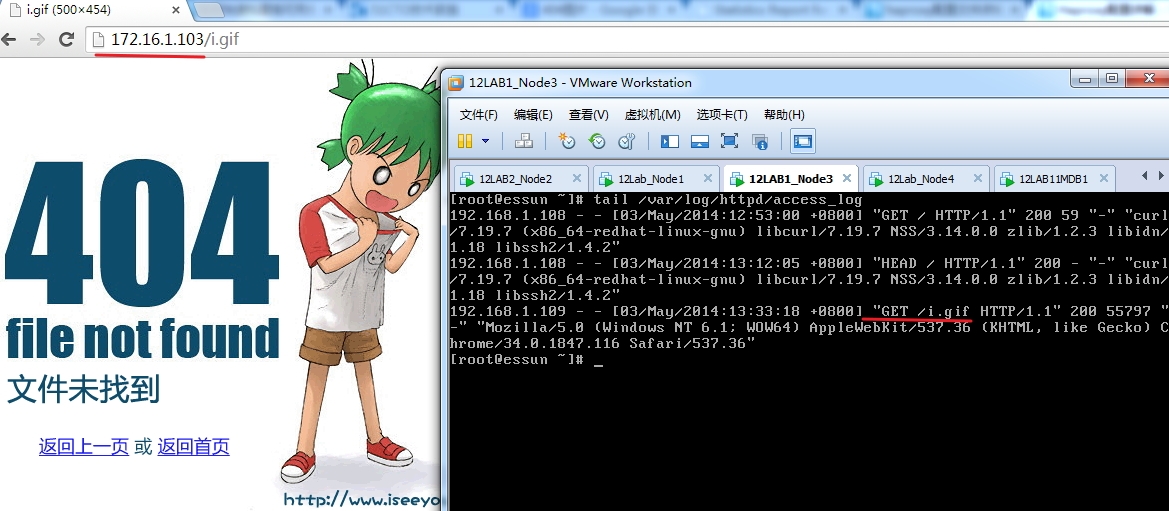
web1 静态页面 (192.168.1.108)
|
1
2
3
4
5
6
7
8
9
10
11
12
13
14
|
#yum install -y httpd[[email protected] html]# lltotal 4
-rw-r--r-- 1 root root 59 May 3 12:50 index.html
[[email protected] html]# cat index.html<h1>这是一个静态页面,地址为192.168.1.108</h1>
[[email protected] html]# service httpd startStarting httpd: httpd: apr_sockaddr_info_get() failed for essun.node3.com
httpd: Could not reliably determine the server's fully qualified domain name, using 127.0.0.1 for ServerName
[ OK ]
[[email protected] html]# curl http://192.168.1.108
<h1>这是一个静态页面,地址为192.168.1.108</h1>
|
在/var/www/html中放一张图片,仅供测试
-
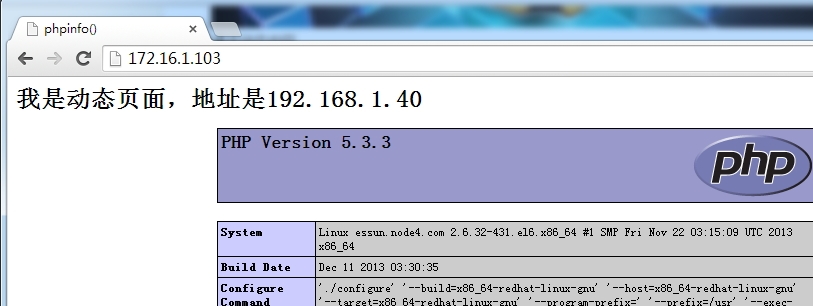
web2 动态页面 (192.168.1.40)
|
1
2
3
4
5
6
7
8
9
10
11
12
13
14
15
16
17
18
19
20
|
[[email protected] yum.repos.d]# yum install -y httpd php php-mysql mysql-server mysql-devel
[[email protected] yum.repos.d]# cd /var/www/html/
[[email protected] html]# vim index.php
[[email protected] html]# service httpd restart
Stopping httpd: [FAILED]Starting httpd: httpd: apr_sockaddr_info_get() failed for essun.node4.com
httpd: Could not reliably determine the server's fully qualified domain name, using 127.0.0.1 for ServerName
[ OK ]
[[email protected] html]# cat index.php
<h1>我是动态页面,地址是192.168.1.40</h1>
<?php phpinfo();
?>[[email protected] html]# curl -I http://192.168.1.40/index.php
HTTP/1.1 200 OK
Date: Sat, 03 May 2014 05:11:47 GMTServer: Apache/2.2.15 (CentOS)
X-Powered-By: PHP/5.3.3
Connection: closeContent-Type: text/html; charset=UTF-8
|
-
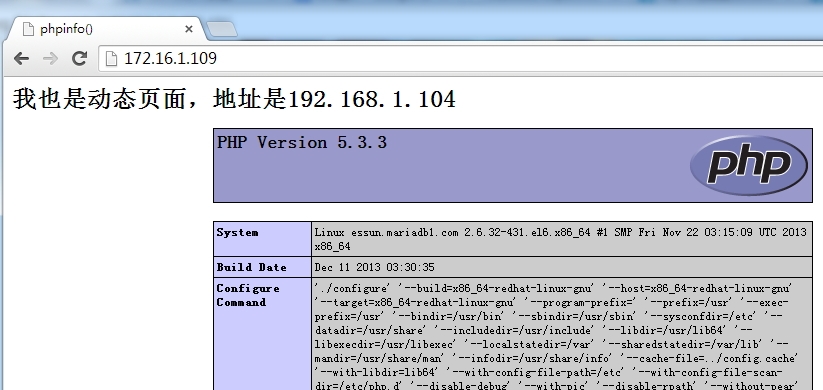
web3 动态页面(192.168.1.104)
|
1
2
3
4
5
6
7
8
9
10
11
12
13
14
15
16
17
18
|
[[email protected] yum.repos.d]# yum install -y httpd php php-mysql mysql-server mysql-devel
[[email protected] yum.repos.d]# cd /var/www/html/
[[email protected] html]# vim index.php
[[email protected] yum.repos.d]# service httpd restart
Stopping httpd: [FAILED]Starting httpd: [ OK ][[email protected] html]# cat index.php
<h1>我也是动态页面,地址是192.168.1.104</h1>
<?php phpinfo();
?>[[email protected] yum.repos.d]# curl -I http://192.168.1.104
HTTP/1.1 200 OK
Date: Sat, 03 May 2014 05:14:22 GMTServer: Apache/2.2.15 (CentOS)
X-Powered-By: PHP/5.3.3
Connection: closeContent-Type: text/html; charset=UTF-8
|
四、测试
1、利用两个vip任意一个测试一下
-
静态页面测试
-
动态页面测试 web3 (192.168.1.104)
-
监控页面,验证用户身份
-
验证通过后
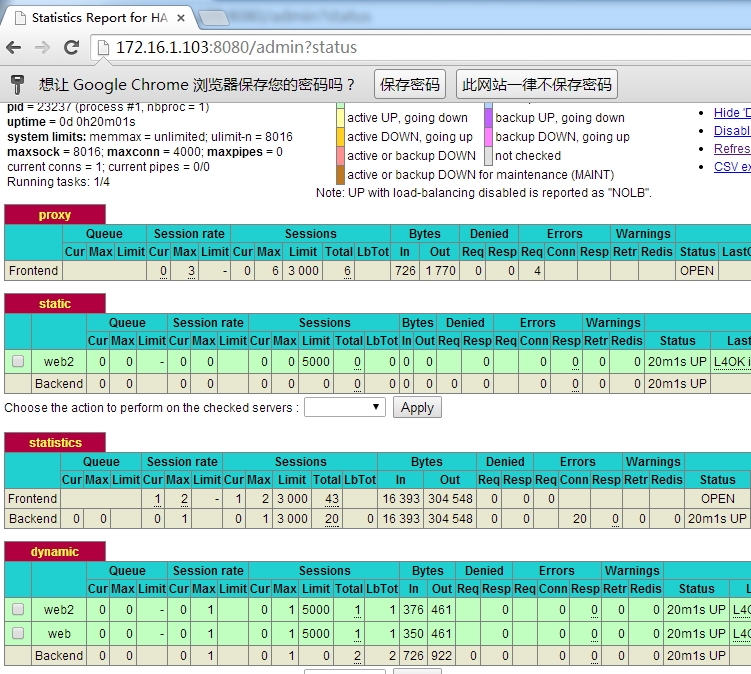
-
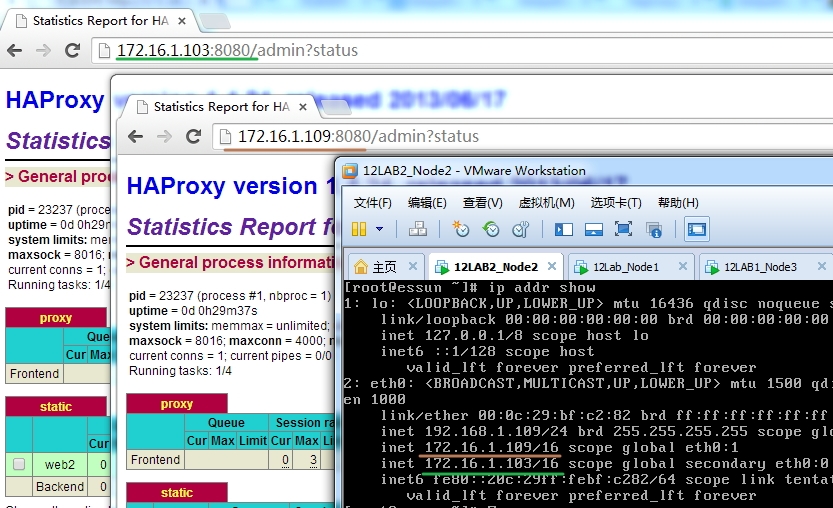
其中一个keepalived宕机后完不会影响到服务的正常的运行