无论oracle还是mysql数据库都有分区的概念,即同一张表物理上不在同一台机器上,有效缓解了表都集中存在一台机器的压力。当然,mongodb也有类似的机制,即是分片。具体理论知识大家可以参考网上文档,我这里只记录下具体操作步骤
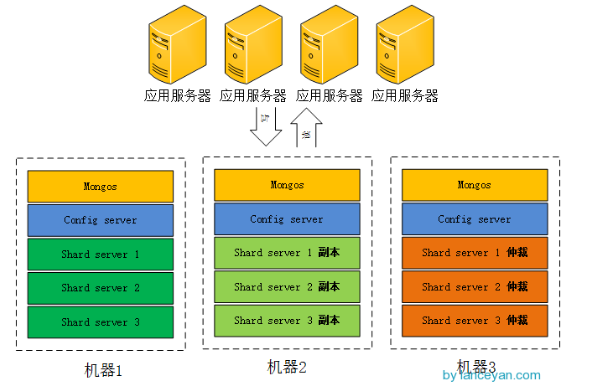
参考网络上一个图。我选用的是2个副本集+1个仲裁。实际上我这里分片集群需要3个mongos,3个config server,数据分片3个shard server,对应着还有3个副本,3个仲裁节点,总共需要15个实例。因为我资源确实紧张,又不想影响实验效果。冥思苦想了一阵,索性在一台机器上实现得了,分给不同的实例以不同的端口就好了。
闲话少说,开始搞起!!!
1. 资源划分(感觉这是最纠结的一步)

2. mongdb的安装
这个可以参考博主的前一篇章进行安装高可用mongodb集群的学习记录(一安装配置MongoDB)
3.创建所需要的目录
|
1
2
3
4
5
6
|
#创建所需要的目录[[email protected] mongodb]# mkdir -p mongos{1..3}/log
[[email protected] mongodb]# mkdir -p config{1..3}/log
[[email protected] mongodb]# mkdir -p config{1..3}/data
[[email protected] mongodb]# mkdir -p shard{1..3}_{1..3}/log
[[email protected] mongodb]# mkdir -p shard{1..3}_{1..3}/data
|
4. 启动每一个配置服务器
|
1
2
3
4
|
#启动配置服务器mongod --configsvr --dbpath config1/data --port 21001 --logpath config1/log/config.log --fork
mongod --configsvr --dbpath config2/data --port 21002 --logpath config2/log/config.log --fork
mongod --configsvr --dbpath config3/data --port 21003 --logpath config3/log/config.log --fork
|
5.启动mongos服务器
|
1
2
3
|
mongos --configdb 192.168.221.160:21001,192.168.221.160:21002,192.168.221.160:21003 --port 20001 --logpath mongos1/log/mongos.log --fork
mongos --configdb 192.168.221.160:21001,192.168.221.160:21002,192.168.221.160:21003 --port 20002 --logpath mongos2/log/mongos.log --fork
mongos --configdb 192.168.221.160:21001,192.168.221.160:21002,192.168.221.160:21003 --port 20003 --logpath mongos3/log/mongos.log --fork
|
6.启动分片的副本集
|
1
2
3
4
5
6
7
8
9
|
mongod --shardsvr --replSet shard1 --port 21101 --dbpath shard1_1/data --logpath shard1_1/log/shard.log --fork --nojournal --oplogSize 10
mongod --shardsvr --replSet shard1 --port 21201 --dbpath shard1_2/data --logpath shard1_2/log/shard.log --fork --nojournal --oplogSize 10
mongod --shardsvr --replSet shard1 --port 21301 --dbpath shard1_3/data --logpath shard1_3/log/shard.log --fork --nojournal --oplogSize 10
mongod --shardsvr --replSet shard2 --port 21102 --dbpath shard2_1/data --logpath shard2_1/log/shard.log --fork --nojournal --oplogSize 10
mongod --shardsvr --replSet shard2 --port 21202 --dbpath shard2_2/data --logpath shard2_2/log/shard.log --fork --nojournal --oplogSize 10
mongod --shardsvr --replSet shard2 --port 21302 --dbpath shard2_3/data --logpath shard2_3/log/shard.log --fork --nojournal --oplogSize 10
mongod --shardsvr --replSet shard3 --port 21103 --dbpath shard3_1/data --logpath shard3_1/log/shard.log --fork --nojournal --oplogSize 10
mongod --shardsvr --replSet shard3 --port 21203 --dbpath shard3_2/data --logpath shard3_2/log/shard.log --fork --nojournal --oplogSize 10
mongod --shardsvr --replSet shard3 --port 21303 --dbpath shard3_3/data --logpath shard3_3/log/shard.log --fork --nojournal --oplogSize 10
|
7.分别对每个分片配置副本集,任意登录一个节点
|
1
2
3
4
5
6
7
8
9
10
11
12
13
14
15
16
17
18
19
20
21
22
23
24
25
26
27
28
29
30
31
32
33
34
35
36
37
38
39
40
41
42
43
44
45
46
47
48
49
50
51
52
53
54
55
56
57
58
59
60
61
62
63
64
65
66
67
68
69
70
71
72
73
74
75
76
77
78
79
80
81
82
83
84
85
86
87
|
#设置第一个分片副本集[[email protected] ~]# mongo 192.168.221.160:21101
MongoDB shell version: 3.0.6connecting to: 192.168.221.160:21101/test
> use adminswitched to db admin#定义副本集配置信息> config = {_id:"shard1",members:[{_id:0,host:"192.168.221.160:21101"},{_id:1,host:"192.168.221.160:21201"},{_id:2,host:"192.168.221.160:21301",arbiterOnly:true}]}
{"_id" : "shard1",
"members" : [
{"_id" : 0,
"host" : "192.168.221.160:21101"
},{"_id" : 1,
"host" : "192.168.221.160:21201"
},{"_id" : 2,
"host" : "192.168.221.160:21301",
"arbiterOnly" : true
}]}#初始化副本集信息> rs.initiate(config){ "ok" : 1 }
shard1:OTHER> #设置第二个分片副本集[[email protected] ~]# mongo 192.168.221.160:21102
MongoDB shell version: 3.0.6connecting to: 192.168.221.160:21102/test
> use adminswitched to db admin> config = {_id:"shard2",members:[{_id:0,host:"192.168.221.160:21102"},{_id:1,host:"192.168.221.160:21202"},{_id:2,host:"192.168.221.160:21302",arbiterOnly:true}]}
{"_id" : "shard2",
"members" : [
{"_id" : 0,
"host" : "192.168.221.160:21102"
},{"_id" : 1,
"host" : "192.168.221.160:21202"
},{"_id" : 2,
"host" : "192.168.221.160:21302",
"arbiterOnly" : true
}]}> rs.initiate(config){ "ok" : 1 }
shard2:OTHER> #设置第三个分片副本集[[email protected] ~]# mongo 192.168.221.160:21103
MongoDB shell version: 3.0.6connecting to: 192.168.221.160:21103/test
> use adminswitched to db admin> config = {_id:"shard3",members:[{_id:0,host:"192.168.221.160:21103"},{_id:1,host:"192.168.221.160:21203"},{_id:2,host:"192.168.221.160:21303",arbiterOnly:true}]}
{"_id" : "shard3",
"members" : [
{"_id" : 0,
"host" : "192.168.221.160:21103"
},{"_id" : 1,
"host" : "192.168.221.160:21203"
},{"_id" : 2,
"host" : "192.168.221.160:21303",
"arbiterOnly" : true
}]}> rs.initiate(config){ "ok" : 1 }
shard3:OTHER> |
8.登录到每一个mongos,设置分片配置,让分片生效
|
1
2
3
4
5
6
7
8
9
10
11
12
13
14
15
16
17
18
19
20
21
22
23
24
25
26
27
28
29
30
31
32
33
34
35
36
37
|
#串联路由服务器与分片副本集1[[email protected] ~]# mongo 192.168.221.160:20001
MongoDB shell version: 3.0.6connecting to: 192.168.221.160:20001/test
Server has startup warnings: 2017-11-15T13:51:20.732+0800 I CONTROL ** WARNING: You are running this process as the root user, which is not recommended.
2017-11-15T13:51:20.733+0800 I CONTROL mongos> use adminswitched to db adminmongos> db.runCommand({addshard:"shard1/192.168.221.160:21101,192.168.221.160:21201,192.168.221.160:21301"})
{ "shardAdded" : "shard1", "ok" : 1 }
mongos> #串联路由服务器与分片副本集2[[email protected] ~]# mongo 192.168.221.160:20002
MongoDB shell version: 3.0.6connecting to: 192.168.221.160:20002/test
Server has startup warnings: 2017-11-15T13:51:43.660+0800 I CONTROL ** WARNING: You are running this process as the root user, which is not recommended.
2017-11-15T13:51:43.661+0800 I CONTROL mongos> use adminswitched to db adminmongos> db.runCommand({addshard:"shard2/192.168.221.160:21102,192.168.221.160:21202,192.168.221.160:21302"})
{ "shardAdded" : "shard2", "ok" : 1 }
mongos> #串联路由服务器与分片副本集3[[email protected] ~]# mongo 192.168.221.160:20003
MongoDB shell version: 3.0.6connecting to: 192.168.221.160:20003/test
Server has startup warnings: 2017-11-15T13:51:59.589+0800 I CONTROL ** WARNING: You are running this process as the root user, which is not recommended.
2017-11-15T13:51:59.589+0800 I CONTROL mongos> use adminswitched to db adminmongos> db.runCommand({addshard:"shard3/192.168.221.160:21103,192.168.221.160:21203,192.168.221.160:21303"})
{ "shardAdded" : "shard3", "ok" : 1 }
mongos> |
9.查看分片服务器的配置信息:
|
1
2
3
4
5
6
7
8
9
10
11
12
13
14
15
16
17
18
19
|
mongos> db.runCommand({listshards:1}){"shards" : [
{"_id" : "shard1",
"host" : "shard1/192.168.221.160:21101,192.168.221.160:21201"
},{"_id" : "shard2",
"host" : "shard2/192.168.221.160:21102,192.168.221.160:21202"
},{"_id" : "shard3",
"host" : "shard3/192.168.221.160:21103,192.168.221.160:21203"
}],"ok" : 1
}mongos> |
仲裁节点不储存数据,没有在这里显示出来
10.连接mongos上,指定数据库、指定集合让分片生效
|
1
2
3
4
5
6
7
8
9
10
11
12
13
14
15
16
|
[[email protected] ~]# mongo 192.168.221.160:20001
MongoDB shell version: 3.0.6connecting to: 192.168.221.160:20001/test
mongos> db.runCommand({enablesharding:"testdb"})
{"ok" : 0,
"errmsg" : "enableSharding may only be run against the admin database.",
"code" : 13
}mongos> use adminswitched to db adminmongos> db.runCommand({enablesharding:"testdb"})
{ "ok" : 1 }
mongos> db.runCommand({shardcollection:"testdb.table1",key:{id:1}})
{ "collectionsharded" : "testdb.table1", "ok" : 1 }
mongos> |
设置testdb的 table1 表需要分片,根据 id 自动分片到 shard1 ,shard2,shard3 上面去。要这样设置是因为不是所有mongodb 的数据库和表都需要分片
11.测试分片片配置效果
|
1
2
3
4
5
6
7
8
9
10
11
12
13
14
15
16
17
18
19
20
21
22
23
24
25
26
27
28
29
30
31
32
33
34
35
36
37
38
39
40
41
42
43
44
45
46
47
48
49
50
51
52
53
54
55
56
57
58
59
60
61
62
63
64
65
66
67
|
[[email protected] ~]# mongo 192.168.221.160:20001
MongoDB shell version: 3.0.6connecting to: 192.168.221.160:20001/test
Server has startup warnings: 2017-11-15T13:51:20.732+0800 I CONTROL ** WARNING: You are running this process as the root user, which is not recommended.
2017-11-15T13:51:20.733+0800 I CONTROL mongos> use testdb;switched to db testdbmongos> for (var i = 1;i<=10000;i++) db.table1.save({id:i,"test1":"item1"})
WriteResult({ "nInserted" : 1 })
mongos> db.table1.stats(){"sharded" : true,
"paddingFactorNote" : "paddingFactor is unused and unmaintained in 3.0. It remains hard coded to 1.0 for compatibility only.",
"userFlags" : 1,
"capped" : false,
"ns" : "testdb.table1",
"count" : 10000,
"numExtents" : 7,
"size" : 1120000,
"storageSize" : 2809856,
"totalIndexSize" : 654080,
"indexSizes" : {
"_id_" : 351568,
"id_1" : 302512
},"avgObjSize" : 112,
"nindexes" : 2,
"nchunks" : 3,
"shards" : {
"shard1" : {
"ns" : "testdb.table1",
"count" : 9991,
"size" : 1118992,
..."ok" : 1,
"$gleStats" : {
"lastOpTime" : Timestamp(0, 0),
"electionId" : ObjectId("5a0bd9cf86a6b76e11b5d820")
}},"shard2" : {
"ns" : "testdb.table1",
"count" : 1,
"size" : 112,
..."ok" : 1,
"$gleStats" : {
"lastOpTime" : Timestamp(0, 0),
"electionId" : ObjectId("5a0bdadd74c5945a33a4ae46")
}},"shard3" : {
"ns" : "testdb.table1",
"count" : 8,
"size" : 896,
..."ok" : 1,
"$gleStats" : {
"lastOpTime" : Timestamp(0, 0),
"electionId" : ObjectId("5a0bdb6f1c75115f41ff92f9")
}}},"ok" : 1
}mongos> |
可以看到testdb.table1数据已经被分到三个分片,各自分片数量为 shard1 “count” : 9991,shard2 “count” : 1,shard3 “count” : 8。我也不知道为啥分配的不均匀。纳闷ing
好了,实验到此结束,关于mongodb的学习会继续进行...