|
1
2
3
4
5
6
7
8
9
10
11
12
13
14
15
16
17
18
19
20
21
22
23
24
25
26
27
28
29
30
31
32
33
34
35
36
37
38
39
40
41
42
43
44
45
46
47
48
49
50
51
52
53
54
55
56
57
58
59
60
61
62
63
64
65
66
67
68
69
70
71
72
73
74
75
76
77
78
79
80
81
82
83
84
85
86
87
88
89
90
91
92
93
94
95
96
97
98
99
100
101
102
103
104
105
|
我的博客已迁移到xdoujiang.com请去那边和我交流debian下安装apache2+ssl支持一、虚拟主机1、当前版本cat /etc/debian_version 5.0.12、本机ipifconfig|awk -v RS="Bcast:" '{print $NF}'|awk -F: '/addr/{print $2}'
10.1.10.2503、安装apache2的prefork模式apt-get -y install apache2-mpm-prefork
apache2 -l|grep prefork.c
prefork.c
4、支持phpapt-get -y install php5-cli
apt-get -y install libapache2-mod-php5
5、修改虚拟主机监听地址和端口 cat /etc/apache2/ports.conf
NameVirtualHost 10.1.10.250:80Listen 10.1.10.250:806、我这里准备的是aaa.bbb.com域名(配置里注释掉的目前不用 根据情况使用 所以保留着)cat /etc/apache2/sites-available/aaa.bbb.com
<VirtualHost 10.1.10.250:80> ServerAdmin [email protected]
ServerName aaa.bbb.com
DocumentRoot /var/www
<Directory />
Options FollowSymLinks
AllowOverride None
</Directory>
<Directory /var/www/>
Options -Indexes FollowSymLinks MultiViews
AllowOverride None
Order allow,deny
allow from all
</Directory>
# ScriptAlias /cgi-bin/ /usr/lib/cgi-bin/# <Directory "/usr/lib/cgi-bin"># AllowOverride None# Options +ExecCGI -MultiViews +SymLinksIfOwnerMatch# Order allow,deny# Allow from 127.0.0.1 localhost 10.1.0.0/24# </Directory> ErrorLog /var/log/apache2/aaa.bbb.com_error.log
# Possible values include: debug, info, notice, warn, error, crit,
# alert, emerg.
LogLevel warn
CustomLog /var/log/apache2/aaa.bbb.com_access.log combined
Alias /jimmy /var/www/ccc/
<Directory /var/www/ccc/>
AllowOverride FileInfo AuthConfig Limit IndexesOptions MultiViews SymLinksIfOwnerMatch IncludesNoExec<Limit GET POST OPTIONS PROPFIND>Order Allow,DenyAllow from 10.0.0.0/8
#AuthName "by Restricted Area"#AuthType basic#AuthUserFile /etc/apache2/securepw#require user www61com</Limit>
<LimitExcept GET POST OPTIONS PROPFIND>Order deny,allowDeny from all</LimitExcept>
</Directory>
</VirtualHost>
7、创建网站目录cccmkdir /var/www/ccc -p
8、创建1个php测试文件 cat /var/www/ccc/test.php
<?phpphpinfo();?>; 9、**站点cd /etc/apache2/sites-available
a2ensite aaa.bbb.com Enabling site aaa.bbb.com.Run '/etc/init.d/apache2 reload' to activate new configuration!
10、修改/etc/hosts在最后添加二行
cat /etc/hosts
10.1.10.250 aaa.bbb.comaaa.bbb.com 10.1.10.25011、根据情况修改php配置文件(可以不修改)cat /etc/php5/apache2/php.ini
expose_php = Off #关闭版本号
display_errors = Off #不显示错误
log_errors on #提供错误日志
12、全部配置完后需要重启apache2/etc/init.d/apache2 restart
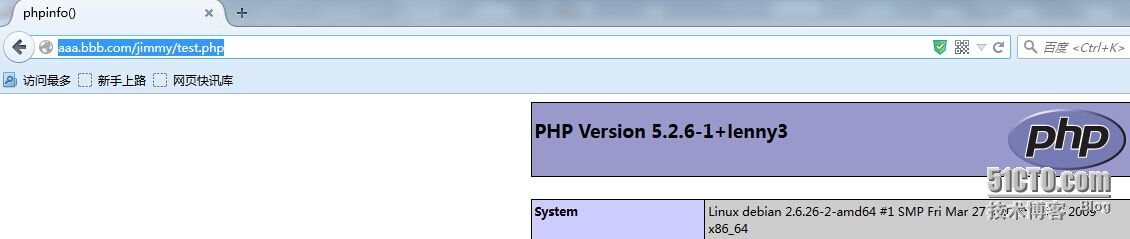
13、使用域名访问测试如果在windows机器上测试的话 可以修改hosts我这边修改过了访问aaa.bbb.com/ccc/test.php就可以看到以下图片了
|
|
1
2
3
4
5
6
7
8
9
10
11
12
13
14
15
16
17
18
19
20
21
22
23
24
25
26
27
28
29
30
31
32
33
34
35
36
37
38
39
40
41
42
43
44
45
46
47
48
49
50
51
52
53
54
55
56
57
58
59
60
61
62
63
64
65
66
67
68
69
70
71
72
73
74
75
76
77
78
79
80
81
82
83
84
85
|
二、支持ssl1、建立ssl目录mkdir /etc/apache2/ssl -p
2、创建一个证书(时间365天)并填写相关一些信息openssl req -x509 -nodes -days 365 -newkey rsa:2048 -keyout /etc/apache2/ssl/aaa.bbb.com.key -out /etc/apache2/ssl/aaa.bbb.com.crt
Generating a 2048 bit RSA private key......+++....+++writing new private key to '/etc/apache2/ssl/aaa.bbb.com.key'
-----You are about to be asked to enter information that will be incorporatedinto your certificate request.What you are about to enter is what is called a Distinguished Name or a DN.There are quite a few fields but you can leave some blankFor some fields there will be a default value,If you enter '.', the field will be left blank.
-----Country Name (2 letter code) [AU]:cnState or Province Name (full name) [Some-State]:shLocality Name (eg, city) []:shanghaiOrganization Name (eg, company) [Internet Widgits Pty Ltd]:aaaOrganizational Unit Name (eg, section) []:aaaCommon Name (eg, YOUR name) []:aaaEmail Address []:[email protected]3、aaa.bbb.com的ssl域名cat /etc/apache2/sites-available/aaa.bbb.com-ssl
<VirtualHost 10.1.10.250:443> ServerAdmin [email protected]
ServerName aaa.bbb.com
SSLEngine On
SSLCertificateKeyFile /etc/apache2/ssl/aaa.bbb.com.key
SSLCertificateFile /etc/apache2/ssl/aaa.bbb.com.crt
Alias /jimmy /var/www/ccc/
<Directory /var/www/ccc/>
Options FollowSymLinks +Execcgi
AllowOverride None
Order deny,allow
Deny from all
Allow from 10.0.0.0/8
</Directory>
ErrorLog /var/log/apache2/aaa.bbb.com_ssl.error.log
# Possible values include: debug, info, notice, warn, error, crit,
# alert, emerg.
LogLevel warn
CustomLog /var/log/apache2/aaa.bbb.com_ssl.access.log combined
</VirtualHost>
4、开启ssl模块支持cd /etc/apache2/mods-available
a2enmod sslEnabling module ssl.See /usr/share/doc/apache2.2-common/README.Debian.gz on how to configure SSL and create self-signed certificates.
Run '/etc/init.d/apache2 restart' to activate new configuration!
5、开启aaa.bbb.com-ssl站点cd /etc/apache2/sites-available
a2ensite aaa.bbb.com-ssl Enabling site aaa.bbb.com-ssl.Run '/etc/init.d/apache2 reload' to activate new configuration!
6、配置443端口cat /etc/apache2/ports.conf
NameVirtualHost 10.1.10.250:80Listen 10.1.10.250:80NameVirtualHost 10.1.10.250:443<IfModule mod_ssl.c> # SSL name based virtual hosts are not yet supported, therefore no
# NameVirtualHost statement here
Listen 10.1.10.250:443
</IfModule>
7、全部配置完后需要重启apache2/etc/init.d/apache2 restart
8、查看监听端口netstat -tupnl |grep apache2
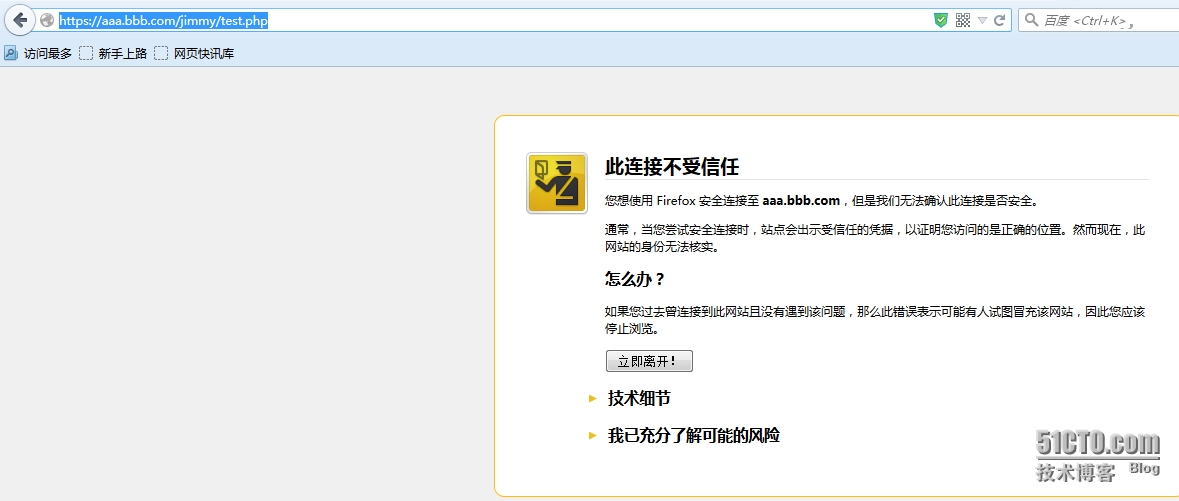
tcp 0 0 10.1.10.250:80 0.0.0.0:* LISTEN 5460/apache2 tcp 0 0 10.1.10.250:443 0.0.0.0:* LISTEN 5460/apache2 9、使用域名访问测试如果在windows机器上测试的话 可以修改hosts我这边修改过了访问https://aaa.bbb.com/ccc/test.php就可以看到以下图片了
|

|
1
2
|
三、参考文档http://httpd.apache.org/docs/2.2/
|
本文转自 xdoujiang 51CTO博客,原文链接:http://blog.51cto.com/7938217/1660979,如需转载请自行联系原作者