引入:
虽然已经用了Apache CXF一段时间了,但是毕竟只是在项目中运用其部分能力,没有系统的学习,其实CXF还有许多强大的功能,这里我准备用一些文章系统的介绍Apache CXF的各个特征。
例子介绍:
演示用Apache CXF对JAX-WS的支持来创建“code first”的web service.
实践
首先我们进行架构设计,我们假设按照传统惯例,搭建一个maven应用,所以它的pom.xml应该如下:
|
1
2
3
4
5
6
7
8
9
10
11
12
13
14
15
16
17
18
19
20
21
22
23
24
25
26
27
28
29
30
31
32
33
34
35
36
37
38
39
40
41
42
43
44
45
46
47
48
49
50
51
52
|
<project xmlns="http://maven.apache.org/POM/4.0.0" xmlns:xsi="http://www.w3.org/2001/XMLSchema-instance" xsi:schemaLocation="http://maven.apache.org/POM/4.0.0 http://maven.apache.org/maven-v4_0_0.xsd">
<modelVersion>4.0.0</modelVersion>
<groupId>com.charles.cxfstudy</groupId>
<artifactId>cxf_jaxws_server</artifactId>
<packaging>war</packaging>
<name>CXF demo using JAX-WS APIs</name>
<description>>CXF demo using JAX-WS APIs</description>
<version>1.0.0</version>
<properties>
<cxf.version>${project.version}</cxf.version>
<cxf.release.base>${basedir}/../..</cxf.release.base>
<spring.version>3.0.7.RELEASE</spring.version>
</properties>
<build>
<plugins>
<plugin>
<artifactId>maven-compiler-plugin</artifactId>
<configuration>
<source>1.6</source>
<target>1.6</target>
</configuration>
</plugin>
<plugin>
<artifactId>maven-war-plugin</artifactId>
<version>2.1</version>
<configuration>
<webXml>src/main/webapp/WEB-INF/web.xml</webXml>
</configuration>
</plugin>
</plugins>
<finalName>cxf_jaxws_server</finalName>
</build>
<dependencies>
<dependency>
<groupId>org.apache.cxf</groupId>
<artifactId>cxf-rt-frontend-jaxws</artifactId>
<version>2.7.10</version>
</dependency>
<dependency>
<groupId>org.apache.cxf</groupId>
<artifactId>cxf-rt-transports-http</artifactId>
<version>2.7.10</version>
</dependency>
<dependency>
<groupId>org.springframework</groupId>
<artifactId>spring-web</artifactId>
<version>${spring.version}</version>
</dependency>
</dependencies>
</project>
|
这里没什么技术含量,主要就是添加一些Apache CXF的依赖的jar包的支持,当然了,我们还考虑到用了spring web(接下来会讲),所以也添加了对spring web的支持。
因为是web应用,所以我们去编辑web.xml,这里特别要注意的是,我们的Apache CXF框架的入口Servlet是CXFServlet,它是一个基于Spring框架的Servlet,它符合拦截和转发web service的请求,并且调用业务方法进行服务,按照国际惯例,我们还必须为其配置url-pattern,从而让系统知道它会拦截何种请求。(我们这里设为拦截所有 /services/开头的请求):
|
1
2
3
4
5
6
7
8
9
10
11
12
13
14
15
16
17
18
19
20
21
|
<?xml version="1.0" encoding="UTF-8"?>
<web-app version="2.5" xmlns="http://java.sun.com/xml/ns/javaee"
xmlns:xsi="http://www.w3.org/2001/XMLSchema-instance"
xsi:schemaLocation="http://java.sun.com/xml/ns/javaee
http://java.sun.com/xml/ns/javaee/web-app_2_5.xsd">
<display-name>cxf demo for "code first" webservice</display-name>
<servlet>
<description>Apache CXF Endpoint</description>
<servlet-name>cxf-endpoint</servlet-name>
<!-- CXFServlet 用于拦截和转发web service 请求-->
<servlet-class>org.apache.cxf.transport.servlet.CXFServlet</servlet-class>
<load-on-startup>1</load-on-startup>
</servlet>
<servlet-mapping>
<servlet-name>cxf-endpoint</servlet-name>
<url-pattern>/services/*</url-pattern>
</servlet-mapping>
<session-config>
<session-timeout>60</session-timeout>
</session-config>
</web-app>
|
下面我们要写一个spring 配置文件,叫WEB-INF/cxf-servlet.xml,为什么要写这个文件呢?我们来看下Apache CXF的核心Servlet ,CXFServlet的实现:
|
1
2
3
4
5
6
7
8
9
10
11
12
13
14
15
16
17
18
19
20
21
22
23
24
25
26
27
28
29
30
31
32
33
34
|
public class CXFServlet extends CXFNonSpringServlet
implements ApplicationListener<ContextRefreshedEvent> {
private static final long serialVersionUID = -5922443981969455305L;
private static final String BUS_PARAMETER = "bus";
private boolean busCreated;
private XmlWebApplicationContext createdContext;
public CXFServlet() {
}
@Override
protected void loadBus(ServletConfig servletConfig) {
ApplicationContext wac = WebApplicationContextUtils.
getWebApplicationContext(servletConfig.getServletContext());
if (wac instanceof AbstractApplicationContext) {
addListener((AbstractApplicationContext)wac);
}
String configLocation = servletConfig.getInitParameter("config-location");
if (configLocation == null) {
try {
InputStream is = servletConfig.getServletContext().getResourceAsStream("/WEB-INF/cxf-servlet.xml");
if (is != null && is.available() > 0) {
is.close();
configLocation = "/WEB-INF/cxf-servlet.xml";
}
} catch (Exception ex) {
//ignore
}
}
if (configLocation != null) {
wac = createSpringContext(wac, servletConfig, configLocation);
}
|
可以看出,它会去读取config-location的配置文件路径,默认为/WEB-INF/cxf-servlet.xml,从而创建Spring的上下文。所以我们可以想象,这个cxf-servlet.xml(或者其他名字的配置文件)肯定是配置了关于web服务的定义 ,并且将这些服务定义为spring的bean,如下:
|
1
2
3
4
5
6
7
8
9
10
11
12
13
14
15
16
|
<?xml version="1.0" encoding="UTF-8"?>
<beans xmlns="http://www.springframework.org/schema/beans"
xmlns:xsi="http://www.w3.org/2001/XMLSchema-instance"
xmlns:jaxws="http://cxf.apache.org/jaxws"
xmlns:soap="http://cxf.apache.org/bindings/soap"
xsi:schemaLocation="
http://www.springframework.org/schema/beans http://www.springframework.org/schema/beans/spring-beans.xsdhttp://cxf.apache.org/bindings/soap http://cxf.apache.org/schemas/configuration/soap.xsdhttp://cxf.apache.org/jaxwshttp://cxf.apache.org/schemas/jaxws.xsd"> <jaxws:server id="cxfJaxwsService" serviceClass="com.charles.cxfstudy.server.services.IGreetingService" address="/greeting">
<jaxws:serviceBean>
<bean class="com.charles.cxfstudy.server.services.GreetingServiceImpl" />
</jaxws:serviceBean>
</jaxws:server>
</beans>
|
所以我们这里就用jaxws的名字空间来声明提供服务的服务全限定接口,服务的地址和服务的实现全限定类,所以一旦web service部署在spring容器中,就可以为外界提供服务了。
接下来就是编码工作,我们必须让我们的代码和我们在cxf-servlet.xml中的配置一样。所以,我们定义了IGreetingService的接口:
|
1
2
3
4
5
6
7
8
9
10
11
12
13
14
15
16
17
18
|
/** * 这是 web service的接口
*/
package com.charles.cxfstudy.server.services;
import javax.jws.WebService;
import com.charles.cxfstudy.server.vo.Person;
/** * @author charles.wang
*
*/
@WebServicepublic interface IGreetingService {
/**
* 对某个Person发起问候
*/
String sayGreetingToPerson(Person person);
} |
并且在这个接口中提供业务方法。因为我们的服务是Web服务,所以必须用@WebService注解将其标示。 我们的接口中可以出现非java内定类型的类,比如自定义类(这里的Person类),他们会被JAXB框架(Apache CXF默认支持的绑定框架)来转为对应的xml类型定义。
所以我们的 Person 类就如下:
|
1
2
3
4
5
6
7
8
9
10
11
12
13
14
15
16
17
18
19
20
21
22
23
24
25
26
27
28
29
|
/** * 这个一个VO,我们定义了一个Person类型,接下来,我们会用JAXB框架将其映射为wsdl文件中的类型定义
*/
package com.charles.cxfstudy.server.vo;
import javax.xml.bind.annotation.XmlType;
/** * 我们定义一个有姓名(name)和年龄(age)的Person类
* @author charles.wang
*
*/
@XmlType(name="person")
public class Person {
private String name;
private int age;
public String getName() {
return name;
}
public void setName(String name) {
this.name = name;
}
public int getAge() {
return age;
}
public void setAge(int age) {
this.age = age;
}
} |
可以看出,这个Person类和一般的Bean没有区别,唯一区别在于我们用了注解@XmlType,它会被JAXB识别并且把这个类转为对应的xml格式的类型定义。
接下来我们就来编写服务实现bean了,根据我们在cxf-servlet.xml中的定义,我们开发了GreetingServiceImpl的实现类:
|
1
2
3
4
5
6
7
8
9
10
11
12
13
14
15
16
17
18
19
20
21
22
|
/** * 这是web service的实现类
*/
package com.charles.cxfstudy.server.services;
import javax.jws.WebService;
import com.charles.cxfstudy.server.vo.Person;
/** * @author charles.wang
*
*/
@WebService (endpointInterface="com.charles.cxfstudy.server.services.IGreetingService", serviceName="GreetingService")
public class GreetingServiceImpl implements IGreetingService {
/**
* 对某个Person发起问候
*/
public String sayGreetingToPerson(Person person) {
System.out.println("calling SayGreetingToPerson(Person) method");
String name = person.getName();
int age = person.getAge();
return "Hello ,this is greeting from Charles to: "+name+", and his age is: "+age;
}
} |
从这里看出,它也和一般具体类没区别,就是多了一个@WebService注解来表示自己是一个服务实现类。这里看到其中还有endpointInterface和serviceName属性,他们都会映射到最终的wsdl文件。
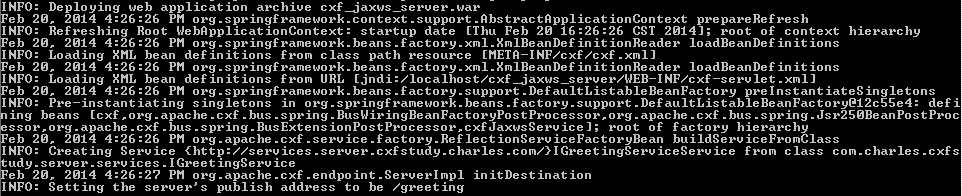
开发完了之后,就足够了(因为我们的逻辑太简单了),我们maven构建war包,然后部署在tomcat容器上(或者其他web容器), 就可以通过URL来测试我们的应用了。从服务器日志可以清楚的看到发布Web服务的过程:
比如访问http://localhost:8080/cxf_jaxws_server/services/greeting?wsdl (因为/services请求会被CXFServlet拦截作为web service请求, /greeting是我们开发的web service的具体请求,定义在cxf-servlet.xml中)
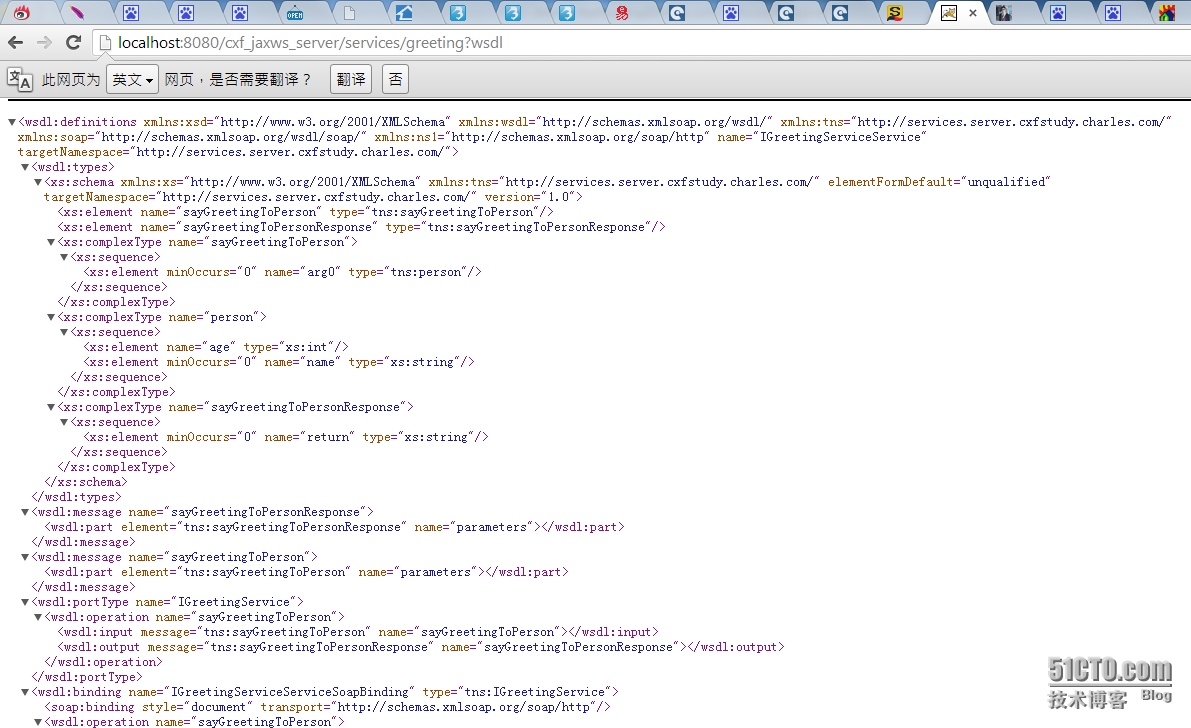
从上图可以看出,这个wsdl文件上部分的 <wsdl:types>中就包含person类型的定义,它是通过JAXB完成的。而下部分则是对我们的业务方法的定义,其中业务方法中用的入参,返回值类型都有在<wsdl:types>中定义。
对于我们生成的这个wsdl,我们可以很容易用各种工具(比如soapUI)测试其正确性,这里就不描述了,大家都会。