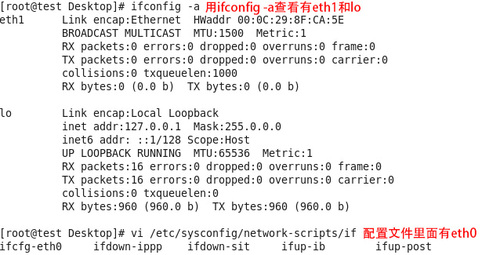
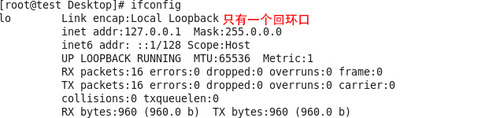
问题:用ifconfig查看只有一个回环口,用ifconfig -a查看有eth1和lo,如下图:
解决出现"Bringing up interface eth0: ~~ 'System eth0'“详解

配置文件中有eth0存在

解决出现"Bringing up interface eth0: ~~ 'System eth0'“详解

此时重启服务FAILED

解决出现"Bringing up interface eth0: ~~ 'System eth0'“详解


解决方法:

#mv /etc/sysconfig/network-scripts/ifcfg-eth0 /etc/sysconfig/network-scripts/ifcfg-eth1

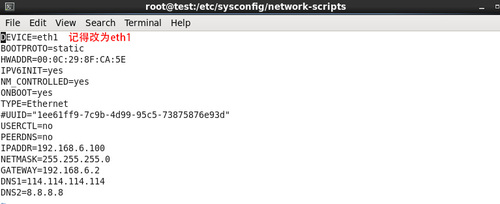
  将网卡eth0的名称改为eth1

修改配置文件如下:
解决出现"Bringing up interface eth0: ~~ 'System eth0'“详解

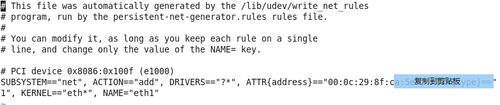
#vi /etc/udev/rules.d/70-persistent-net.rules
解决出现"Bringing up interface eth0: ~~ 'System eth0'“详解

硬件地址name改的和上图一样,将eth0的内容字段删除,保留eth1

重启network服务

解决出现"Bringing up interface eth0: ~~ 'System eth0'“详解

重启服务成功


转载于:https://blog.51cto.com/12948447/1969276

相关文章:

  • 2022-02-18
  • 2022-02-23
  • 2021-07-22
  • 2021-05-24
  • 2022-01-20
  • 2022-12-23
  • 2021-10-12
  • 2021-11-02
猜你喜欢
  • 2022-01-11
  • 2022-12-23
  • 2022-12-23
  • 2022-12-23
  • 2021-06-02
  • 2021-09-01
相关资源
相似解决方案