首先在下载windows版zabbix-agent:
|
1
|
http://www.zabbix.com/downloads/2.0.18/zabbix_agents_2.0.18.win.zip
|
下载后解压zabbix_agents压缩包,里面有两个文件夹,分别是bin文件夹和conf文件夹。bin文件夹里一个是win32 zabbix_agentd,一个是win64zabbix_agentd,生产环境都是64位,这里选择win64
在C盘创建一个文件夹,然后把win64拷贝过去,再将zabbix-agent.conf拷贝进去。

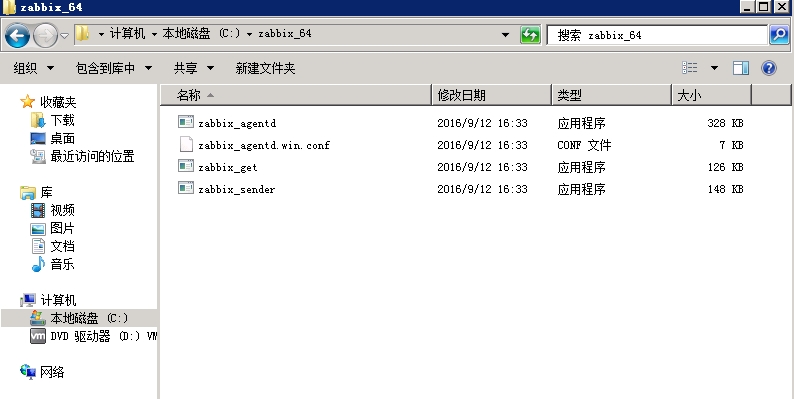
编辑zabbix_agentd.win.conf 配置文件,修改以下几项:
|
1
2
3
4
5
6
7
|
Server=47.93.162.108ServerActive=47.93.162.108UnsafeUserParameters=0UserParameter=EnableRemoteCommands=1LogRemoteCommands=1 Include=c:\zabbix\zabbix_agentd.userparams.conf |
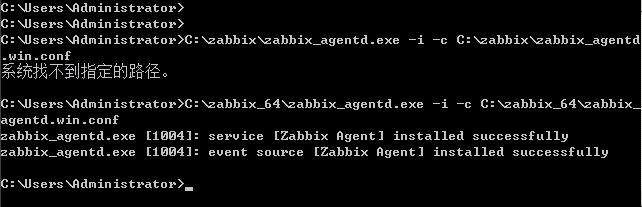
启动zabbix_agent,打开运行,输入cmd->输入以下来安装zabbix_agent:以下代表安装成功!
|
1
|
C:\zabbix\zabbix_agentd.exe -i -c C:\zabbix\zabbix_agentd.win.conf |
|
1
2
|
#注意:如果后面启动不成功,则关闭服务,然后再卸载安装:C:\zabbix\zabbix_agentd.exe -d -c C:\zabbix\zabbix_agentd.win.conf |
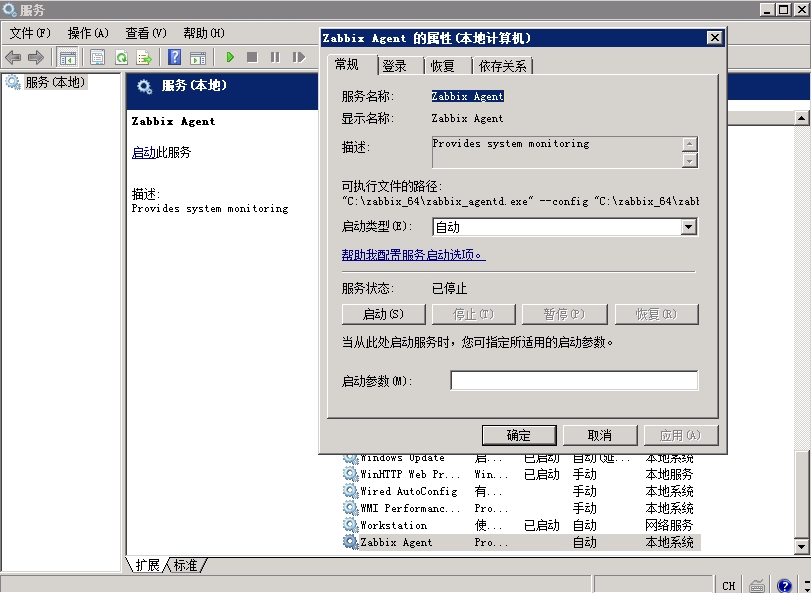
启动zabbix_agent服务:
用netstat -an查看zabbix_agent端口是否监听:
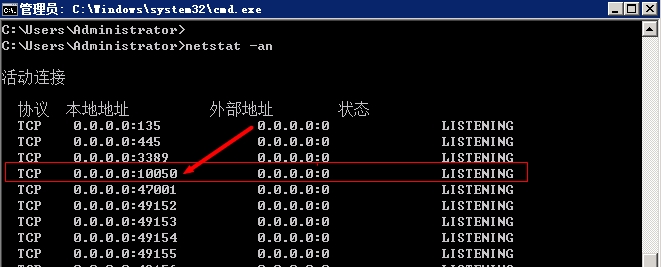
若windows本身自带的防火墙已经关闭,则无需开启10050端口入站规则,若是开启了防火墙,则需要添加一条入站规则。
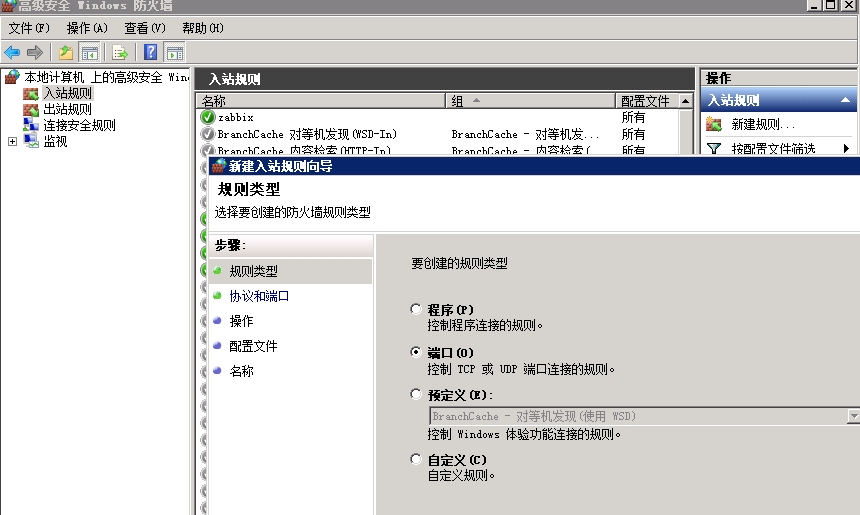
下面讲解,自动安装windows版zabbix_agent:
写一个脚本:
|
1
2
3
4
5
6
7
8
9
10
11
12
13
14
15
16
17
18
19
20
21
22
23
24
25
26
27
28
29
30
31
32
33
34
35
36
37
38
39
40
41
42
43
44
45
46
47
48
49
50
51
52
53
54
55
56
57
58
59
60
61
62
63
64
65
66
67
|
:: 一键安装zabbix agent 2.2.9:: 1、修改脚本里的zabbix_server变量:: 2、执行本脚本,自动安装zabbix agent到C盘@Echo offsetlocal enabledelayedexpansion:: 需要修改IP:set zabbix_server=47.93.162.108
:: 替换配置文件中的server ipset conf_file=%~dp0\zabbix_agents_2.2.9.win\conf\zabbix_agentd.win.conf
for /f "delims=" %%a in ('type "%conf_file%"') do (
set str=%%a
set "str=!str:127.0.0.1=%zabbix_server%!"
echo !str!>>"%conf_file%"_tmp.txt
)move "%conf_file%" "%conf_file%"_bak.txt
move "%conf_file%"_tmp.txt "%conf_file%"
:: 32 bit or 64 bit process detectionIF "%PROCESSOR_ARCHITECTURE%%PROCESSOR_ARCHITEW6432%"=="x86" (
set _processor_architecture=32bit
goto x86
) ELSE ( set _processor_architecture=64bit
goto x64
):x86xcopy "%~dp0\zabbix_agents_2.2.9.win\bin\win32" c:\zabbix_x86 /e /i /y
copy "%conf_file%" c:\zabbix_x86\zabbix_agentd.conf /y
sc stop "Zabbix Agent" >nul 2>nul
sc delete "Zabbix Agent" >nul 2>nul
c:\zabbix_x86\zabbix_agentd.exe -c c:\zabbix_x86\zabbix_agentd.conf -ic:\zabbix_x86\zabbix_agentd.exe -c c:\zabbix_x86\zabbix_agentd.conf -sgoto firewall:x64xcopy "%~dp0\zabbix_agents_2.2.9.win\bin\win64" c:\zabbix_x64 /e /i /y
copy "%conf_file%" c:\zabbix_x64\zabbix_agentd.conf /y
sc stop "Zabbix Agent" >nul 2>nul
sc delete "Zabbix Agent" >nul 2>nul
c:\zabbix_x64\zabbix_agentd.exe -c c:\zabbix_x64\zabbix_agentd.conf -ic:\zabbix_x64\zabbix_agentd.exe -c c:\zabbix_x64\zabbix_agentd.conf -sgoto firewall:firewall:: Get windows Version numbersFor /f "tokens=2 delims=[]" %%G in ('ver') Do (set _version=%%G)
For /f "tokens=2,3,4 delims=. " %%G in ('echo %_version%') Do (set _major=%%G& set _minor=%%H& set _build=%%I)
Echo Major version: %_major% Minor Version: %_minor%.%_build%:: OS detectionIF "%_major%"=="5" (
IF "%_minor%"=="0" Echo OS details: Windows 2000 [%_processor_architecture%]
IF "%_minor%"=="1" Echo OS details: Windows XP [%_processor_architecture%]
IF "%_minor%"=="2" IF "%_processor_architecture%"=="32bit" Echo OS details: Windows 2003 [%_processor_architecture%]
IF "%_minor%"=="2" IF "%_processor_architecture%"=="64bit" Echo OS details: Windows 2003 or XP 64 bit [%_processor_architecture%]
:: 开启防火墙10050端口
netsh firewall delete portopening protocol=tcp port=10050
netsh firewall add portopening protocol=tcp port=10050 name=zabbix_10050 mode=enable scope=custom addresses=%zabbix_server%
) ELSE IF "%_major%"=="6" (
IF "%_minor%"=="0" Echo OS details: Windows Vista or Windows 2008 [%_processor_architecture%]
IF "%_minor%"=="1" Echo OS details: Windows 7 or Windows 2008 R2 [%_processor_architecture%]
IF "%_minor%"=="2" Echo OS details: Windows 8 or Windows Server 2012 [%_processor_architecture%]
IF "%_minor%"=="3" Echo OS details: Windows 8.1 or Windows Server 2012 R2 [%_processor_architecture%]
IF "%_minor%"=="4" Echo OS details: Windows 10 Technical Preview [%_processor_architecture%]
:: 开启防火墙10050端口
netsh advfirewall firewall delete rule name="zabbix_10050"
netsh advfirewall firewall add rule name="zabbix_10050" protocol=TCP dir=in localport=10050 action=allow remoteip=%zabbix_server%
)pauserd /s /q "%~dp0\zabbix_agents_2.2.9.win"
del %0 |
然后和zabbix_agent解压好的文件放在一起执行就能安装,附件中有脚本和zabbix_agent文件。
附件:http://down.51cto.com/data/2366626
本文转自 王家东哥 51CTO博客,原文链接:http://blog.51cto.com/xiaodongge/1921062