一、函数
1、函数的使用场景及定义
在使用函数编程之前,我们一直是面向过程式编程,语句的堆积造成大量的代码重复,由此,函数应运而生,函数式编程是将反复使用的代码封装到函数中,使用时只需调用即可。函数的学习会让我们更快理解面向对象这一抽象的概念,面向对象即是对函数进行分类和封装。
|
1
2
3
4
5
6
|
#函数的定义def first_func(): print("This is my first function!")
first_func() |
def:定义函数的关键字
first_func:函数名(自定义),通过函数名来调用函数
() : 可向函数传递的参数
print... : 函数体,包含函数所有的功能语句
first_func() : 调用函数
函数的调用结果如下
|
1
2
|
C:\python36\python36.exe D:/cto3jym/day3/def_1.py
This is my first function!
|
返回值:函数执行完毕后,返回给调用者的数据
2、函数的返回值
函数的返回值默认为None,在函数体中有return等有返回值的语句时,才有返回值;return多个对象时,解释器会把多个对象组装成一个元组作为一个整体结果输出
我们要知道函数具体的执行结果时可以如以下发送邮件的示例
|
1
2
3
4
5
6
7
8
9
10
11
12
13
14
15
16
17
18
19
20
21
|
import smtplib
from email.mime.text import MIMEText
from email.utils import formataddr
def mail():
ret = True
try:
msg = MIMEText('邮件内容','plain','utf-8')
msg['Subject'] = "主题"
server = smtplib.SMTP("smtp.126.com",25)
server.quit()
except Exception:
ret = False
return ret
ret = mail()
print(ret)
|
如示例中所示,返回值为True说明函数执行成功,邮件发送
3、参数
1、无参数:形如上文发送邮件的例子,mail(): 无参数,那么在调用时()中也不填入参数
2、有参数
1.普通参数:定义函数时指定几个参数,调用时就要传入几个参数
|
1
2
3
4
5
6
7
8
9
|
#一个参数def show(arg):
print(arg)
show("one parameter")
#两个参数def show(a1,a2):
print(a1,a2)
show("two parameter")
|
2.默认参数:在定义函数时指定参数的默认值,调用时不传参数即返回默认值,传入参数返回传入的参数
|
1
2
3
4
5
6
7
8
9
10
11
12
13
14
15
|
def show(a1,a2=1):
print(a1,a2)
show("default",)
返回值:C:\Users\JYM\untitled\Scripts\python.exe D:/cto3jym/day3/func_parameter.py
default 1
def show(a1,a2=1):
print(a1,a2)
show("default",2)
返回值:C:\Users\JYM\untitled\Scripts\python.exe D:/cto3jym/day3/func_parameter.py
default 2
|
Ps:默认参数必须在位置参数的后面
3.指定参数:调用时根据变量名指定参数
|
1
2
3
4
5
6
7
|
def show(a1,a2):
print(a1,a2)
show(a2=2,a1=1)
返回值:C:\Users\JYM\untitled\Scripts\python.exe D:/cto3jym/day3/func_parameter.py
1 2
|
4.动态参数:可灵活的传入任意参数
|
1
2
3
4
5
6
7
8
9
10
11
12
13
14
15
16
17
18
19
20
21
22
23
24
25
26
27
28
29
30
31
32
33
34
35
36
37
38
39
40
41
42
43
44
45
46
47
48
49
50
51
52
53
54
55
56
57
|
1、*args :将传入的参数转为元组存入内存def f1(*args): print(args,type(args))
f1(1)函数调用结果如下(1,) <class 'tuple'>
或者可以直接传入序列def f1(*args): print(args,type(args))
l1 = [11,22,33]f1(*l1)2、**kwargs:将传入的参数转为字典存入内存def f1(**kwargs): print(kwargs,type(kwargs))
f1(k1='v1',k2='v2')
函数调用结果如下{'k2': 'v2', 'k1': 'v1'} <class 'dict'>
或者直接传入字典def f1(**kwargs): print(kwargs,type(kwargs))
d1 = {'k1':'v1','k2':'v2'}
f1(**d1)3、*args,**kwargs:可传入任意参数def f2(*args,**kwargs): print(args,type(args))
print(kwargs,type(kwargs))
f2(11,22,33,44,k1='v1')
函数调用结果如下(11, 22, 33, 44) <class 'tuple'>
{'k1': 'v1'} <class 'dict'>
Ps:*args,**kwargs同时使用时,*args在前如上,如果直接传入引用名的话,会是什么样的呢def f2(*args,**kwargs): print(args,type(args))
print(kwargs,type(kwargs))
l1 = [11,22,33,44]d1 = {'k1':'v1'}
f2(l1,d1)结果如下:([11, 22, 33, 44], {'k1': 'v1'}) <class 'tuple'>
{} <class 'dict'>
那么,引用时指明传入的类型呢f2(*l1,**d1)结果如下:(11, 22, 33, 44) <class 'tuple'>
{'k1': 'v1'} <class 'dict'>
|
4、函数的作用域
python中的作用域分四种情况
local:函数中定义的变量
enclosing:父函数定义的变量,作用域包含父函数极其所有子函数
globa:全局变量
built-in:系统变量
作用域查找顺序:
1、local < enclosing < globa < built-in,在查找变量过程中,模块内定义的变量在函数内先声明就会覆盖外部变量,不声明直接使用,就会使用外部作用域的变量。
2、函数内要修改外部作用域变量时,全局变量使用global关键字,嵌套作用域变量使用nonlocal关键字,nonlocal是python3新增的关键字。
例:
|
1
2
3
4
5
6
7
8
9
10
11
12
13
14
15
16
17
|
count = 1 # 全局变量
def outer():
global count # 在函数中要修改全局变量需先global声明
count+=5
print(count)
def outer():
count = 1
def inner():
nonlocal count # 在函数中要修改父级变量需先nonlocal声明,(python3新增)
count+=5
print(count)
inner()
print(count)
outer() |
二、内置函数
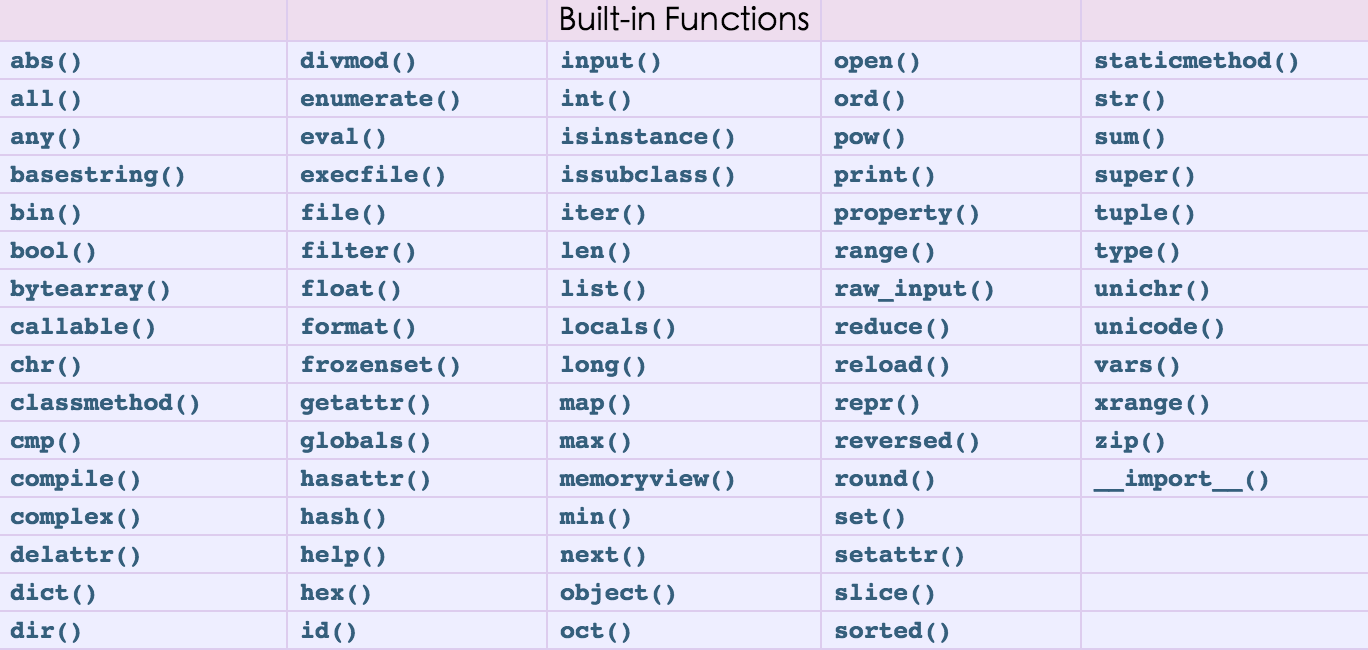
常用的内置函数:
abs():取绝对值
|
1
2
|
>>> abs(-1)1 |
all():传入的序列中元素都为真返回True,有假则返回False
|
1
2
3
4
|
>>> all([11,22,])True>>> all([0,None,False,[],"",11])
False |
any(): 传入的序列中的元素有一个为真就返回True
|
1
2
|
>>> any([1,0,[],None,False,(),"",{},])
True |
bin():将传入的参数转换为二进制
|
1
2
3
4
|
>>> bin(1)'0b1'>>> bin(16)'0b10000' |
bool():传入的参数为真时返回True,为假时返回False
|
1
2
3
4
|
>>> bool(1)True>>> bool([])False |
callable():判断传入的参数是否可被调用
|
1
2
3
|
>>> f = lambda x:x+1>>> callable(f)True |
chr():ord():ASCII编码表转换
|
1
2
3
4
|
>>> chr(65)'A'>>> ord("A")
65 |
enumerate()
|
1
2
3
4
5
|
>>> for i,item in enumerate([11,22,33],1):print(i,item)
1 112 223 33 |
map():遍历序列,对序列中每个元素进行操作,最终获取新的序列
|
1
2
3
4
5
6
7
8
9
10
11
12
13
14
|
>>> l1 = [11,22,33]>>> newlist = map(lambda a:a+100, l1)>>> for i in newlist: print(i)
111122133>>> l2 = [1,2,3]>>> nl = map(lambda a,b:a+b,l1,l2)
>>> for i in nl:print(i)
122436 |
filter():对于序列中的元素进行筛选,获取符合条件的序列
|
1
2
3
4
5
6
|
>>> l1 = [11,22,33]>>> newlist = filter(lambda x: x>20, l1)>>> for i in newlist:print(i)
2233 |
globals():返回当前所有的全局变量
|
1
2
|
>>> globals(){'l2': [1, 2, 3], 'f': <function <lambda> at 0x02B58978>, '__spec__': None, 'i': 33, 'nl': <map object at 0x02B626B0>, '__name__': '__main__', 'l1': [11, 22, 33], 'random': <module 'random' from 'D:\\pathon\\lib\\random.py'>, '__builtins__': <module 'builtins' (built-in)>, 'newlist': <filter object at 0x02B62650>, '__package__': None, '__doc__': None, '__loader__': <class '_frozen_importlib.BuiltinImporter'>, 'item': 33}
|
locals():返回本地变量
|
1
2
|
>>> locals(){'l2': [1, 2, 3], 'f': <function <lambda> at 0x02B58978>, '__spec__': None, 'i': 33, 'nl': <map object at 0x02B626B0>, '__name__': '__main__', 'l1': [11, 22, 33], 'random': <module 'random' from 'D:\\pathon\\lib\\random.py'>, '__builtins__': <module 'builtins' (built-in)>, 'newlist': <filter object at 0x02B62650>, '__package__': None, '__doc__': None, '__loader__': <class '_frozen_importlib.BuiltinImporter'>, 'item': 33}
|
hex():十六进制转换
|
1
2
|
>>> hex(16)'0x10' |
oct():八进制转换
|
1
2
|
>>> oct(8)'0o10' |
id():获取元素在内存中的位置
|
1
2
|
>>> id(1)
1786045296 |
help():帮助信息
input():接受用户输入
|
1
2
3
|
>>> input("please input number:")
please input number:11'11' |
len():长度
|
1
2
|
>>> len("123fda")
6 |
max():获取最大值
|
1
2
|
>>> max(11,22,33,44)44 |
min():获取最小值
|
1
2
|
>>> min(11,22,33,44)11 |
round():四舍五入
|
1
2
3
4
|
>>> round(0.9)1>>> round(1.1)1 |
reversed():给定序列反转
|
1
2
3
|
>>> l1 = reversed([11,22,33])>>> list(l1)[33, 22, 11] |
sorted():给定序列排序
|
1
2
|
>>> sorted([11,33,55,22,44])[11, 22, 33, 44, 55] |
sum():给定序列求和
|
1
2
|
>>> sum([11,22])
33 |
type():返回对象的类
|
1
2
|
>>> type([])
<class 'list'>
|
zip():
|
1
2
3
4
5
6
|
>>> x = [1,2,3]>>> y = [4,5,6]>>> z = [7,8,9]>>> z1 = zip(x,y,z)>>> list(z1)[(1, 4, 7), (2, 5, 8), (3, 6, 9)] |