【问题标题】:FittedBox with fitHeight renders rest of the image width带有 fitHeight 的 FittedBox 呈现图像宽度的其余部分
【发布时间】:2021-03-14 21:29:22
【问题描述】:

在下面的示例中,FittedBox 做了我想做的事:它适合容器的高度。但是,它应该隐藏图像的其余部分。但是,它会渲染它。

怎么了?

/// Flutter code sample for Expanded

// This example shows how to use an [Expanded] widget in a [Column] so that
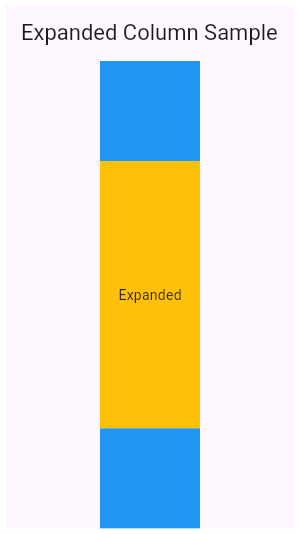
// its middle child, a [Container] here, expands to fill the space.
//
// ![This results in two thin blue boxes with a larger amber box in between.](https://flutter.github.io/assets-for-api-docs/assets/widgets/expanded_column.png)
import 'package:flutter/material.dart';

void main() => runApp(const MyApp());

/// This is the main application widget.
class MyApp extends StatelessWidget {
  const MyApp({Key? key}) : super(key: key);

  static const String _title = 'Flutter Code Sample';

  @override
  Widget build(BuildContext context) {
    return const MaterialApp(
      title: _title,
      home: MyStatelessWidget(),
    );
  }
}

/// This is the stateless widget that the main application instantiates.
class MyStatelessWidget extends StatelessWidget {
  const MyStatelessWidget({Key? key}) : super(key: key);

  @override
  Widget build(BuildContext context) {
    return Scaffold(
      appBar: AppBar(
        title: const Text('Expanded Column Sample'),
      ),
      body: Center(
        child: Container(
          width: 100,
          child: Column(
          children: <Widget>[
            Container(
              color: Colors.blue,
              height: 100,
              width: 100,
            ),
            Expanded(
              child: Container(
                color: Colors.amber,
                child: FittedBox(
                  fit: BoxFit.fitHeight,
                  child: Image.network(
                    'https://i.ytimg.com/vi/E5fD0SSqPa0/maxresdefault.jpg'))
              ),
            ),
            Container(
              color: Colors.blue,
              height: 100,
              width: 100,
            ),
          ],
        )),
      ),
    );
  }
}

根据https://api.flutter.dev/flutter/widgets/FittedBox-class.html,它应该适合高度但忽略图像的剩余部分

【问题讨论】:

  • 由于拟合的盒子在左右两边都有空间,它会渲染图像。我在这里没有发现任何问题。
  • @MindStudio 请查看我的更新。我将Expandeds 的父级宽度设为宽度

标签: flutter dart


【解决方案1】:

您可以删除您的 FittedBox 并将 fit 属性设置为值 BoxFit.cover 直接到 Image。

return Scaffold(
      appBar: AppBar(
        title: const Text('Expanded Column Sample'),
      ),
      body: Center(
        child: Container(
            width: 100,
            child: Column(
              children: <Widget>[
                Container(
                  color: Colors.blue,
                  height: 100,
                  width: 100,
                ),
                Expanded(
                  child: Container(
                      color: Colors.amber,
                      child: Image.network(
                        'https://i.ytimg.com/vi/E5fD0SSqPa0/maxresdefault.jpg',
                        fit: BoxFit.cover,
                      )),
                ),
                Container(
                  color: Colors.blue,
                  height: 100,
                  width: 100,
                ),
              ],
            )),
      ),
    );

【讨论】:

  • 谢谢,这行得通。但是,如果我真的需要修复小部件而不是图像怎么办?
  • 对于一个小部件,您可以定义它,以便它在容器内扩展宽度和高度。这不会是个问题。
【解决方案2】:

尝试将clipBehavior 添加到FittedBox,例如:

Expanded(
    child: Container(
        color: Colors.amber,
        child: FittedBox(
            fit: BoxFit.fitHeight,
            clipBehavior: Clip.hardEdge,
            child: Image.network('https://i.ytimg.com/vi/E5fD0SSqPa0/maxresdefault.jpg')
        )
    ),
),

欲了解更多信息,请参阅此链接breaking-changes/clip-behavior

【讨论】:

    猜你喜欢
    • 1970-01-01
    • 2011-08-16
    • 1970-01-01
    • 1970-01-01
    • 2015-06-13
    • 2011-06-30
    • 1970-01-01
    • 2021-11-02
    • 2013-08-27
    相关资源
    最近更新 更多